70.2.1 Installing the Windows Drivers
Follow the procedure described below to install tape libraries and tape drives into a windows system:
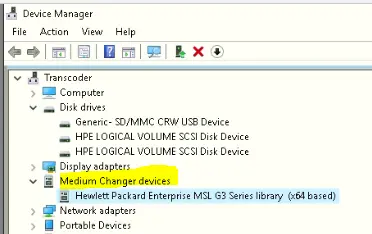
1. Connect all tape libraries and drives to the servers from which they will be controlled. Once the library and all drivers have been connected to the server, these items will be visible from the Windows Device Manager, obviously, it is possible to connect Tape Libraries and Drives to different servers:
Device Manager
2. In order to facilitate the Etere Data Pump configuration, it is suggested to set under the Library configuration, all the SCSI ID different (for both the Library and the drives), even if they are connected to different servers.
3. To control tape drives, Etere HSM needs the drivers to be installed, instead, for the libraries, it is not needed since Etere HSM can control it via SCSI pass-through.
NB: In case of installing/uninstalling a driver from the library, the library is able to 'see' the same drive with a different name, for example, the same type will be shown as 0 (if installed) and 5001 (if not installed).
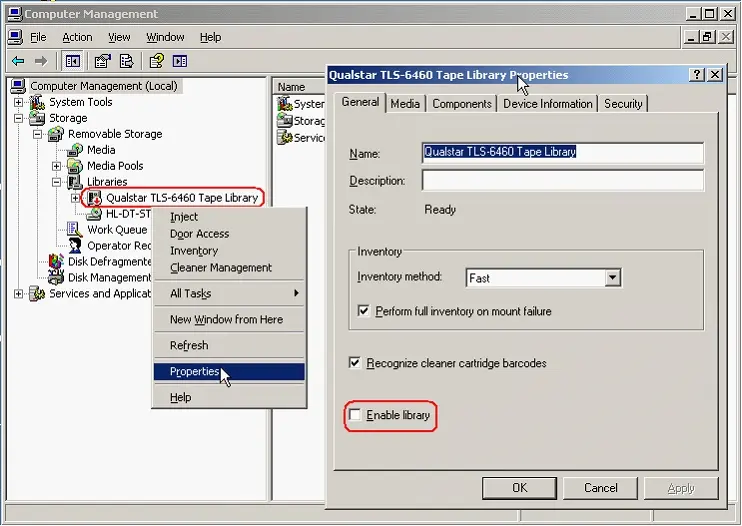
4. In order to avoid conflicts, it is suggested to deactivate the library under the Removable Storage windows service, by unchecking the 'Enable library' option under its properties:
Computer Management
Note
In order to install and use Etere HSM (Headquarters, DataPump and Robotics), according to the Etere installation policies, users must have local administrator permissions and the Windows UAC must be disabled, otherwise, the software may not work properly.
 Computer_Management
 Device_Manager