59.2.40.22 Harmonic SCTE-104 Inserter
If you have installed Harmonic SCTE-104 inserter, contact Etere Support for the application to test the component.
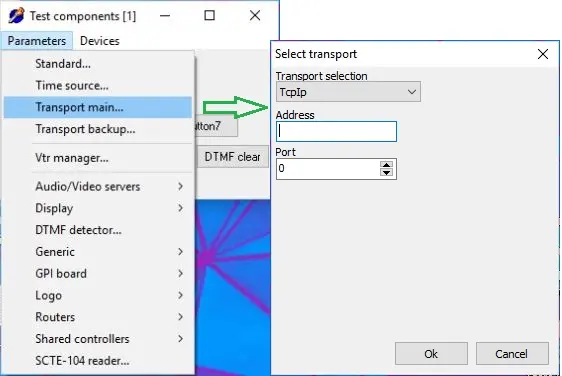
Upon receiving and storing the "TestComponents.exe" file in the workstation where the SCTE-104 inserter is connected, double-click to launch the program. Once the program starts, click on Parameter > Transport main and input data to fulfill the test.
Transport_main
• Transport selection: Select "TCP/IP" as the communication protocol.
• Address: Enter the device hostname where the inserter is connected.
• Port: Enter port number 5167.
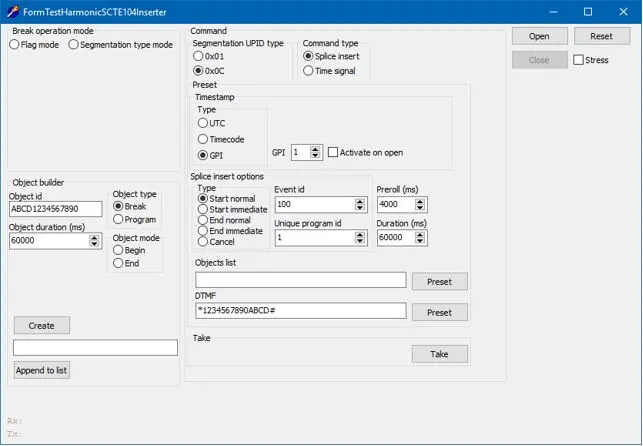
Click <OK> to continue and "Open" the settings dialogue if the connection is established.
settings_dialogue_if_the_connection_is_established
Enter the required parameters:
• Select a Break operation mode
• Select Object type Break
• Enter an Object ID
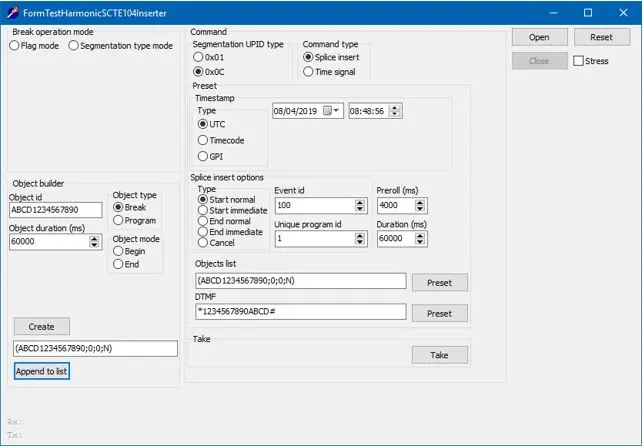
• In the textbox between the Create and Append to list buttons, enter the segmentation command to notify the substitution of the break, e.g. "ABCD 1234567890;0;0; N" by appending _N or _S to the break code.
• In Preset > Timestamp, select UTC to create a filename in UTC format and specify a date and time of the creation.
• Click Append to list to add the above commands to the list.
The settings are updated in the dialogue.
updated_into_the_dialogue
You can execute Preset and Take for the insertion to take place.
 Transport_main
 settings_dialogue_if_the_connection_is_established
 updated_into_the_dialogue