84.2.2.10 Snipes - Important considerations
Snipes supported types
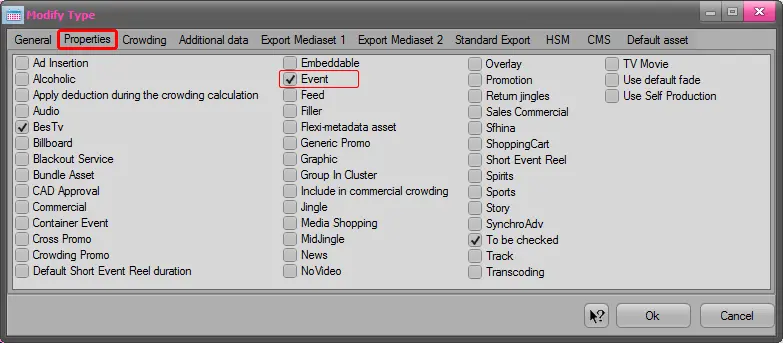
It's worth mentioning that Snipes are managed only for programs, that is, for scheduled assets which type has the "event" property:
4930_Properties
In case a snipe is manually matched by the user to a non-program event, said snipe will not be managed by the Snipes system.
Length of snipes
All snipes (CTM scripts) have a duration and preroll set by either the import or user and available in the snipes properties. The actual length of a snipe is calculated by adding both values, the preroll and the duration:
|0s
|40s
|120s
|240s
Program duration:240s
Snipe preroll:40s
Snipe duration : 80s
SNIPE LENGTH:120s
Consecutive programs
In case two (or more) programs/parts are consecutively scheduled in the playlist, the DSK's activation & deactivation will be managed as below:
CASE A: the next consecutive program/part doesn't use the DSK (i.e. it doesn't have a snipe)
The DSK is deactivated at the scheduled time.
|0s
|50s
|70s
|120s
[Prog A]
| DSK on
DSK off |
[Spot]
[Prog B]
IMPORTANT NOTE: In the example above, if the user manually skips the first program (Prog A) prior to its scheduled end (because it's a "live" program), the DSK will be automatically deactivated as the next event doesn't use it (because it's not a program).
CASE B: the next consecutive program/part uses the DSK (i.e. it has a snipe)
The DSK remains activated until the end of the next program/part:
|0s
|50s
|100s
Prog A
| DSK on
DSK off |
(omitted)
[Prog B]
| DSK on (omitted)
DSK off |
IMPORTANT NOTE: In the example above, if the user manually skips the first program (Prog A) prior to its scheduled end (because it's a "live" program), its "DSK off" command won't be executed along with the skip but it will remain pending until its original scheduled time (thus deactivating the DSK ahead of time, before the end of the second program):
|0s
|30s
|50s
|80s
[Prog A]
| DSK on
DSK off |
(pending)
| SKIP
[Prog B]
| DSK on
DSK off |
Therefore : A "live" program (i.e. ended through a manual skip) cannot be succeeded by another program, instead, it must be succeeded by a non-program event (to behave as "CASE A").
High-priority graphics
Graphics with a high transmission priority (e.g. bollini, logo stazione) must not be managed as snipes, but separately as Master Control graphics.
 4930_Properties