59.5.4.19 Orders Status List
Report Description
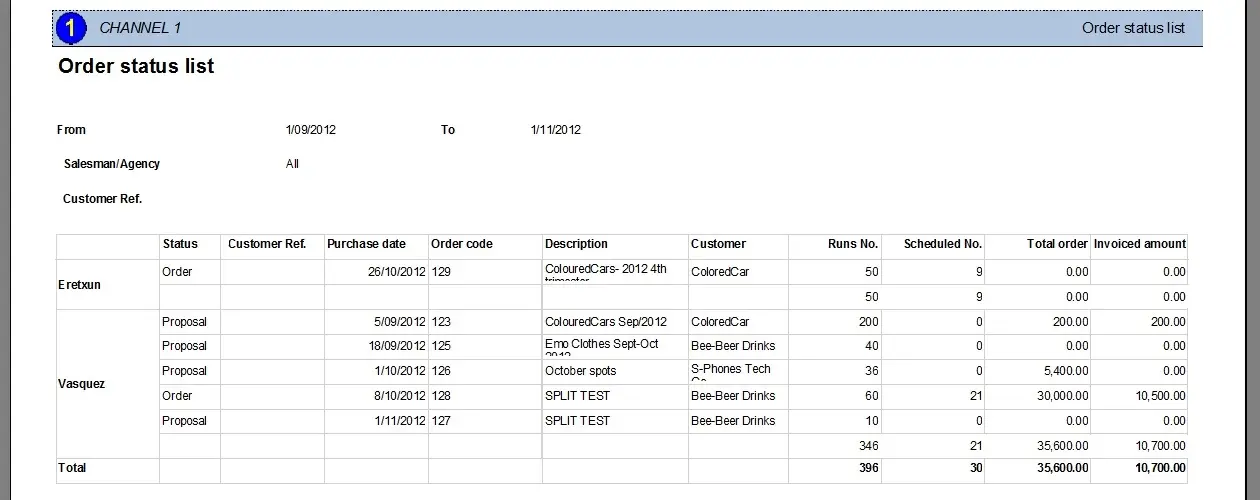
The Orders status list report allows the generalization of a document that highlights for a given period and account executive/agency all the managed orders or proposals, specifying for each one of them the number of expected and scheduled runs, as well as the total expected amount (entered during creation phase) and their total invoiced amount (computed from all scheduled performances); further organizing all data provided by grouping orders and proposals by account executive/agency.
NB: Only those orders compiled with at least an agency or an account executive will be included in the report.
Report Filters
All the parameters that permit a detailed report generation have been distributed across seven different tabs to allow a more manageable configuration. By default, all filters are disabled (i.e., either blank or unselected); to enable them, it is enough to configure at least one parameter inside. Available filters include:
•Order period: Indicate the time range for which orders must be valid to be included in the report. All orders with start or end dates falling within the given period will be retrieved.
•Customer ref. Only those orders matching the given reference code will be processed if entered.
•Account Executive: If selected, retrieved orders will be grouped by their related account executive.
•Agency: If selected, retrieved orders will be grouped by their related agency.
•Order status: Indicate here to include all orders or only a specific status. Available status includes:
Order - all orders
Proposal - all proposals
Approved - all proposals approved for being scheduled
Rejected - all proposals rejected by supervisors
Evaluate - all proposals being evaluated by supervisors
Archived - all approved and rejected proposals archived
Re-evaluate - all proposals are being re-prepared by the account executive
Expired - all proposals out of their validity period
To schedule - all approved proposals ready for scheduling
To customer - all approved proposals being evaluated by customers
Customer rejected - all proposals rejected by customers
Report Preview
The [Settings] permits the configuration of the page layout of the outgoing document; once filters and settings have been set, it will be possible to select between displaying a preview using the related [Preview] button or printing the document directly using the [Report] button:
Columns legend
Account Executive/Agency - Agency/account executive to which the order is related
Status - Indicates the status (order, proposal, etc.)
Customer ref. - Reference code of the customer
Purchase date - Start date of the order line
Order code - Identification code of the order
Description - Description of the order
Customer - Customer related to the order
Runs No. - Expected number of broadcast performances
Scheduled No. - Actual number of broadcast performances
Total (order line) - Amount expected from the order line
Invoiced amount - Amount collected from the order line
Total - Sum of all Totals for all customers related to the same account executive/agency
Please note that some reports permit the export of the generated document in the most common formats (PDF, CSV, doc, xls, XML, etc) just by using the [Export] button.
Orders_Status_List_preview
 Orders_Status_List_preview