84.4.4.67 CUSTOM > EPG ICAREUS XML
Export Scope
The Export Custom EPG ICAREUS XML export to an XML file containing schedules of one day or multiple days.
The export would search the asset playlists for schedules matched the following criteria:
•Export the primary events which duration matches or longer than the specified value, e.g. 10 minutes.
•Events divided into parts would be grouped and exported in single row in the XML file.
•Programs in group are exported in single row with program marked as type “EPGI” at the start of program, and with type “EPGO” marked at the end of the programs group.
Export Parameters
Fulfill all the parameters to extract the asset playlists.
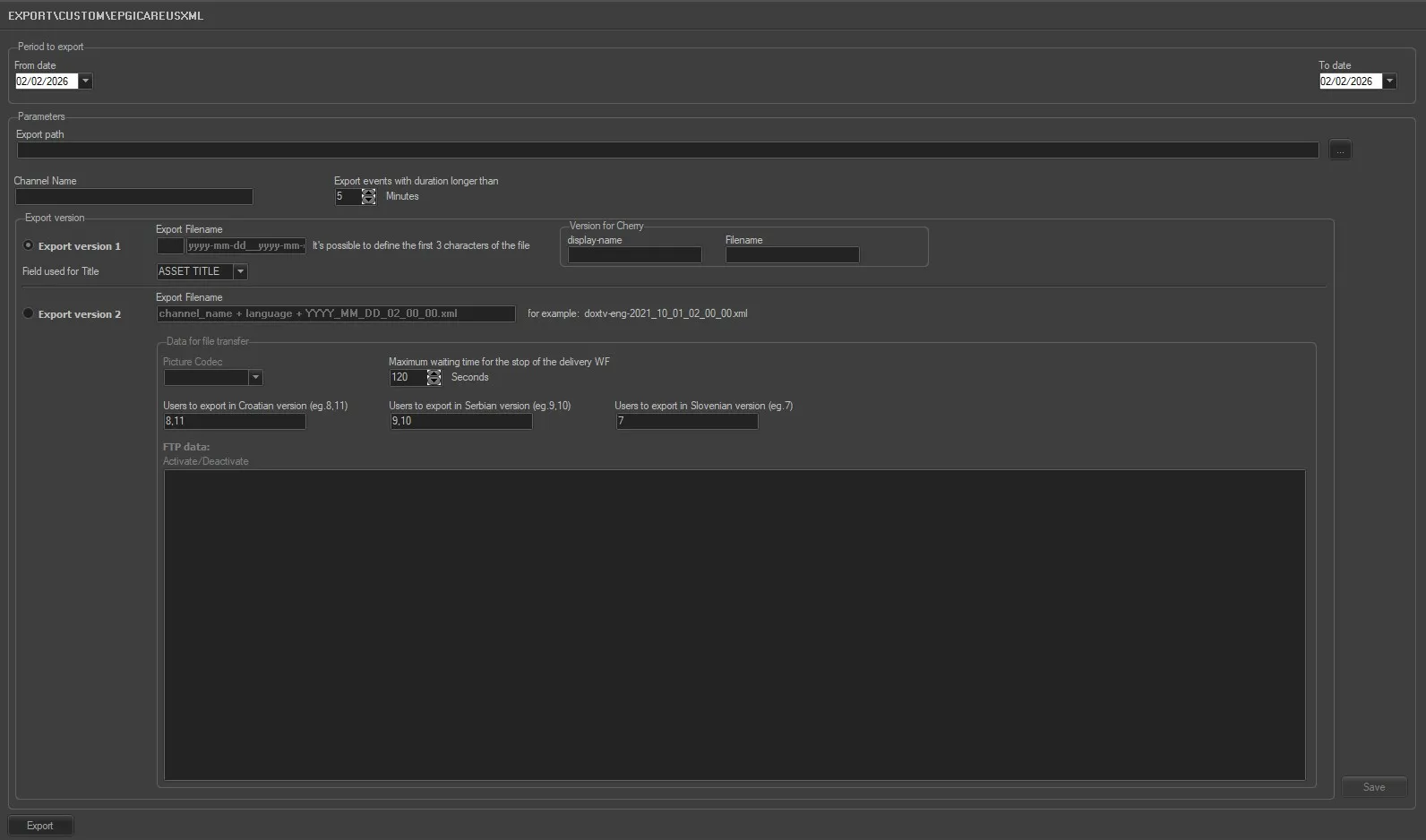
Export_custom_epg_icareus_xml
Period to export
•From date – To date: Specify the start date and end date to export playlists within the date range.
Parameters
•Export path: Specify the path where the exported file would be saved. You can use the browse button to locate the path in the local or network drive.
•Export Filename: You can define the first 3 characters of the export filename, it can be ABC, EPG, XYZ or other preferences, e.g. “ABCyyyy-mm-dd__yyyy-mm-dd,xml” where the first “yyyy-mm-dd” indicate the start date and second “yyyy-mm-dd” indicate the end date of export.
•Display Name: fill the form have in the export the section <display-name></display-name>
•Filename: if the ‘File name’ is set, this is used for each exported file. The language is translated from lcid to iso_639_2 (1040 -> ita)
•Channel Name: Indicate the channel name used to execute the export.
•Export events with duration longer than (minutes): Specify a duration in minutes to export only events with duration longer than the specified value.
•Export version: Select an option to export the file
❑Export version 1: This option export an XML file with initial format.
•Export Filename: define the name for the export 1.
•Field used for Title: 3 options available - ASSET TITLE, EPG1, EPG2.
❑Export version 2: This option export an XML file in different format, with addition capability of data file transfer via FTP, as described in Data for file transfer section.
Starting from Etere version 31.3, two XML files would be generated when Export version 2 is enabled. One XML file in English version, and one XML file in Serbian version, with the respective file name as follow:
- “doxtv-eng-2021_10_01_02_00_00.xml”
- “doxtv-srp-2021_10_01_02_00_00.xml”
Data for file transfer
Define the parameters for file transfer via FTP. This section is enabled when Export version 2 option is selected.
•Picture Codec: Indicate the codec used to link the poster file to the asset.
•Maximum waiting time for the stop of the delivery WF: Set a maximum waiting time (in seconds) for the completion of delivery workflow.
•FTP data (Activate / Deactivate): Define the file transfer elements,
- Data for file transfer of exported XML file.
- Set the source and destination metadevice for file transfer.
- Specify the workflow to be launched to manage the file transfer
- Define the default poster file to be inserted if the asset does not have poster file.
When all parameters are set, click the <Save> button to confirm the settings.
Launch the export
Once the parameters are correct and saved, simply click the <Export> button to launch the export process.
 epgicareus