72.7.3.3 Subtitles by STMan
1. Open the Etere STMan module and go to the Configuration tab,
2. Make click on the Subtitles Management plugin,
3. Set the parameters available in this section as explained in the "Subtitles Management" section of the STMan chapter. For instance:
Subtitles Manager
Enable this plug-in feature - Tick this option to enable the subtitling feature of Etere STMan.
Subtitler to use - Indicate the graphic device (e.g. subtitler) to which Etere STMan will send the subtitles for being transmitted.
NB: For information on how to add subtitlers refer to the Resources configuration chapter.
Language - Indicate the language of the subtitles to be transmitted along with the main video. It's worth mentioning that subtitles stored in the database are cached by Etere STMan as .sami files within the Etere's local application data folder (e.g. c:\users\myuser\appdata\local\etere\stman.cache.ctm\user.xxx\).
NB: For information on how to configure languages see Language configuration chapter.
Manage vertical position information
If enabled, Etere STMan will use the vertical position information embedded within the subtitle file, you can select to:
•Always use the scheduled template, or
•Calculate the template name using the following rules (see the Rules (sbt_rules.xml)).
NB: This feature is not supported for MTX Logo devices.
Manage alignment information - If enabled, Etere STMan will manage text so that each line is displayed as indicated in the subtitle file; otherwise (disabled), text will be always displayed left-aligned.
To align the subtitles to be displayed in the center of the screen, do the following:
•Enable option “Manage alignment information”
•In MAM > Subtitled Management Tool, set the number of characters in “Row characters”, e.g. 32
•In MSM > Subtitles Management Tool, set the “Text alignment” to “Center”.
Enable Live Subtitling - Enable this option to constantly check for updates to the live subtitle file for the time interval (in seconds) indicated in the "Refresh rate" parameter. If there are updates to the subtitle file it would be reflected in Live subtitling.
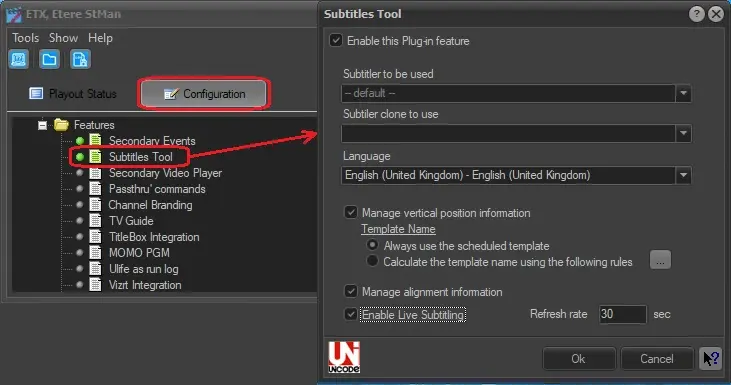 Subtitles_Manager