201.10.5.7 Search BMS
Function - Search available rights
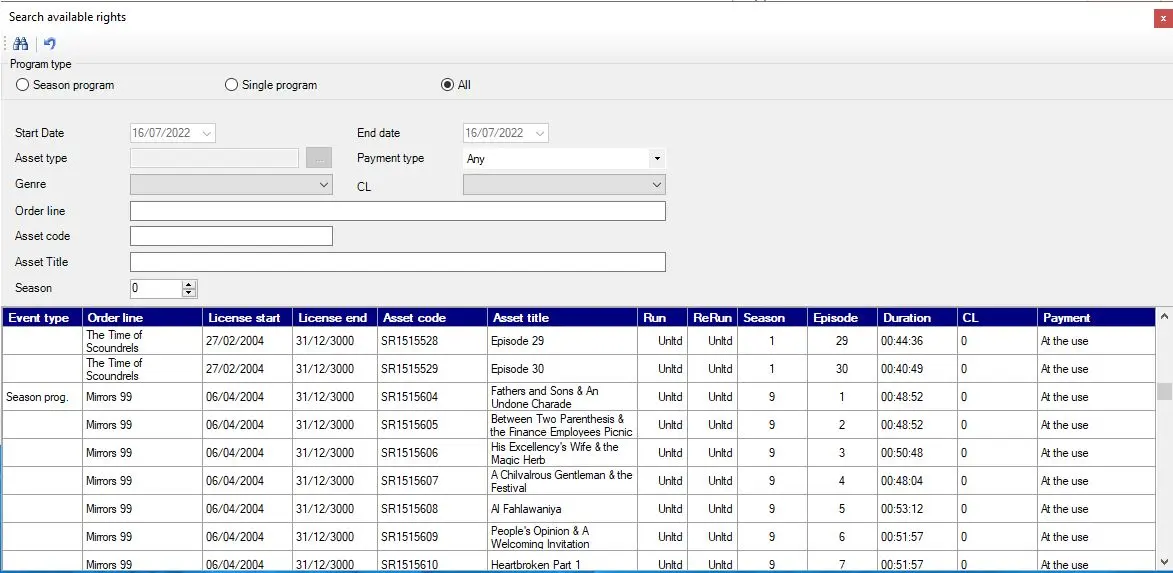
Description : Search for all the programs/seasons loaded into the Purchase Orders module which are valid for the current day (i.e. with broadcast rights). The search engine allows filtering results by:
Airsales_strategiceditor_searchbms_01
.•program type (i.e. seasons programs or single programs).
•license start/end (i.e. licensed period).
•asset type (e.g. Movie, Seasons, Program, etc).
•payment method (e.g. prepaid or pay after used).
•program genre (e.g. drama, thriller, horror, etc).
•parental classification (e.g. 14+, 18+, etc).
•order line (e.g. simpsons, peanuts, superman, etc).
Once matching results are retrieved, it can be consulted (e.g. program type, order line, runs, reruns, genre, classification, etc) in order to insert item into the schedule by double-click on the items. The Search form would remain open for subsequent insertion of programs into schedule.
Displayed results which are valid for the current day but which doesn't count with rights will be colored with red.
Function - Rights check on day
Description : Displays a list of ALL program/seasons scheduled within the current open day, checking the correctness of their scheduled rights (i.e. Run or ReRun).
For detailed information on this function please refer to the "Rights check for period" chapter of the Etere BMS manual.
Function - View program cost on day
Description : Shows the costs derived from ALL the program/seasons scheduled within the current open day.
For detailed information on this function please refer to the "Programs costs for period" chapter of the Etere BMS manual.
NB: Please note that if attempting to insert a program (e.g. seasons) into a incompatible segment (e.g. News), the system will warn the operator about the issue and prompt for a confirmation in order to proceed with the insertion.
 7296_Airsales_strategiceditor_searchbms_01