70.2.3 Robotics Configuration
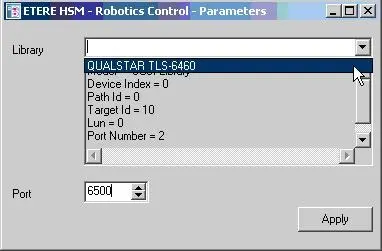
Under the configuration menu of Etere HSM - Robotics the following options and parameters are available:
PARAMETERS
Library - Select the device to be controlled by Robotics. Supported devices includes:
Libraries - Tape libraries installed in the system.
Single-drives - Storages mounted as local volumes (e.g. H:) installed in the system.
Currently, only "Optical Memory Devices" are supported.
NB: Here will be displayed only those devices assigned to the current server name under the Resource Editor.
OPTIONS
Operations number - Set the maximum number of operations displayed in the relative tab.
MASTER/CLONE
(Enable the use of redundant robotics servers ready to be switched at any time to guarantee a fault-tolerant functioning)
Config - Set the parameters that will permit Etere Robotics Control to work in master/clone mode. Please note that these parameters must be set in both, the master and clone servers:
Robotics Control
•Local port: Indicate the port on which the current server will made available for communicating with the other robotics server.
•Remote host: Enter the IP address of the other robotics server.
•Polling every: Dictate the time interval for interrogating the other robotics server.
•Time out: Specify the maximum time for waiting for a response from the other robotics server before switching the current server on master mode.
NB: Please remember that, in order to function, master/clone robotics servers must be directly connected to the library.
Switch - This function allows to switch the current robotics server into either master or clone mode (depending on its current master/clone status), switching in the same way the other robotics server automatically.
NB: The Master/Clone status of a robotics server is indicates in the top left of the main window.
NB: HSM Robotics require no particular device driver to be installed, the robotics use SCSI IOCTL commands to communicate with the target device via SCSI Passthrough.
 Robotics_Control