58.3.3 Replace video
The replacement of the Video clip is illustrated below.
Censormx_editor_replacevideo
The clip would be inserted and replaced with the current clip. Note that the footage after the [MarkIn] would be deleted, and the replacement clip will start from the [MarkIn] point. A marker would appear on the Timeline indicating the position where the clip has been inserted. This allows you to determine where edits have been made.
Note:
For deletions and/or replacements of clips, the Timeline will be adjusted according to the duration of the replacement clip minus the deletion duration.
For instance, if the replacement clip is 10 seconds and the deleted section is 7 seconds, the Timeline will increase by 3 seconds (10 - 7 = 3).
If the replacement clip is 10 seconds and the deleted section is 12 seconds, the Timeline will decrease by 2 seconds. (10 - 12 = -2)
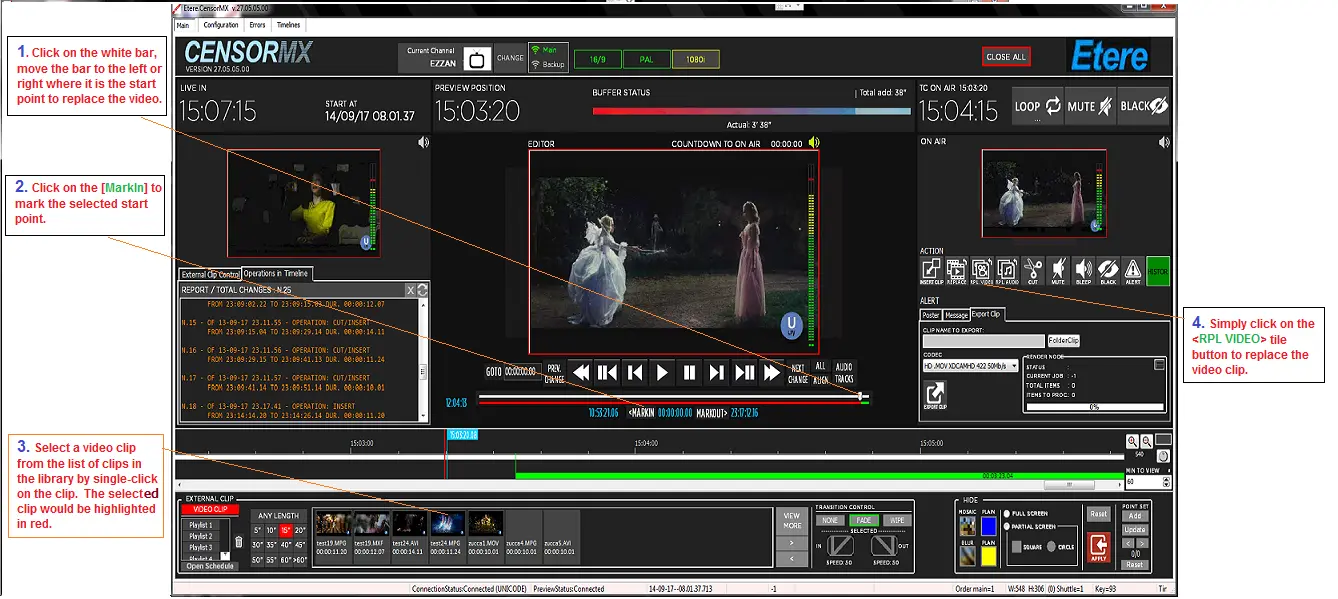 Censormx_editor_replacevideo