201.2.1.9 Scheduling
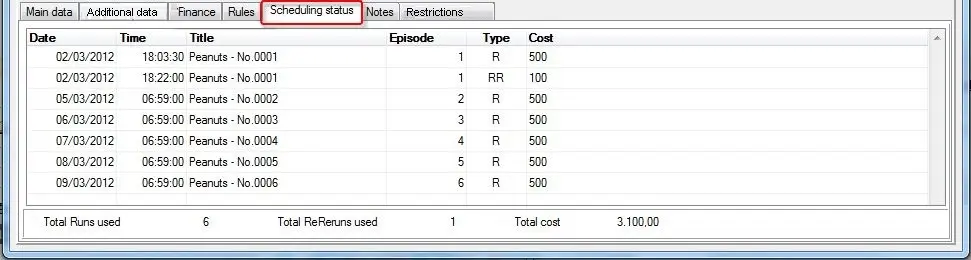
The "Scheduling" tab displays detailed information concerning the single/season program's scheduling. Available information includes:
Bms_properties_03
Date and time - Specifies the date and time the program has been scheduled in the broadcast playlist.
Title - Shows the description of the scheduled program.
Episode - Displays the episode number of the scheduled program episode.
Type - Indicates if the program has been scheduled in the broadcast playlist as either a Run (R), ReRun (RR) or Not-scheduled-from-order (N)
Cost - List the cost of the scheduled program.
Additionally, the "total number of used Runs", the "total number of used ReRuns" and the "total cost of Runs and ReRuns" are updated at the bottom of the display.
Moreover, by right-click on a scheduled program Run/ReRun it can be remove (Ctrl-R) from the schedule (i.e. to cancel its scheduled appearance).
It's worth mentioning that more specific reports about program's scheduling and rights are available in the "tools" menu.
NB: Please note if an scheduled event derived from a purchase order is deleted from Executive Editor, it will still appear in the scheduling list until an operator definitively removes it from the scheduling system.
 Bms_properties_03