59.8.3.11 GPI alarms
The SNMP Console allows controlling GPI devices (e.g. Advantech USB-4761) from the Monitoring Console every time the Etere SNMP Trap intercepts an SNMP message matching a SNMP filter set in the GPI section:
NB: Please note that the "GPI alarm" feature requires the "Visual C++ 2010 redistributable package (SP1)" to be installed into the SNMP Console server.
Installing the GPI Card
The drivers of the GPI device to be used must be installed into the system. For instance, for the Advantech USB-4761 the following files are executed:
•DAQNavi_USB4761_x.x.x.x.exe (device driver)
•DAQNavi_x.x.x.x.exe (sdk and utilities)
Once drivers have been installed and the GPI device has been connected (e.g. via USB) it will be required to know its "Device number" through any of the following methods:
•Windows Device Manager:
Computer_managment
•Advantech Navigator (installed by the DAQNavi):
Advantech_Navigator
Configuring the SNMP Filters
The Monitoring Console allows setting SNMP filters to activate GPI outputs in case SNMP messages matches their filters. The GPI alarm is locally set for every Monitoring Console computer with a GPI card installed, this, by opening the "SNMP > Setting" menu item and setting the following parameters:
GPI
•Device number: Set here the device number of the device.
•Read properties: Press this button to load into the "Switches" so many checkboxes as GPI switches are detected
•Switches: Select here all the switches to be activates when SNMP messages matches the current filter.
•GPI test: The red button allows to activate all -local- selected switches whereas the gray button allows to deactivate them.
Managing the Monitoring Console
Since the Monitoring Console is the application in charge of controlling the GPI device used for alarm notifications, this module must be running on the Pc(s) where the devices are installed.
All Monitoring Consoles enabled for GPI alarms (in one or more filters) will be displayed in the monitoring status bar, detailing their status (idle, done) according to received SNMP messages:
Monitoring_Consoles
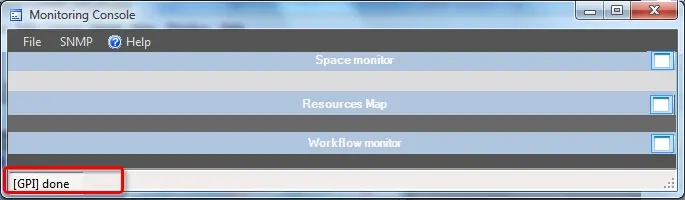 Monitoring_Consoles
 GPI
GPI
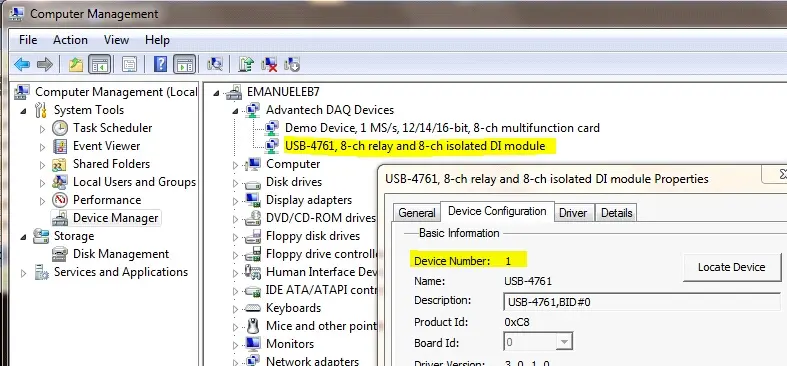 COMPUTER_MANAGMENT
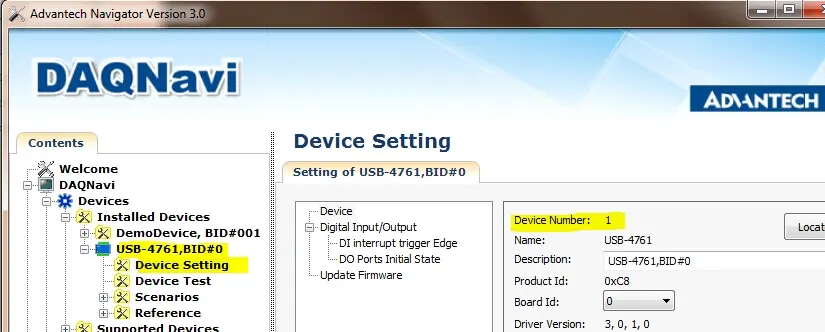 Advantech_Navigator