84.4.5.67 CUSTOM > METROTV LMS
Import Scope
The import custom METROTVLMS import an XML file containing LMS field data such as title, call/contact number, shooting location, shooting date, clip category, program name, script and LTO code into Etere database. The import would update the metadata if asset exist in database, else the import would create new assets in database.
Import Parameter
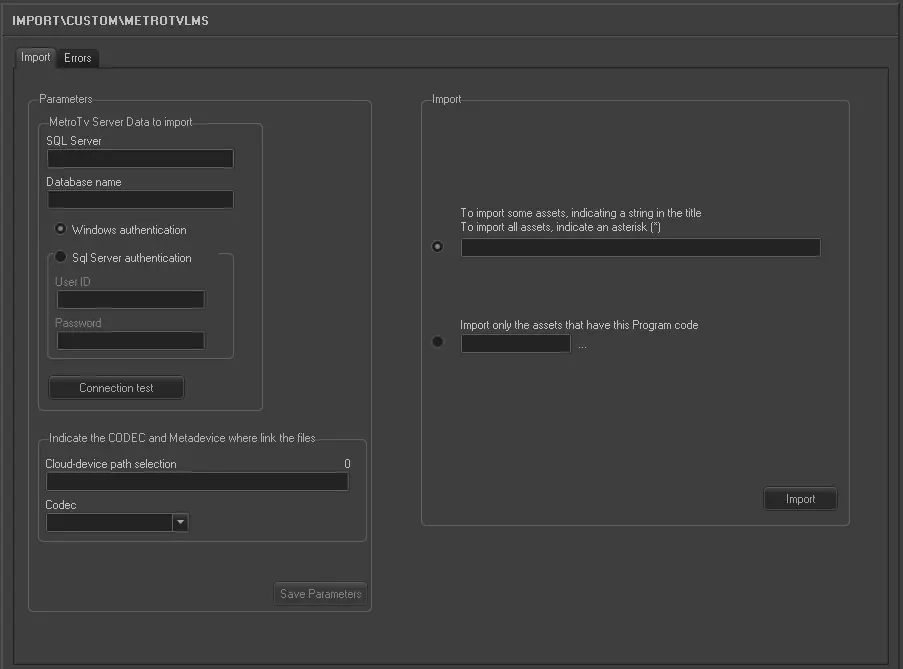
Import_custom_metrotv_lms
Metro TV Server Data to import:
•SQL Server: Specify the SQL Server name.
•Database Name: Specify the name of the database to be import in the SQL Server.
oWindows authentication:
Select this option if the importation would be authenticated by Windows user ID and access rights created in Windows Active Directory.
oSQL Server authentication:
Select this option to authenticate the import based on the user ID created in SQL Server. You are required to provide the user ID and password for authentication.
•Use the “Connection test” feature to establish the connection to the SQL Server.
Indicate the codec and metadevice where link the files:
•Cloud-device path selection: Specify the path of the cloud-device to link the files.
•Codec: Select the type of codec to be used.
Import:
Select one of the import option:-
oTo import some assets, indicating a string in the title.
To import all assets, indicate an asterisk (*):
Select this option and specify a string to import certain assets or specify “*” to import all assets.
oImport only the assets that have this program code:
Select this option and specify a program code in the text box to import only specific assets.
Launch the Import
When all parameters had been fulfilled, click the <Import> button to start the import process.
 5278_Import_custom_metrotv_lms