VOD
6.4.4 VOD New Contract
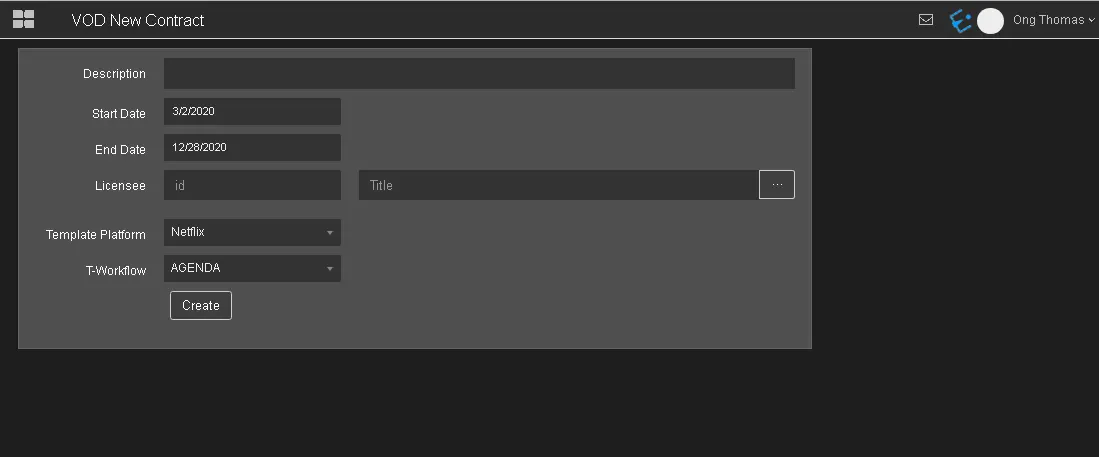
In VOD New Contract, you can create a new VOD contract to cater for specific events.
VOD_New_Contract
- Description: Give a brief description to identify the contract;
- Start Date: Select from the calendar the starting date of validity of the contract;
- End Date: Set in the calendar the contract end date of validity;
- Licensee: Indicate the license holder. Clicking on the button on the right side of the Title field, is possible to choose a company among the personal data entries. The ID of the selected entry will be automatically inserted in Licensee field.
- Template Platform: Select one of the available platform templates to be used for the new contract;
- T-workflow: Select the T-workflow to be associated with the new contract. In order to be selectable, at least a "Delivery VOD files" action must be inserted in the workflow.
Click the <Create> button to create the new VOD contract.
When a new VOD contract is created, you can fill the contract data starting from General tab of the new contract. In the next chapter are described all the sections of a VOD contract.
 VOD_New_Contract