59.3.10.50 Worksheet Actions - Default Costs Templates
All actions are created from the "Worksheet" action template.
The Costs section allows to perform the first step of the Work Orders Management process; this step consists of defining a suited cost structure based on user-defined cost templates that will be used by worksheet actions (during both their creation and compilation). Using predefined costs provides added convenience to operators, allowing them to quickly create standard work orders by selecting the cost template to apply to the work order.
NB: For detailed information on the entire management of work orders, please refer to the Work Orders Management chapter.
Settings cost templates
The Costs table is the structure where cost templates are defined by entering indicating for each one of them the following information:
Settings_costs_templates
Field- Description
Description: Enter a brief description of the cost (e.g. shooting time, copying quantity, subtitling money, etc).
Example: editing TIME
Field - Cost type
Description: Specifies if the cost is related to the expenditure of time (e.g. hours), money (e.g. dollars) or quantity (e.g. tapes).
Example: time
Field- Unit cost
Description: Indicates the cost for each time or quantity unit.
NB: Please note that money costs don't require a unit cost.
Example: 15$
Field - Measurement unit
Description: In case the "cost-type" is time, specify here the reference unit (e.g. minutes, hours, days, weeks, months) that details the "unit cost" (e.g. 15$ per hour).
This field converts costs in cases where users enter expenses in a format (e.g. hours) different from the template's (e.g. days).
Example: Hours
Field - To invoice
Description: Enable this flag in case operation cost will be considered for invoicing purposes.
Example: yes
How are costs calculated?
Once a worksheet is compiled, its total cost is calculated depending on its cost type:
•Money: The total cost will equal the operator's entered cost (e.g. 12$).
MONEY
•Quantity: The total cost will be calculated by multiplying the operator's entered cost (e.g. 12 items) by the "unit cost" (e.g. 50$ per item).
QUANTITY
•Time: The total cost will be calculated by multiplying the operator's entered cost (e.g. 12 hours) by the "unit cost" (e.g. 20$ per day), and if required by a "conversion factor" (e.g. 1/24 for converting hours to days).
TIME
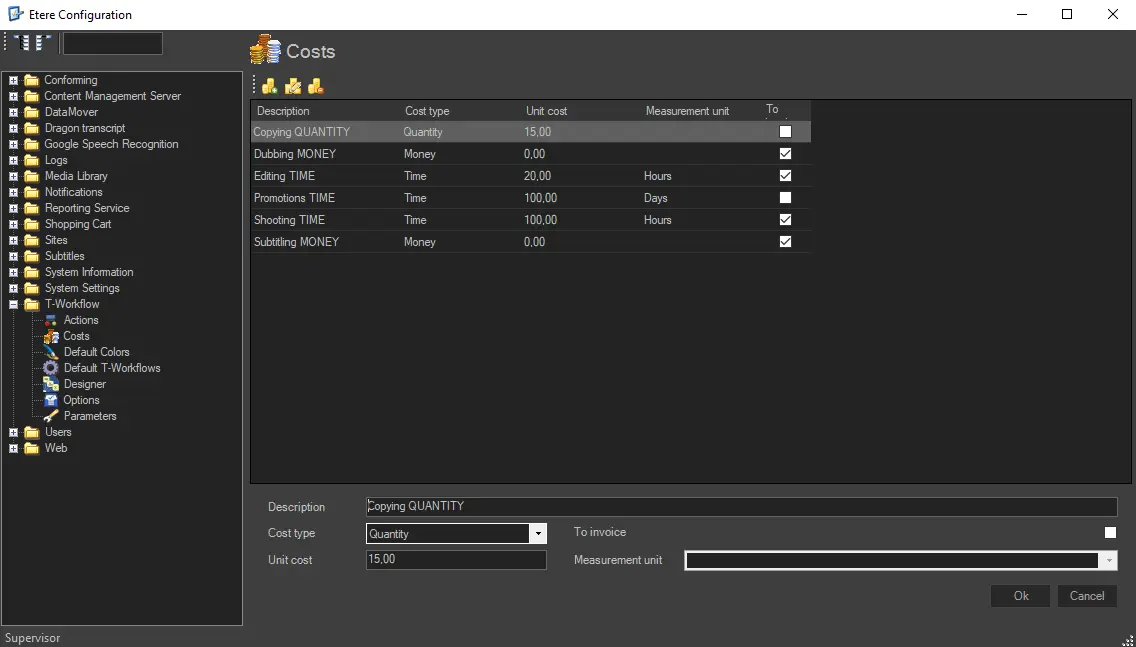 Settings_costs_templates
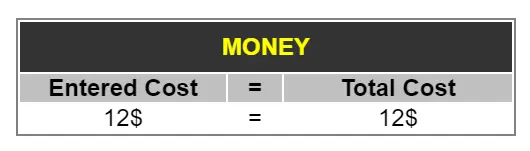 MONEY
MONEY
 QUANTITY
 TIME
TIME