69.2.1.19 XML
Import Scope
The F90 - XML import allows to import, as it name suggest, standardized XML files containing the schedule of the specified day(s).
Import Parameters
The parameters required are described below:
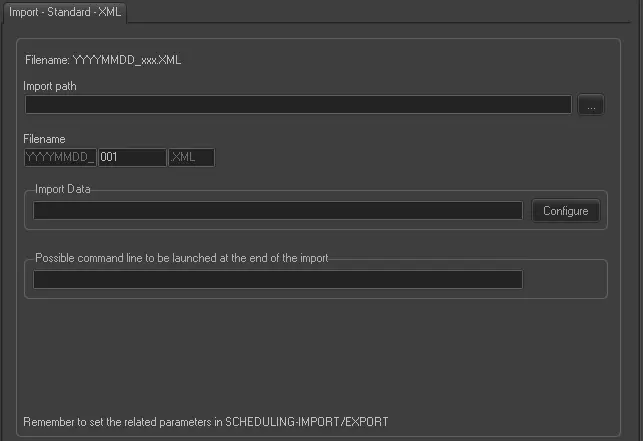
Import - Standard - XML
Import path - Indicate the path and directory where the XML file is stored.
Filename - Etere F90 will search on the import path for all files matching the following format: YYYYMMDD_xxx.xml, where:
▪ YYYYMMDD: the year, month and day of the imported schedule.
▪ xxx: the station to which the imported schedule is related (e.g. 001, 002, etc).
Import Data - Opens the Configure Import window to specify the days and the frequency to be imported.
Possible command line to be launched at the end of the import - Indicate the Windows command (in dedicated path) to be executed when the import is completed. If the command line required a parameter but it is not distinguished, an error message would be recorded to alert user.
You can leave it as blank to ignore the parameter.
Once the automatic import is started, if the records are locked by user from the same PC, the import would force closure the opened records and resume importing.
NB: Imported files are renamed to YYYYMMDD.old001, YYYYMMDD.old002, and so on.
Scheduling related import
Remember to set the same parameters in the Etere Scheduling > Import/Export > IMPORT\STANDARD\GENERIC\XML and SAVE the changes once done.
NB: When import is in progress, you can terminate the import with the “Stop” button. The “Stop” command would not interfere with the current import process. Instead, subsequent import/export processes would not be triggered automatically when the current import process ends.
 Import_-_Standard_-_XML