85.1.2 Configuration
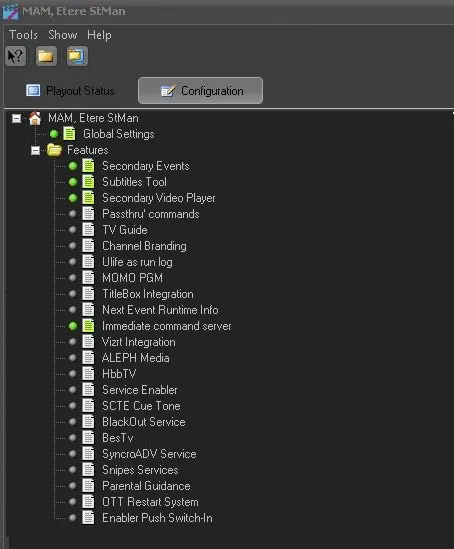
In this section it is possible to view and set which secondary events will be managed by STMan. An item is active if there is a green tick beside it, if it is grey the item is disabled, and if it has a red cross means that the item is active but some settings are wrong:
Configuration
Global Settings
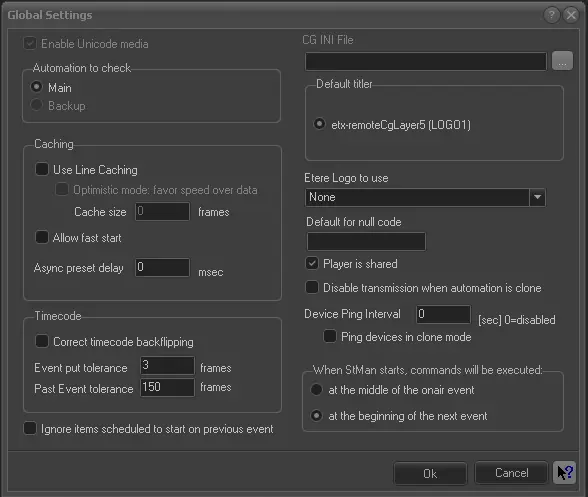
In this section the following general parameters are configured:
Global Settings
Unicode
•Enable Unicode media: This option must be checked if the used CG device receive data in Unicode Format.
Automation
•Automation to check: Select if the application will be synchronized with either the main or clone automation. Please note that Etere STMan allows Main/Clone mode; all the other parameters are common for both main and backup applications.
Caching
•Use line caching: if checked, enables the inside cache for the scheduling's lines which avoids problems for the playout in case of a sequence of short events or SQL server overloads,
- Optimistic mode: if this option is enabled the application does not re-reads data anymore if a data row has been already read from the server (i.e.: thus favoring speed over data). The only case that forces data re-read is a schedule publication. In optimistic mode, unpublished schedule's changes are NOT detected,
- Cache size: In case of optimistic caching you can control how much data (in frames length) must be read from the sql server,
•Allow fast start: if checked, it enables the chance to simulate the video file change without waiting for Automation notifications, in order to start the following event as fast as possible,
•Async preset delay (msec): It is an internal runtime parameter that represents the delay used to execute a preset after a new event start. The default value (i.e.: 750) must not be changed unless Etere's support indicates the contrary (If a value less than 100 msec is provided, the application will use the default value).
Timecode
•Correct timecode back-flipping: If enabled, negative time gap values (i.e.: backward jumps) will be avoided. This prevention of timecode back-flipping is based on an Etere STMan's internal thread that constantly reads the current automation timecode, performing a binary search across the list of 'timecodes of scheduled commands', searching for the first one within the tolerance interval to execute it.
Increasing tolerance will protect the application against 'timecode jumps' and/or imprecise computer clocks; it will also dilate the interval for inserting contiguous events causing -as a collateral effect- commands to start before expected time.
•Event put tolerance (frames): This SENSITIVE parameter allows to modify the maximum 'tolerance interval' (in frames) for executing commands, this 'tolerance interval' is determined from the interval: [a, b] ; where: a= timecode - (tolerance - 1) and b= timecode + (tolerance -1). Commands inserted out of this interval won't be executed.
By default, the 'event put tolerance' value is set to 3, resulting in a tolerance interval of 5 frames (i.e.: [timecode-2 , timecode+2)], however, it can be modified depending of the needs of the station, for example:
(a) if the current timecode is 100 and the tolerance is 5, the tolerance interval will go from 96 to 104, in the 99% of cases, the title will be executed in advance at the first frame of the interval (i.e.: at 96).
(b) for a current timecode equal to 2 and the tolerance of 3, the tolerance interval will go from 0 to 4, in the 99% of cases, the title will be executed in advance at the first frame of the interval (i.e.: at 0).
(b) in cases where the current timecode is 0 and tolerance is 0, titles won't be executed since the tolerance interval will result inconsistent.
NB: Notice that inserting two titles within the same tolerance interval is 'dangerous', since it will be almost sure that only one of them will be executed (most probably the first one).
Device.ini
•CG INI file: This parameter, which is enabled only for Etere versions lower than 16.3, indicated where the titler device.ini file is located.
Titlers/Logos
•Default titler: Indicates the titler that STMan will use when it is not specified. The “etx-remoteCgLayer5 (LOGO1)” resource is only available if there is an ETX system configured. If ETX resource is not available, other titlers and resources configured in the system would be listed.
•Etere logo to use: Set here the logo-insertion device to be reserved for Executive Editor to perform checking operations.
Other settings
•Default for NULL code: Enter a string that will be used to replace empty parameters in the commands sent to the titler,
•Player is shared: If selected, it indicates that the used device is shared with another application, .
•Disable transmission when automation is clone: If this parameter is active, in case the automation to which Etere STMan is related is running in 'clone mode', all data transmissions will be disabled on all devices.
•Device Ping Interval: Indicate the interval (in seconds) to issue a “Ping” command to check the availability of the Automation machine. Leave the value as “0” to disable the “Ping” command.
❑Ping devices in clone mode: Enable this option to “Ping” also the clone devices if the interval is defined.
•When STMan starts, commands will be executed:
❑At the middle of the onair event: Enable this option to manually start the secondary event (e.g. subtitles transmission) at the middle of the on-air event. This option is useful if STMan is restarted in the middle of secondary event when connecting to Automation.
❑At the beginning of the next event: Enable this option to start the secondary event at the starts of the next event. This option is useful when the Automation is restarted at the middle of on-sir event, it would ensure that the correct secondary event (e.g. subtitles) is transmitted.
•Ignore items scheduled to start on previous event: If enabled, all secondary events (i.e. secondary objects and passthru commands) which scheduled timecodes are based on another secondary event won't be executed by Etere STMan.
Features
Making double-click on any feature it is possible to enable/disable (and in some cases customize) any secondary events managed by Etere STMan, all available features are fully explained in the next chapter, STMan Features.
NB: All devices intended to be used by Etere STMan needs to be associated to it from the Etere Configuration | Resources module, specifying the module (STMan) and the user that will use it.
 5136_Configuration
 5135_Global_Settings