90.3 How to use Etere Face Recognition
Once we have reached this point and have created the Face Recognition action, the Face Recognition workflow and the artists usable by Face Recognition, we can proceed with some examples of how to use Etere Face Recognition.
How to execute the workflow Face Recognition in an asset from Etere Web
The first step is to access Etere Web from the home page and then find the asset where we want to perform the Face Recognition workflow (Mam > MediaLibrary > AdvancedSearch > write ID).
After opening our correct asset (in our example below the asset is ID 762) we have to go in the tab T-WORFLOW, select the Face Recognition workflow (in our example below the FR wf is Face Recognition on CM inside the EDL7) and click on Attach and Start it.
HowToAttach&StartAFaceRecognitionWorkflow
Once the Attach and Start button has been pressed, the Face Recognition workflow will be started in the selected asset. Now, we have to wait for the wf to complete its task.
FRwfAttached&Started
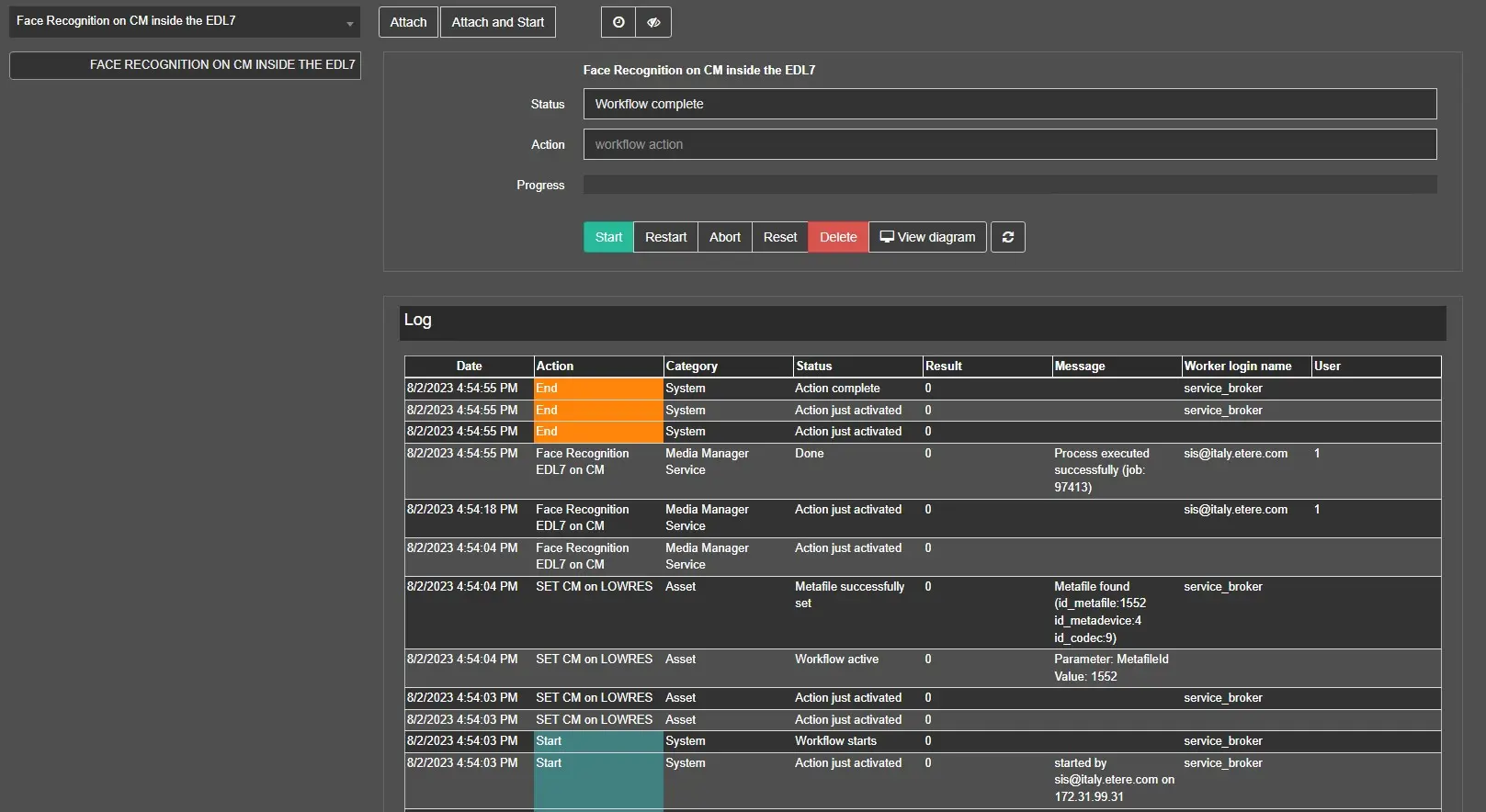
Once completed we will have a situation similar to the example below:
FRwfCompleted
Important information: to see the completed workflow in the tab T-WORKFLOW we have to click on the show\hide completed wfs button:
ShowHiddenWFCompleted
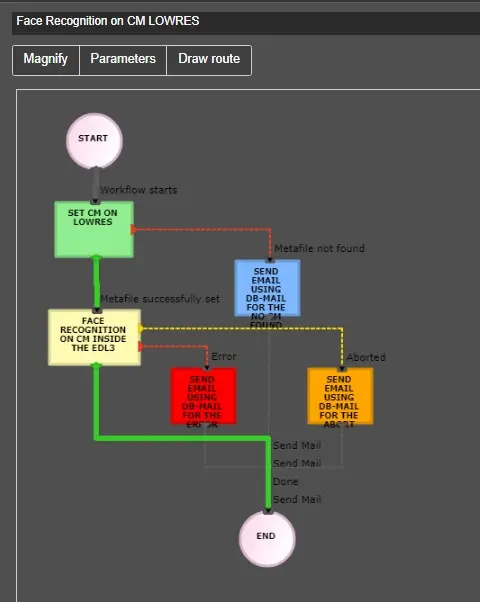
By clicking on button "View Diagram" we can see the complete route of the workflow, as in the example below:
ViewDiagramFRWorkflow
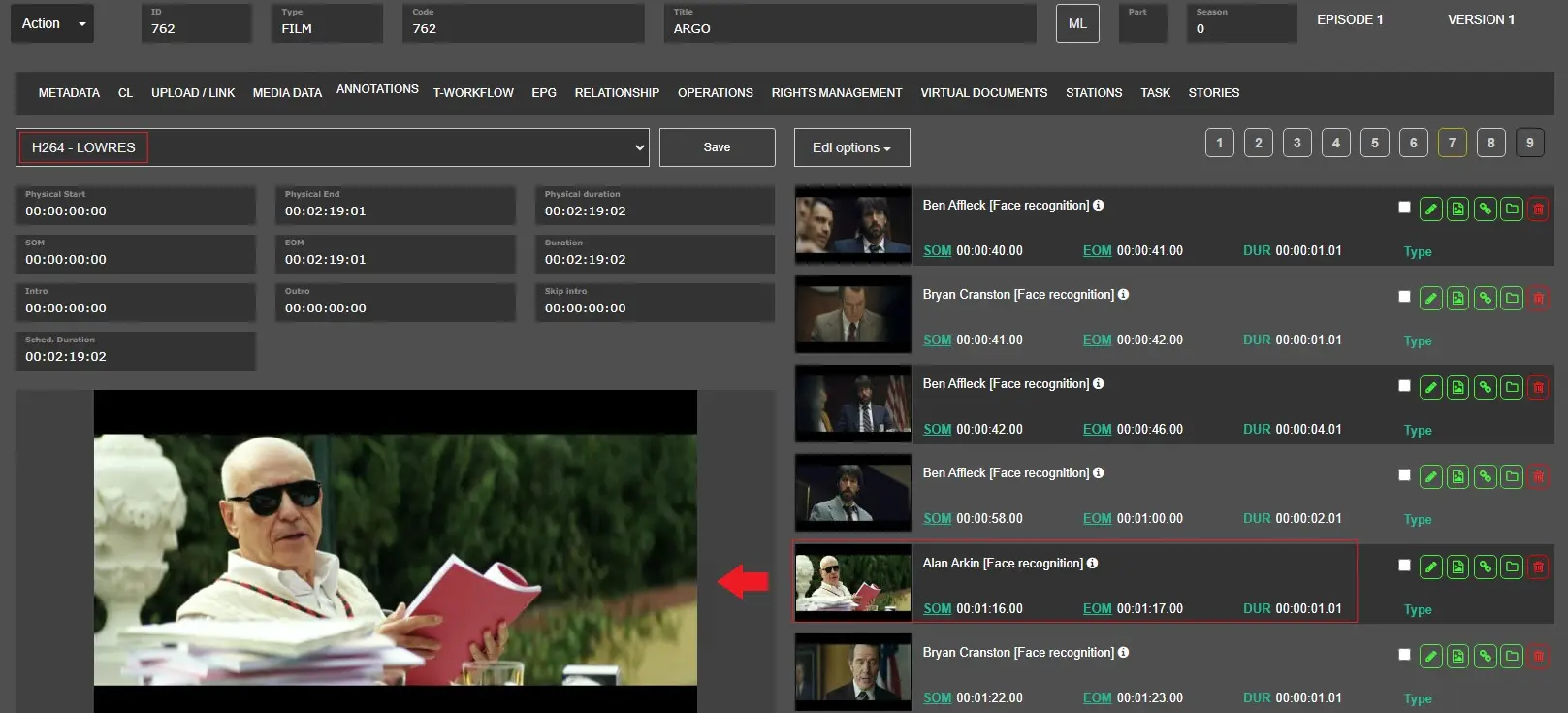
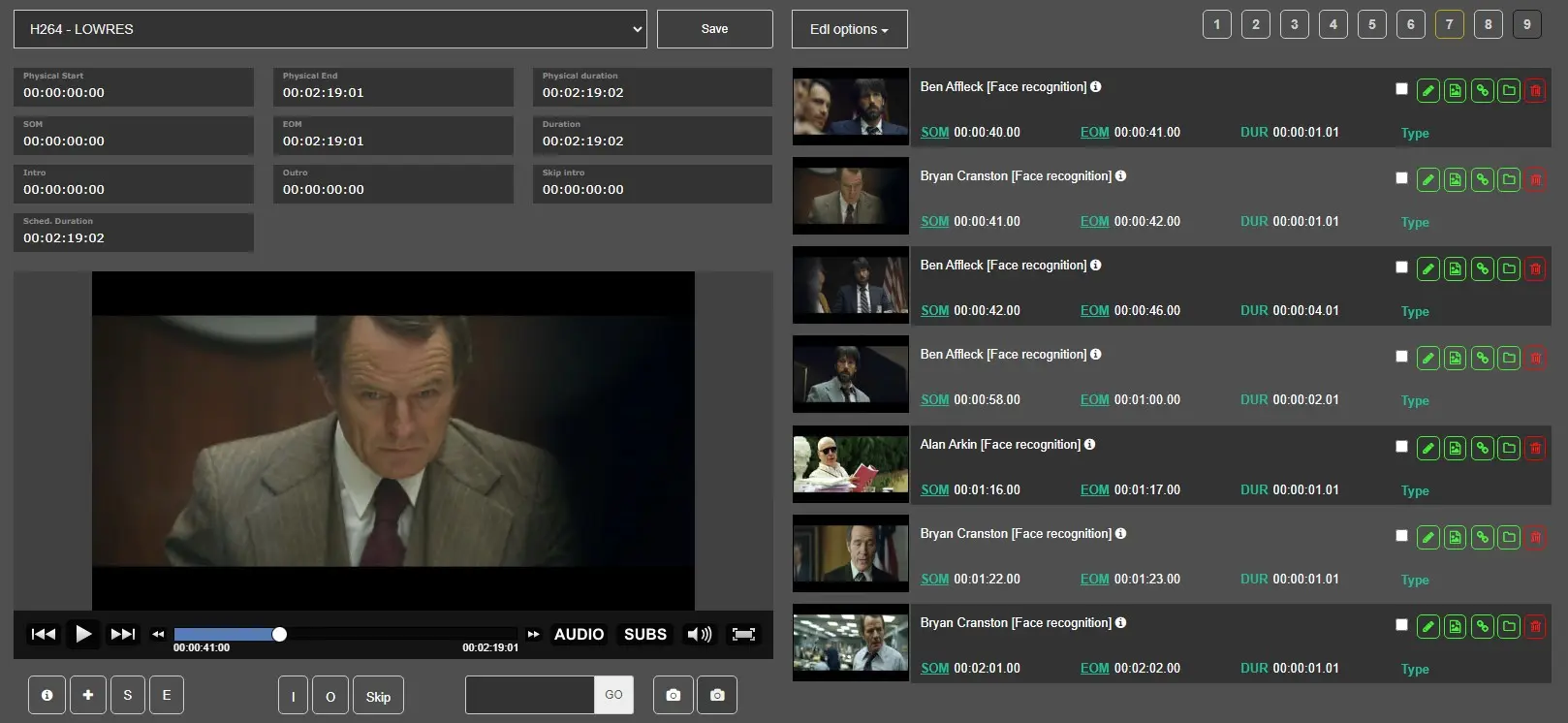
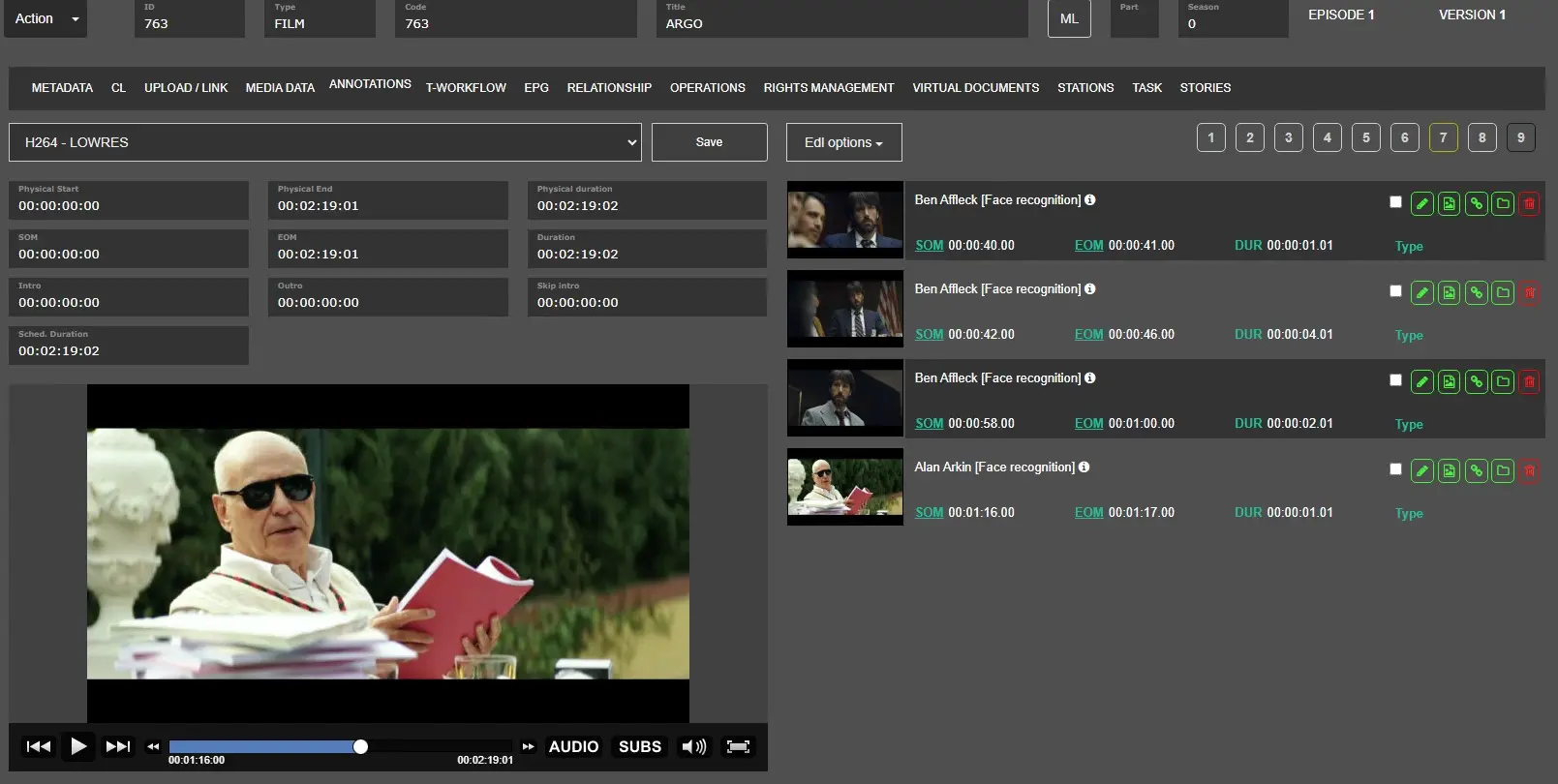
Now, we can go on Annotation tab and select the correct LOWRES file to see the preview then select the correct EDL level (in our example is EDL n.7) and we can see all segments created by the system.
FaceRecognitionEDL7Example
What if we run the Face Recognition workflow in the same asset without changing any settings
If we run the Face Recognition workflow on the same asset without changing any settings, such as artist image or face recognition enabled or action settings, the system runs the operation one more time on the selected assets but any information will be overwritten.
What happens when we update an artist image
We can update or remove an artist image, as indicated in the Artist Manager chapter, but no changes will be applied in the segments already created of an asset until we execute the FR wf on it again.
Here's an example:
The FACE RECOGNITION action is based on the image uploaded in artist X at the moment when the action in the asset Y is performed. So, once the action is completed successfully on asset Y, the system will create the segment\s in the selected edl and artist X will be assigned. If after performing this operation the operator decides to Remove or Update the image of artist X, the system will set the FACERECONTEMPLATE field to NULL and this means that at the next Face Recognition operation in the asset Y the segments will be updated\removed based on the new information indicated.
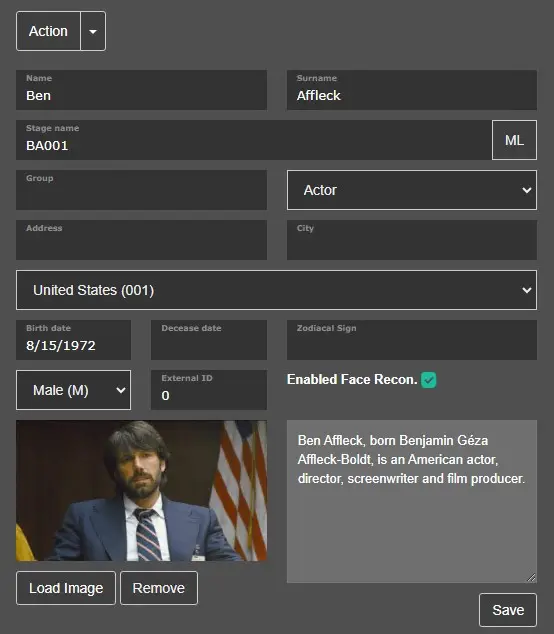
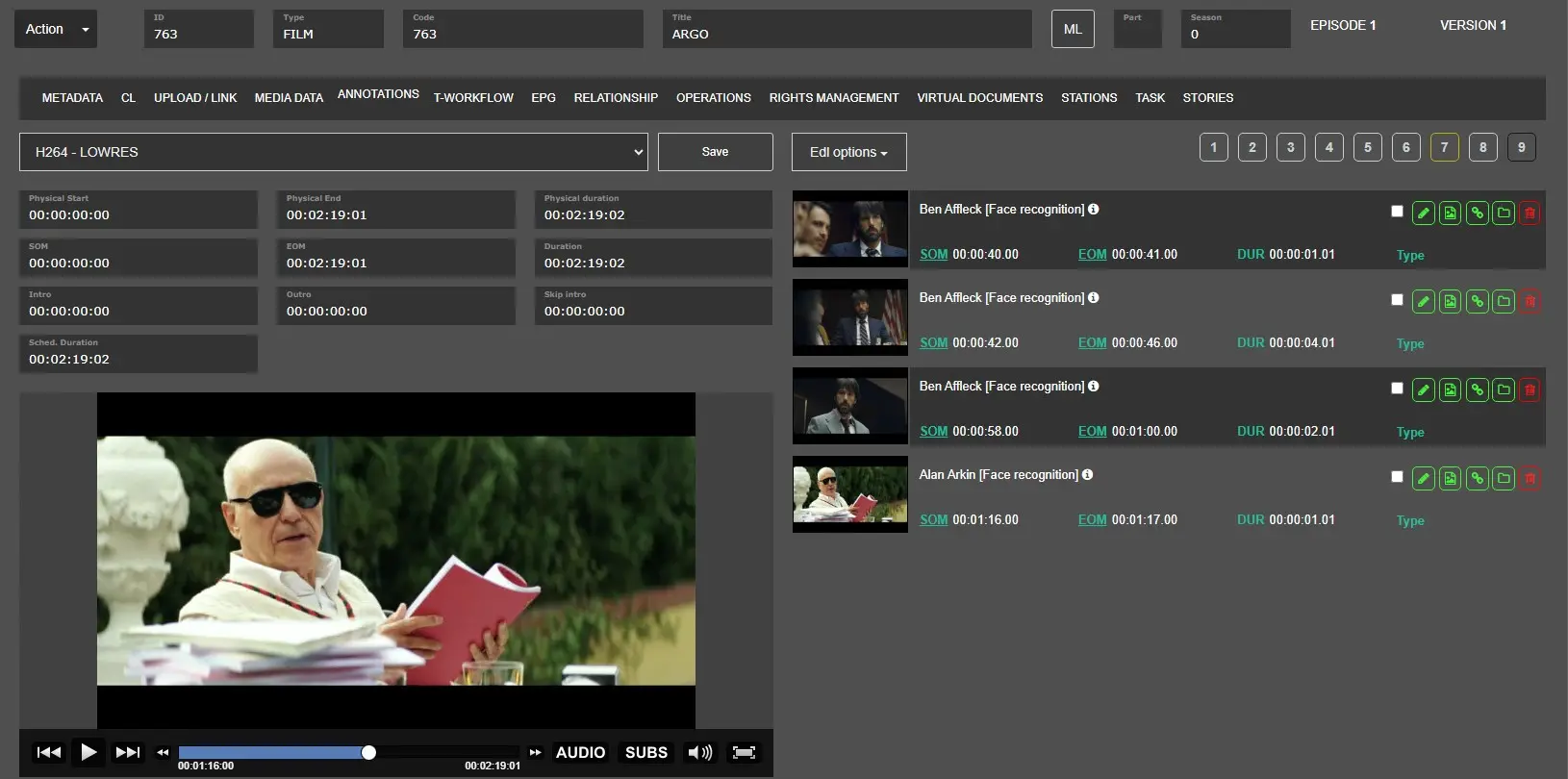
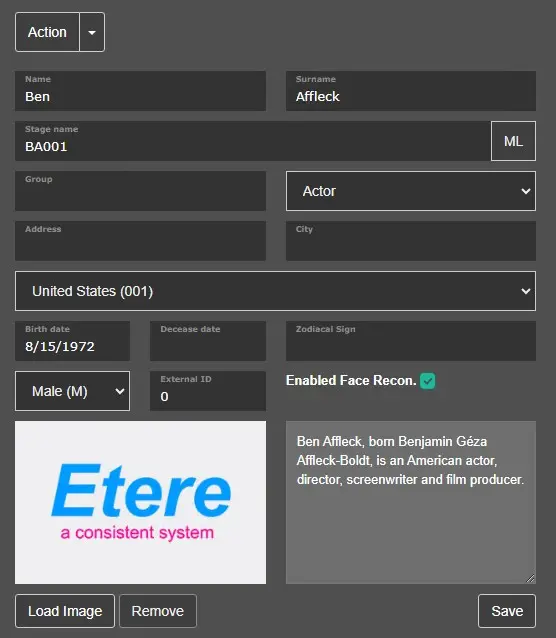
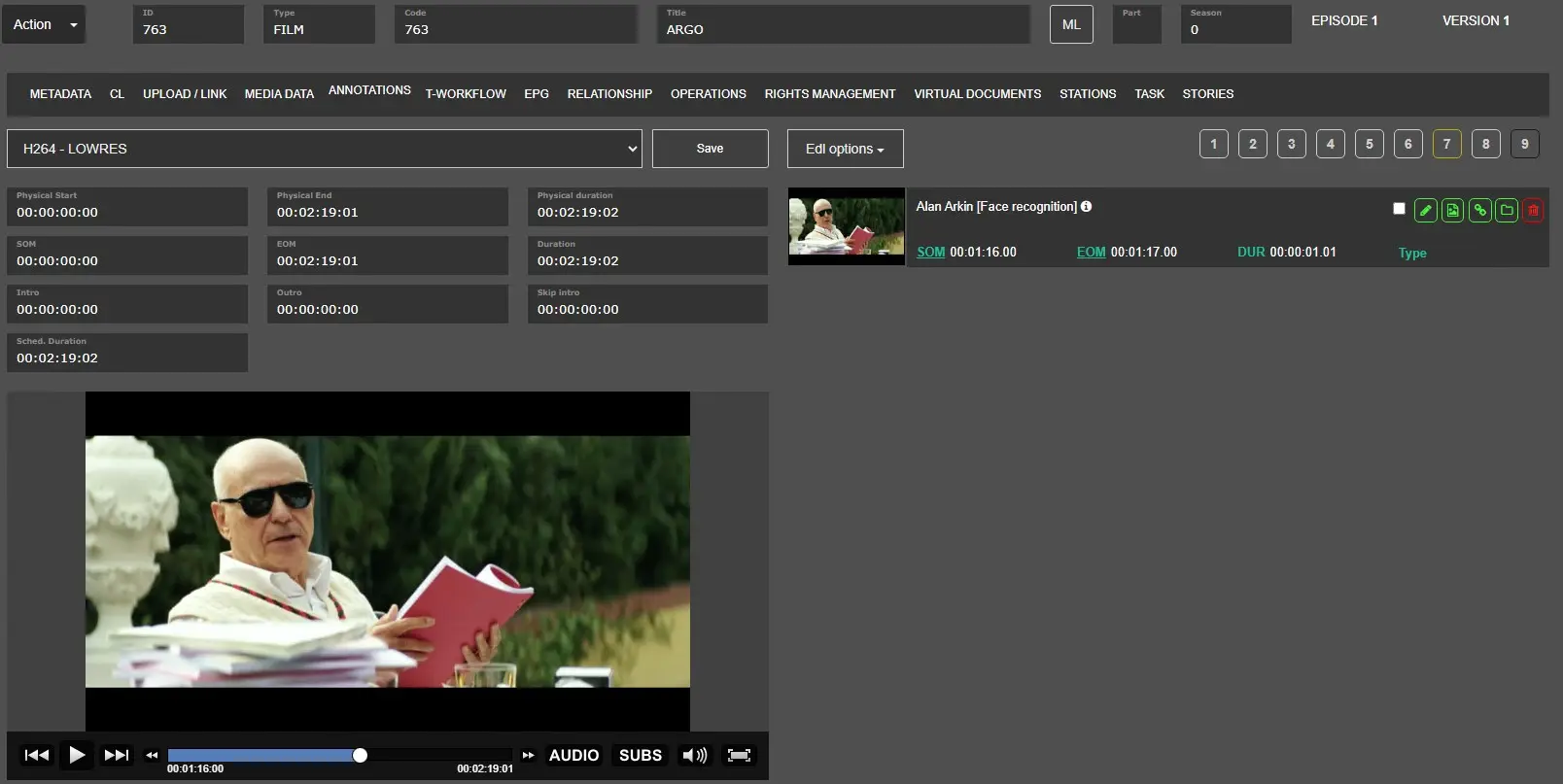
In this example we'll delete the image from an artist:
FR_UPDATEIMAGE_STEP1 -> We have an Artist X with the Image already updaloaded.
FR_UPDATEIMAGE_STEP2 -> We have an Asset Y with segments created where the Artist X is assigned.
FR_UPDATEIMAGE_STEP3 -> We removed the image from the Artist X then click on SAVE button to apply our modification.
FR_UPDATEIMAGE_STEP4 -> We ran the FR workflow one more time and the segments of asset Y were updated according to the new settings.
What happens when we delete the option "ENABLED THE FACE RECOGNITION" in an artist
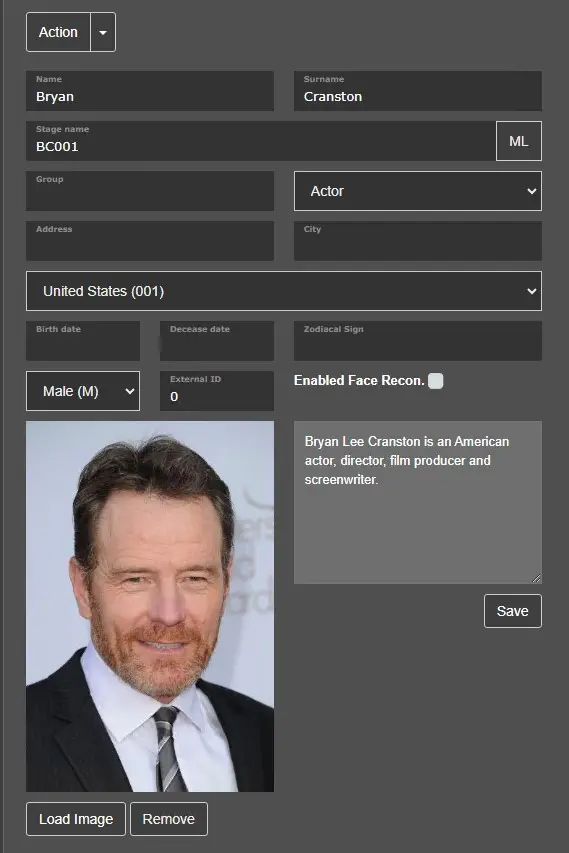
We can delete the option "ENABLED THE FACE RECOGNITION" in an artist, as indicated in the Artist Manager chapter, but no changes will be applied in the segments already created of an asset until we execute the FR wf on it again.
FR_IMAGE_STEP1 -> We have an asset with 7 segments already created.
FR_IMAGE_STEP2 -> We disabled the option "ENABLE THE FACE RECOGNITION" in an artist from Etere Web.
FR_IMAGE_STEP3 -> We ran the FR workflow one more time and the segments were updated according to the new settings.
What happens when we modify the similarity parameters in a Face Recognition action
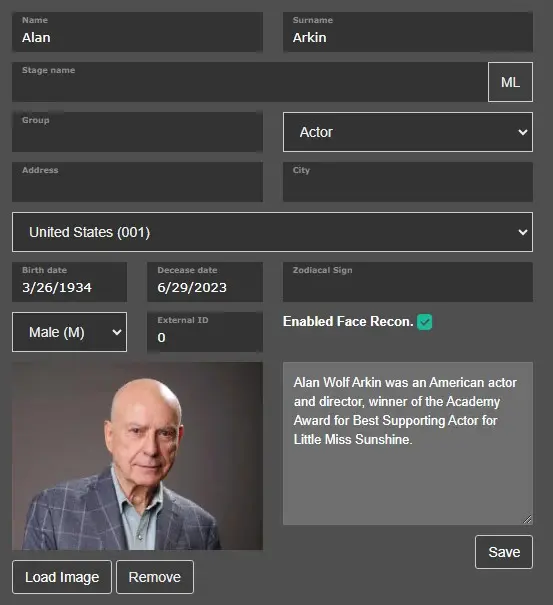
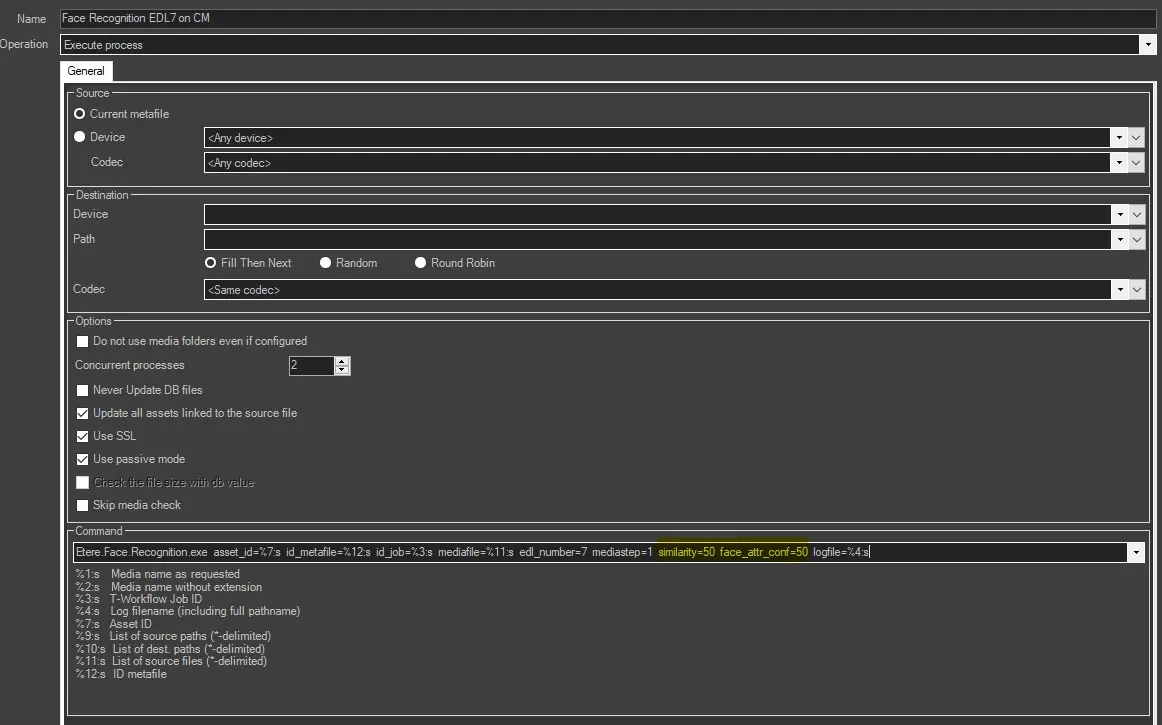
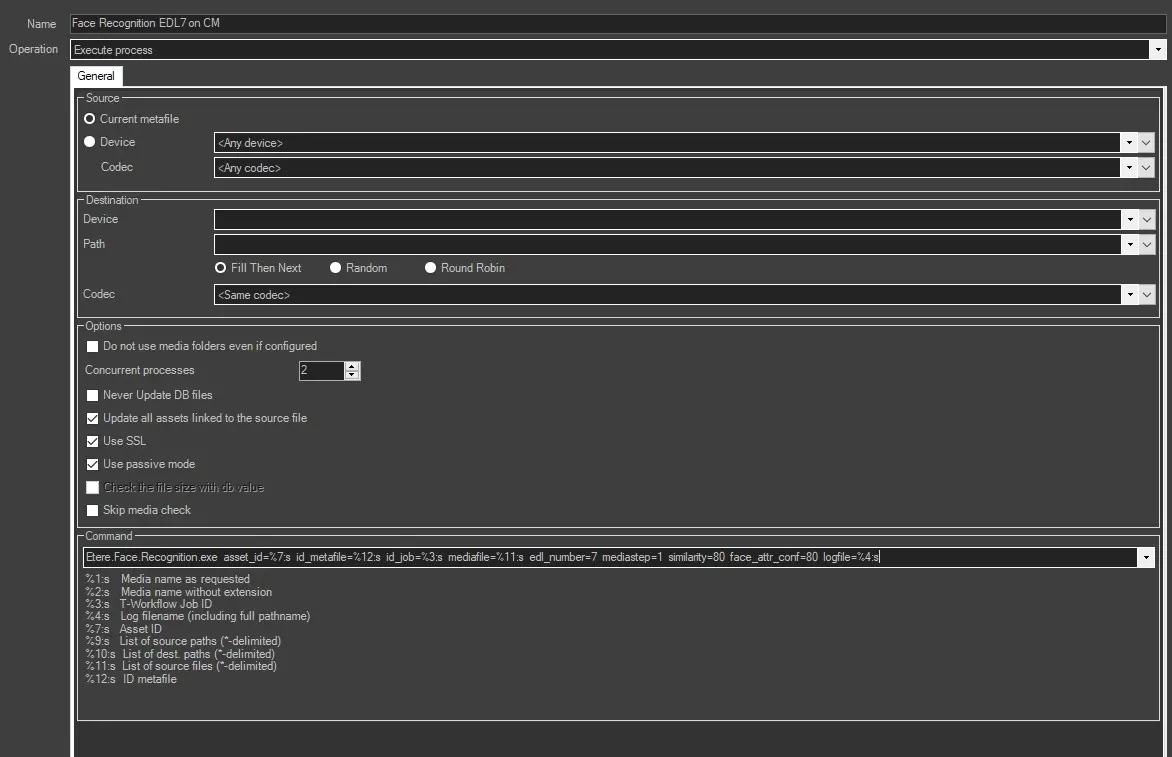
In each action of Face Recognition we can modify the percentage level of the Sampling step and Similarity threshold options, as indicated in the chapter "How to configure Face Recognition inside the Etere System", but no changes will be applied in the segments already created of an asset until we execute the FR wf on it again.
FR_STEP1 -> Artist is ready to be used by FR action
FR_STEP2 -> We changed the Sampling step and Similarity threshold from 80% to 50% then save the modifications by clicking on save button.
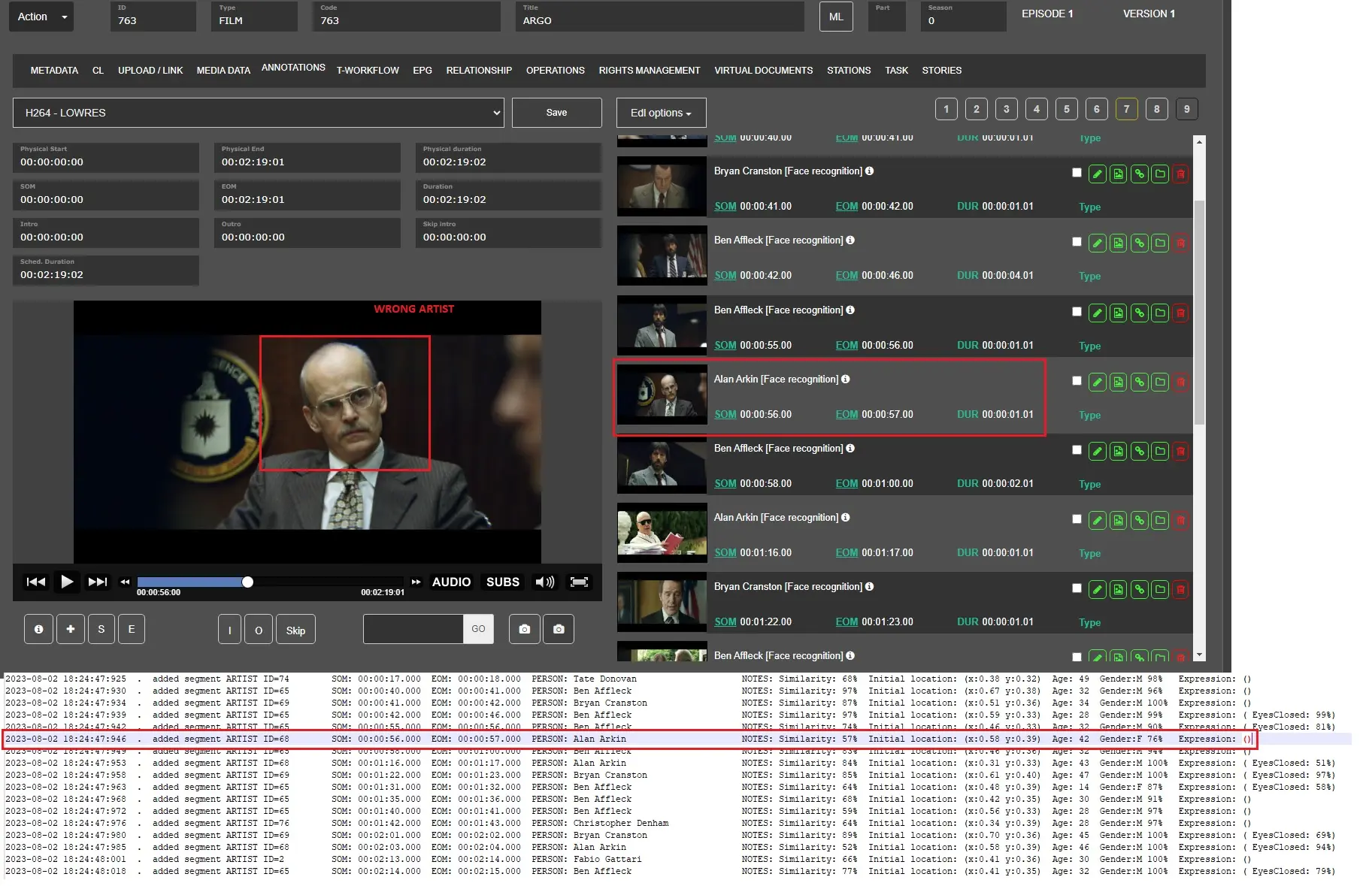
FR_STEP3 -> We execute the FR workflow in the asset Y and we can see that in this segment an incorrect artist has been assigned due to the lowering of the similarity threshold from 80% to 50%, see chapter "How to configure Face Recognition inside the Etere System"
FR_STEP4 -> We reverted the Sampling step and Similarity threshold from 50% to 80% then save the modifications by clicking on svae button.
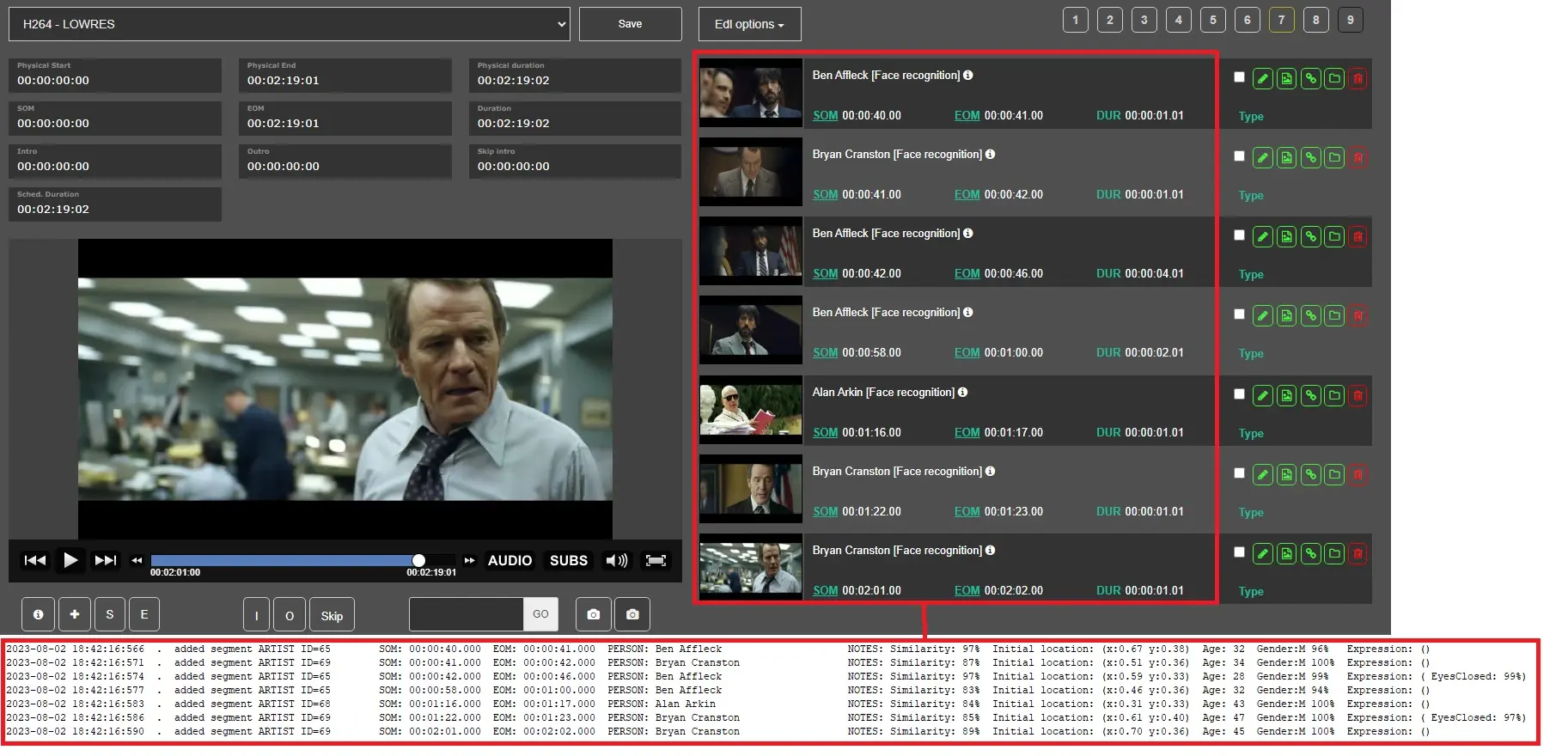
FR_STEP5 -> We executed the FR workflow in the asset Y another time and we can see that the segments have been fixed basing on new Face Recognition's settings. in fact a lot of segments have been removed from the EDL n.7
How to see the logs
You can find the logs in the folder C:\Users\XXX\AppData\Local\Etere\Log\smm.job (XXX=user with which the MMS service is running) and the actions concerning the FR have rnx.job inside them
Here is an example:
service.mediamanager.media manager service (1).workstationW11.a.763.rnx.job.97437.log
service.mediamanager.media manager service -> it is the MMS service that processed the action
workstationW11 -> is the workstation where the service is running
763 -> is the Id of the asset
rnx.job.97437 -> is the specific action and job number.
Here is an example of our logs where the system creates the segment on EDL n.7 and assigns the artist based on FR action settings:
..
2023-08-02 17:35:35:290 "Etere.Face.Recognition.exe" asset_id=763 id_metafile=1552 id_job=97421 mediafile="\\workstationW11\archive\LOWRES\761.mp4" edl_number=7 mediastep=1 similarity=80 face_attr_conf=80 logfile="C:\Users\sis.ETERE\AppData\Local\Etere\Log\smm.job\service.mediamanager.media manager service (1).workstationW11.a.763.rnx.job.97421.log"
2023-08-02 17:35:35:290 executable: C:\Program Files (x86)\Etere\Etere.Face.Recognition.exe
2023-08-02 17:35:35:292 version : 33.3.1.3
2023-08-02 17:35:35:294 - asset_id : 763
2023-08-02 17:35:35:294 - edl_version: 6 (0-based)
2023-08-02 17:35:35:294 - mediafile : \\workstationW11\archive\LOWRES\761.mp4
2023-08-02 17:35:35:295 - mediastep : 1.00 second(s) / sample frame
2023-08-02 17:35:35:295 - similarity : 80%
2023-08-02 17:35:35:295 - face attributes detection: Expression:[YES] Age:[YES] Gender:[YES]
2023-08-02 17:35:35:295 - face attributes detection: confidence threshold = 80%
..
2023-08-02 17:36:09:189 - asset id : 763
2023-08-02 17:36:09:189 - edl version: 6 (0-based)
2023-08-02 17:36:09:227 . added segment ARTIST ID=65 SOM: 00:00:40.000 EOM: 00:00:41.000 PERSON: Ben Affleck NOTES: Similarity: 97% Initial location: (x:0.67 y:0.38) Age: 32 Gender:M 96% Expression: ()
2023-08-02 17:36:09:235 . added segment ARTIST ID=69 SOM: 00:00:41.000 EOM: 00:00:42.000 PERSON: Bryan Cranston NOTES: Similarity: 87% Initial location: (x:0.51 y:0.36) Age: 34 Gender:M 100% Expression: ()
2023-08-02 17:36:09:240 . added segment ARTIST ID=65 SOM: 00:00:42.000 EOM: 00:00:46.000 PERSON: Ben Affleck NOTES: Similarity: 97% Initial location: (x:0.59 y:0.33) Age: 28 Gender:M 99% Expression: ( EyesClosed: 99%)
2023-08-02 17:36:09:251 . added segment ARTIST ID=65 SOM: 00:00:58.000 EOM: 00:01:00.000 PERSON: Ben Affleck NOTES: Similarity: 83% Initial location: (x:0.46 y:0.36) Age: 32 Gender:M 94% Expression: ()
2023-08-02 17:36:09:256 . added segment ARTIST ID=68 SOM: 00:01:16.000 EOM: 00:01:17.000 PERSON: Alan Arkin NOTES: Similarity: 84% Initial location: (x:0.31 y:0.33) Age: 43 Gender:M 100% Expression: ()
2023-08-02 17:36:09:260 . added segment ARTIST ID=69 SOM: 00:01:22.000 EOM: 00:01:23.000 PERSON: Bryan Cranston NOTES: Similarity: 85% Initial location: (x:0.61 y:0.40) Age: 47 Gender:M 100% Expression: ( EyesClosed: 97%)
2023-08-02 17:36:09:265 . added segment ARTIST ID=69 SOM: 00:02:01.000 EOM: 00:02:02.000 PERSON: Bryan Cranston NOTES: Similarity: 89% Initial location: (x:0.70 y:0.36) Age: 45 Gender:M 100% Expression: ()
 HowToAttach&StartAFaceRecognitionWorkflow
 FRwfAttached&Started
 FRwfCompleted
 ShowHiddenWFCompleted
 ViewDiagramFRWorkflow
 FaceRecognitionEDL7Example
 FR_UPDATEIMAGE_STEP1_
 FR_UPDATEIMAGE_STEP2
 FR_UPDATEIMAGE_STEP3
 FR_UPDATEIMAGE_STEP4
 FR_IMAGE_STEP1
 FR_IMAGE_STEP2
 FR_IMAGE_STEP3
 FR_STEP1
 FR_STEP2
 FR_STEP3
 FR_STEP4
 FR_STEP5