69.2.1.1 APPLE FCP IMPORT XML
Import Scope
The APPLE FCP XML function allows importing multiple XML files containing data related to asset linked files (from Final Cut Pro systems). Imported files must be named as the video file but with an .XML extension.
Please note that in order to be imported in Etere, the following metadata must exist in the Etere's SMPTE metadata dictionary:
Audio CH1 ICD
Type: string
Sample: Audio Italian
Audio Ch2 ICD
Type: string
Sample: Audio Italian
Audio Ch3 ICD
Type: string
Sample: Audio English
Audio Ch4 ICD
Type: string
Sample: Audio English
Aspect Ratio ICD
Type: string
Sample: 16F16
Compliance Pass
Type: string
Sample: Yes
Technical QC Pass
Type: string
Sample: Yes
Native HD
Type: string
Sample: Yes
Definition
Type: string
Sample: HD
Originator
Type: string
Sample: From Tasmania
NB: Metadata can be created in "Configuration > Settings > Media Asset Management > Flexi-Metadata".
It's worth mentioning that APPLE FCP XML function is automatically launched by Etere Active Sync to enrich synchronized video files.
Import parameters
This import allows the following parameters to be set:
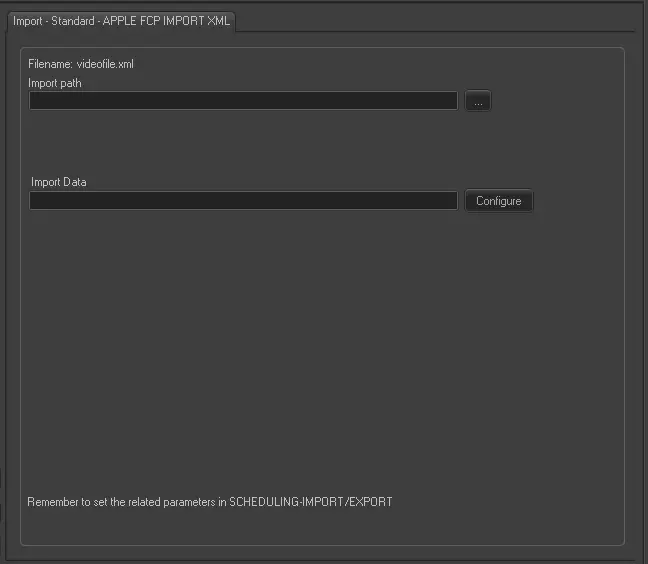
Import - Standard - APPLE FCP IMPORT XML
Filename - Files containing assets data must be named in the following format: videofile.XML
Import path - Indicate the path of the files to be imported.
Import data - Opens the Configure Import window to specify the days and the frequency to be imported.
Scheduling related import
This automatic import is based on the Etere Scheduling's manual import called APPLE FCP IMPORT XML., therefore, required parameters not available here might be taken from the manual import.
Sample file to import
The file to be imported using this method must have the following structure:
<?xml version="1.0" encoding="utf-8"?>
<FinalCutServer>
<getMdReply>
<entity entityType="asset" entityId="not defined">
<metadata>
<mdValue fieldName="Audio Ch1" dataType="string">Audio Italian</mdValue>
<mdValue fieldName="Audio Ch2" dataType="string">Audio Italian</mdValue>
<mdValue fieldName="Audio Ch3" dataType="string">Audio English</mdValue>
<mdValue fieldName="Audio Ch4" dataType="string">Audio English</mdValue>
<mdValue fieldName="File Name" dataType="string">ID_PIPPO.mxf</mdValue>
<mdValue fieldName="Duration" dataType="timecode">00:00:10:00</mdValue>
<mdValue fieldName="Cart No" dataType="string">ID_PIPPO</mdValue>
<mdValue fieldName="Material_Id" dataType="string">ID_PIPPO</mdValue>
<mdValue fieldName="Type" dataType="string">Commercial</mdValue>
<mdValue fieldName="Aspect Ratio" dataType="string">16F16</mdValue>
<mdValue fieldName="Originator" dataType="string">From Tasmania</mdValue>
<mdValue fieldName="Working Title" dataType="string">TITLE OF ID_PIPPO</mdValue>
<mdValue fieldName="In-point" dataType="timecode">10:00:00:00</mdValue>
<mdValue fieldName="Definition" dataType="string">HD</mdValue>
<mdValue fieldName="Destination" dataType="string">Unknown</mdValue>
<mdValue fieldName="aes" dataType="string">No</mdValue>
</metadata>
</entity>
</getMdReply>
</FinalCutServer>
 Import_-_Standard_-_APPLE_FCP_IMPORT_XML