84.4.5.28 STANDARD > MUSIC MASTER
Import Scope
The Music Master import allows reading an .XML file containing a broadcast playlist and import it automatically into the Etere system. During the import, those events which code is not present in the Etere database will be ignored (excepting those which code starts with 'A', which will be imported into the asset repository as commercial assets).
For already existing events imported into the system, scheduling data (e.g. duration, type, etc) will be automatically retrieved from the Etere's asset repository. Events ignored during the import (because not present into the Etere database) will be logged and displayed at the end of the import, indicating the code in question and the number of appearances within the playlist.
Import Parameters
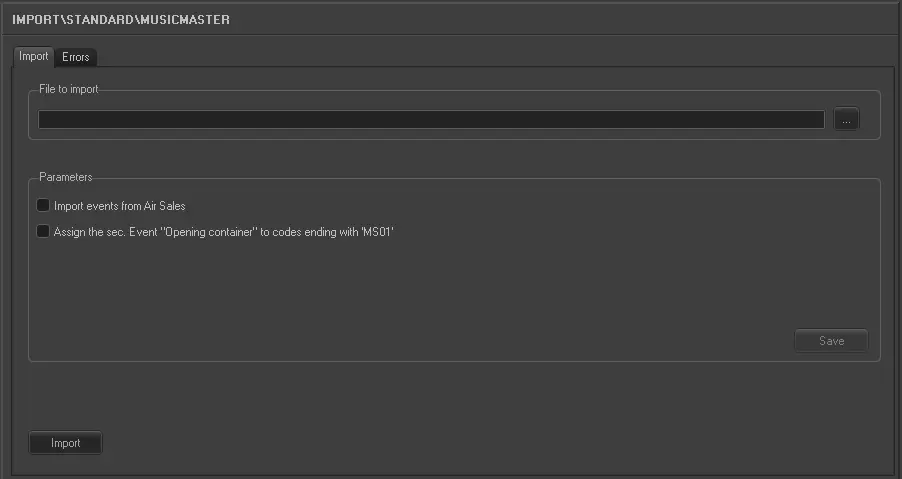
Under the Parameters section, other settings that can be configured are:
Import_standard_music_master
•File to import: Select the file to be imported and its file path,
•Import events from Air Sales: If enabled, also commercial events derived from the commercials management system will be imported.
•Assign the secondary event 'Opening container' to codes ending with 'MS01': If enabled, as the names suggest, all events which code ends with the string 'MS01' will be automatically assigned with an 'Opening container' secondary event during the import.
Sample imported file
<?xml version="1.0" encoding="ISO-8859-1"?>
<playlist channel="CH_NAME" date="20110301">
<event>
<time>HH:MM:SS:FF</time>
<cartnumber>G101980</cartnumber>
<ms>01</ms> -- PART in etere
<description></description> --
<duration></duration> --
<type></type>
<type_dsc></type_dsc>
<id_break></id_break> -- will be treated as an RCS import
<property></property> -- will be treated as an RCS import
</event>
<event>
<time>HH:MM:SS:FF</time>
<cartnumber>A455410</cartnumber>
<ms></ms>
<description></description>
<duration></duration>
<type></type>
<type_dsc></type_dsc>
<id_break>{GV0701}</id_break>
<property></property>
</event>
<event>
<time>HH:MM:SS:FF</time>
<cartnumber>G101980</cartnumber>
<ms>02</ms>
<description></description>
<duration></duration>
<type></type>
<type_dsc></type_dsc>
<id_break></id_break>
<property></property>
</event>
</playlist>
Launch the import
Once the import has been configured, it can be started just by pressing the <Import> button.
 5236_Import_standard_music_master