93.2.1.20 MMS - Content Check x64
The Media Manager service action Content Check x64 allows to check a file linked to an asset and write EDL segments corresponding to video faults, audio issues and scene changes.
This action is created automatically by system maintenance and reads the content check settings from Etere Configuration > Configuration editor > Content Management Server > Content Check (see chapter 59.3.3.2 Content Check).
Here below are described the action parameters and the content check parameters this action reads.
ACTION PARAMETERS
content_check_x64_action_params
• Name: Type a brief, self-descriptive name for the action.
• Operation: Since the content check operation is carried out by Etere.CCExec.exe, select "Execute process".
• Source: Set if the action have to search the metafile from a specific device with a specific codec or if it should take the current metafile.
• Concurrent processes: Indicate the maximum number of instances a single Etere Media Manager Service can execute for this action.
• Command: This is the command line Etere MMS uses to launch Etere.CCExec.exe. It's advisable to leave the string as it is.
CONTENT CHECK PARAMETERS
GENERAL PARAMETERS
content_check_params_general
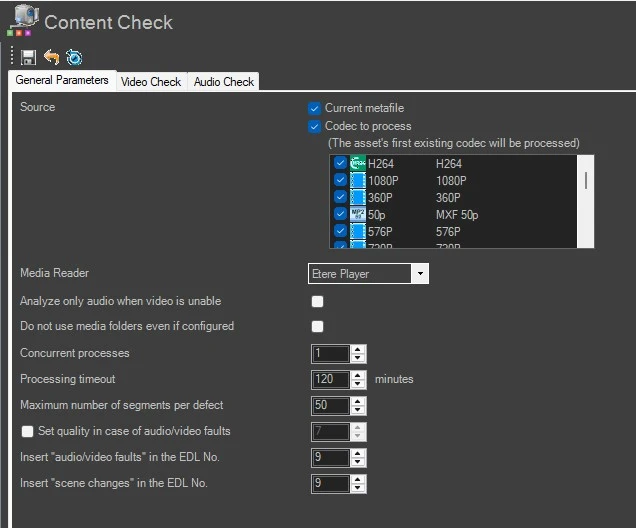
• Source: Choose if the action has to take the current metafile as source and which is the codec priority. The asset's first existing codec will be processed.
• Media reader: Ignored. This action by default uses Etere Player at faster speed.
• Analyze only audio when video is unable: Not used.
• Do not use media folder even if configured: If enabled, the path to be processed will be read from the main path (i.e. "media folder for the assets") of the metadevice. When disabled, the path will be read from the media folder (i.e.: "etereweb path") set for the metadevice.
• Concurrent processes: Not used. It must be set in the action's parameters.
• Processing timeout: Not used.
• Maximum number of segments per defect: Specify the maximum number of segments to be pointed out for each check type (e.g. scene change, loudness, etc.). This option prevents the creation of a multitude of segments related to the same defect when files are almost fully defective, thus speeding up the overall control by avoiding the extraction of unnecessary thumbnails.
• Set quality in case of audio/video faults: Set the quality value (0-9) to be assigned to the asset in case defective segments are detected during the check. Changing the quality when audio/video defects are encountered is useful to determine whether an asset has successfully passed the content check.
• Insert audio/video faults in the EDL no.: Select the EDL (i.e. 1,2,3,...9) on which audio and video faults detected during the check will be marked.
• Insert "scene changes" in the EDL no.: Select the EDL (i.e. 1,2,3,...9) on which scene changes detected during the check will be marked.
VIDEO CHECK
content_check_params_video
• Video survey grid: Set the number of columns and rows that will determine the size of the "screen area" to be analyzed. Please note that each column and row measure 1 pixel, therefore, setting both this parameters to, for example, 30, means the size of the area is 30 pixels width by 30 pixels height.
• Black frame reference
- Video threshold: Set the RGB channels that determine the reference luminance level used for detecting black frames (e.g. in correspondence with audio silence). Etere suggests to change this value only if "black frames" are not traceable using the default value. Default: R=50 G=50 B=50
- Maximum black tolerance: Set the dimension of the black reference level (in pixels) used for detecting black frames. This value is the minimum number of black pixels over the RGB threshold that a frame must have in order to be considered as a black frame.
• Freeze frames
- Max. freeze tolerance: Set the maximum "freeze" percentage difference between two consecutive keyframes which are considered as a freeze frame.
- Minimum duration: Set the minimum duration that video segments containing "freeze" frames must last in order to be marked as a freeze frame.
• Scene changes
- Minimum brightness difference: Set the minimum brightness percentage that must change between two keyframes in order to consider them as an "scene change".
- Insert keyframes shifted in: Define the interval in seconds for inserting keyframes and create relative Picon. The default interval is 5 seconds. It is not recommended to insert keyframes immediately (i.e. 0 seconds) since the generated picons would always be black.
Note: To minimize the detected freeze frames in EDL during the video check, consider to set the parameters as below:
• Survey Grid: 500*300 pixels
• Max. Freeze Tolerance: 1%
• Minimum duration: 300
"Check scene changes" feature is available from Etere.CCExec.exe v. 35.1.2.3
AUDIO CHECK
content_check_params_audio
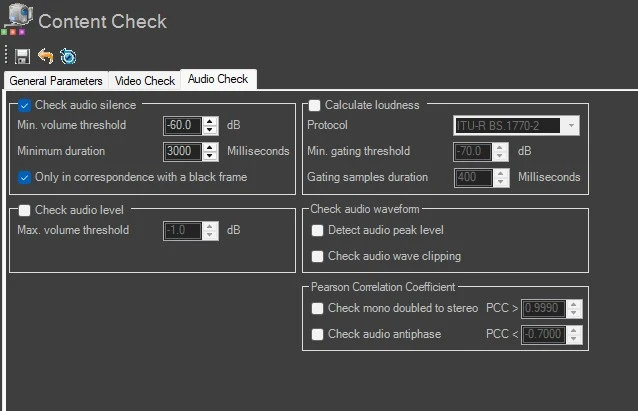
• Audio silence
- Minimum volume threshold: Specify the minimum level (dB) below which an audio volume is considered "silence". Audio signals with a volume less than the value specified will be marked as defective.
- Minimum duration: Define the minimum duration in milliseconds that an audio signal must last in order to be marked as an audio fault.
- Only in correspondence with a black frame: If enabled, a video segment would have to match a black frame reference (besides a low audio level) in order to be considered as "silent".
• Audio level
- Maximum volume threshold: Specify the minimum level in decibels above which an audio volume is considered "noisy". Audio signals with a volume greater than the one specified will be marked as defective.
• Audio loudness
- Protocol: The protocol used is not listed here, but it's hard-coded; the action will use only EBU protocol.
- Minimum gating threshold: Ignored.
- Gating samples duration: Ignored.
• Check audio waveform
- Detect audio peak level: If enabled, determines the "maximum peak" by calculating across all channels their individual audio peaks. The maximum peak level is stored in the CMS > AudioPeakLevel (0F.01.02.00.00.00.00.00) asset metadata, whereas the frame in each peak is stored in CMS > AudioPeakFrame (0F.01.03.00.00.00.00.00).
- Check audio wave clipping: If enabled, counts the number of times the audio waveform goes off the scale. The result value is stored in the CMS > AudioWaveClippingCount (0F.01.04.00.00.00.00.00) asset metadata.
• Pearson Correlation Coefficient
- Check mono doubled to stereo: If enabled, Etere MMS will check if a stereo channels pair is actually made up by one mono channel doubled to stereo. Set a coefficient between -1 (completely different channels) and 1 (perfectly equal channels) against which detected values are compared. The result of this check is written in the mapped metadata MAM > Stereo mono correlation (0F.01.1B.00.00.00.00.00).
- Check audio antiphase: If enabled, Etere MMS will check for "antiphase audio signals", to detect audio signals carrying two opposite channels which completely cancel each other.
Set a coefficient between -1 (completely anti-phased signals) and 1 (perfectly in-phase signals) against which detected values to be compared and pointed out when audio signal is lower. Segments containing "anti-phased signals" are marked in the audio/video faults EDL. The result of this check is written in the mapped metadata MAM > Stereo antiphase (0F.01.1C.00.00.00.00.00).
Notes:
- The measured "loudness" is stored in the "CMS > Loudness" asset metadata.
- The loudness calculation must be performed ONLY against media with a sample rate of 48 KHz; otherwise, the calculation won't be performed.
- The calculated loudness value of assets can be used to, for example, view the loudness statistics of events scheduled across television days, or to simply monitor the media loudness values through a dedicated loudness report.
- In order to maintain a compact loudness and a better loudness analysis (e.g. detection of abrupt loudness variations between assets), Etere strongly suggest using a sample rate of 48Khz (e.g. 192kbps, 48khz) when creating proxy files.
 content_check_x64_action_params
 content_check_params_general
 content_check_params_video
 content_check_params_audio