84.4.5.60 CUSTOM > GEN21 XML
Import Scope
The GEN21 XML function allows importing an .XML file containing the broadacst playlist of a television day. The imported file has the following characteristics:
File structure
The duration of events is provided in the <onairtime> tag, the start time is not provided
The segments of events are specified within the title tag: <title>SEG 1 >> APA INI APA ITU</title>
The <reconcilekey> tag is the same for all segments of an event
The identification code is omitted for almost all events, it's provided only for few ones through the tags: <mediaid> and <houseid>
The value of the <category> tag is always a question mark (?).
Import process
The system verifies the validity of the file
In case the type (<category>) doesn't exist, it's automatically created in Etere using the tag value as description and the leading four characters as code.
The channels of live events are taken from the "routing table" according to the <source> tab. Moreover, if the code of a live event is not provided, it will be automatically generated as follows: LIVE_<source>
Import Parameters
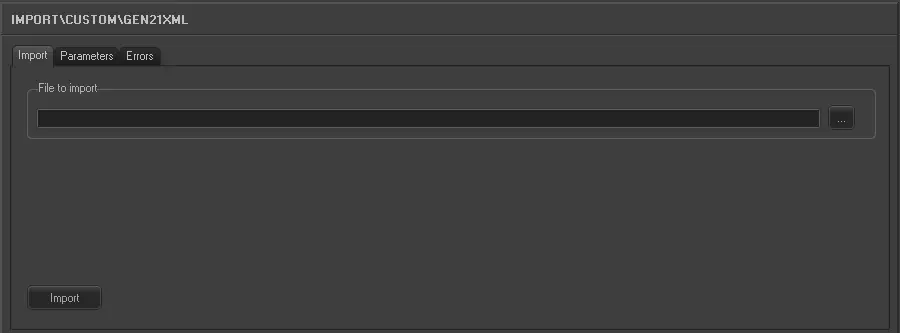
Under the Import section, the following settings can be configured:
Import custom gen21 xml
•File to import: Enter or browse the (.xml) file to be imported.
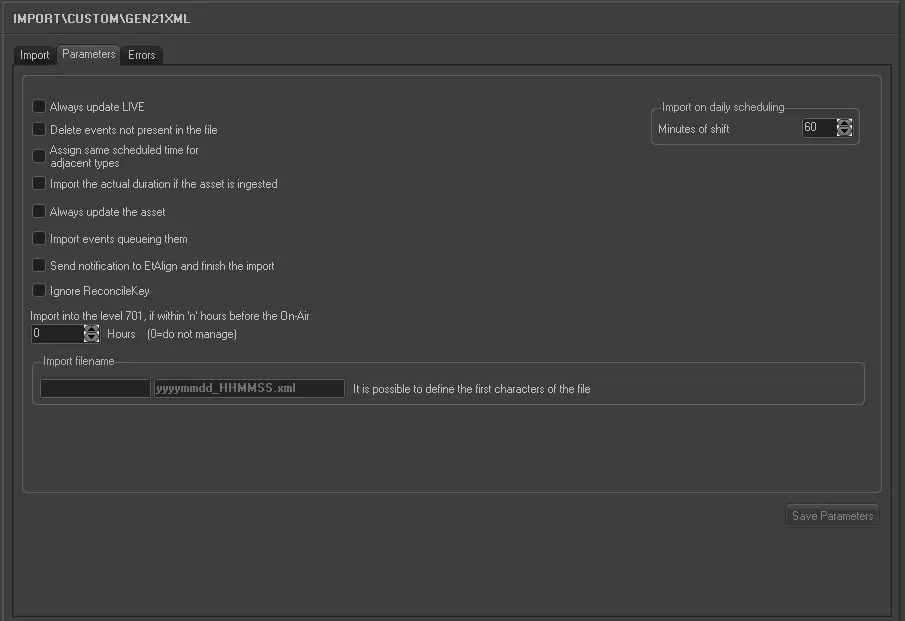
Under the Parameters section, other settings that can be configured include:
Import custom gen21 xml 1
•Always update Live: Allows you to always update the Live events, even if they already exist in the archive.
•Delete events not present in the file: Allows you to delete all events scheduled on the imported day but not present in the imported file.
•Assign same scheduled time for adjacent types: For events that have the same typology and fall adjacent to each other in the schedule (e.g. commercials in a cluster) this parameter allows you to assign the same scheduled time to these events. In the 'Data' to import under the previous tab the field HOUR must not be activated for this parameter to work.
•Import the actual duration if the asset is recorded: Allows you to import the real duration of the asset form in a situation where it has been recorded, even if the scheduled duration is present and different in the imported file.
•Always update the Asset Form: Allows you to always update the asset forms even if they already exist in the Archive. Elements that will be updated are Duration, Mark in/Mark out, Type, Description and Insertion points. This parameter also refers to LIVE events.
•Import events queuing them: If enabled, import events in consecutive order, even if a scheduling time is not specified for them.
•Send notification to EtAlign and finish the import: Send a notification to EtAlign at the end of the import so that EtAlign can publish the schedule in automation (and eventually restore required files).
•Import into the level 701, if within x hours before the on-air: If enabled, data imported 'x' hours before the on-air time will be directly imported into the level 701 (i.e. the real schedule), thus avoiding the manual confirmation of changes that could result on an undesired loss of time.
•Import filename: The filename must be formatted as follows:
XXXXXXXXXyyyymmdd_hhmmss.xml ,where:
oXXXXXXXXX: A code of unlimited characters (e.g. representing the station).
oYYYYMMDD: The date of the imported schedule (year, month and day).
oHHMMSS: The time of the imported schedule (hours, minutes and seconds).
•Import on daily scheduling: If you are importing the schedule for the current day, this parameter defines what time on the schedule the import starts from. It is calculated as Current time + Time shift. Events with a start time before the current time will not be imported.
Once the import has been configured, it can be started just by pressing the [Import] button, once the import has finished, it will be possible to display the schedule of the related day to check/approve the operation.
Sample file to import
The file to be imported using this method will have to the following structure in order to be correctly imported:
<playlist>
<history>
<created name="Pebble Beach Systems Channel=1 Date=2012-07-16"
datetime="2012-12-10T14:44:40" />
<modified name="Pebble Beach Systems Channel=1 Date=2012-07-16"
datetime="2012-12-10T14:44:40" />
</history>
<eventlist>
<event type="COMMENT">
<eventnote>=== Start of Program APA INI APA ITU ===</eventnote>
</event>
<event type="MEDIA">
<stream>0</stream>
<onairtime>00:07:00:00</onairtime>
<onairdate>2012-07-16</onairdate>
<starttype>SEQ</starttype>
<endtype>NORM</endtype>
<mediaid>
</mediaid>
<houseid>
</houseid>
<reconcilekey>26302673</reconcilekey>
<title>SEG 1 >> APA INI APA ITU</title>
<category>?</category>
<som>00:00:00:00</som>
<duration>00:07:00:00</duration>
<effect>Take</effect>
<rate>Fast</rate>
<eventnote>
</eventnote>
</event>
<event type="MEDIA">
<stream>0</stream>
<onairtime>00:07:00:00</onairtime>
<onairdate>2012-07-16</onairdate>
<starttype>SEQ</starttype>
<endtype>NORM</endtype>
<mediaid>
</mediaid>
<houseid>
</houseid>
<reconcilekey>26302673</reconcilekey>
<title>SEG 2 >> APA INI APA ITU</title>
<category>?</category>
<som>00:00:00:00</som>
<duration>00:07:00:00</duration>
<effect>Take</effect>
<rate>Fast</rate>
<eventnote>
</eventnote>
</event>
 5272_Import_custom_gen21_xml_1
 5271_Import_custom_gen21_xml