203.2 Using Etere Backup
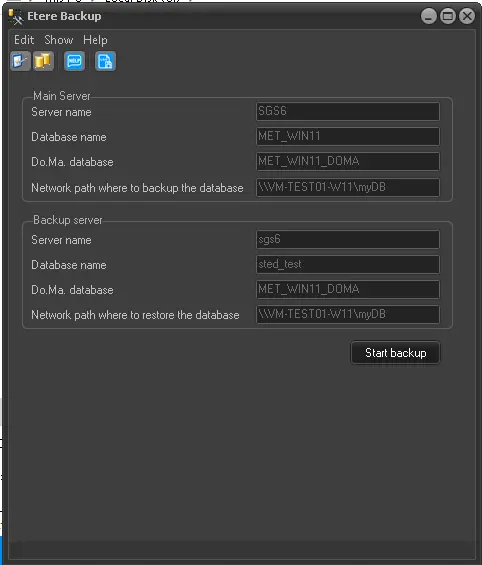
Once you have configured all relevant settings, Etere Backup is ready to be used; you just have to click on the 'Start backup' button when you want to make a backup of your database:
Etere_Backup
Each time the [Start backup] button is pressed, the following actions are sequentially performed:
1. Backup to [Local path where to backup the database] from [Main Server].
2. Copy the DB_[yyyymmdd]_[day]_[databasename].bak from [Local path where to backup the database] to [Local path where to restore the database].
3.Restore DB_[yyyymmdd]_[day]_[databasename].bak to [Backup Server].
NB: When configuring Etere Backup SQL, the "SQL Server Browser" Windows service must be enabled (Started) to listen to incoming requests for Microsoft SQL Server resources and provide information for SQL Server instances installed in the computer.
Automatic Database Backups
Database backups can be automated by scheduling the execution of Etere Backup at specific times (see Schedule and Run Etere Backup); moreover, the database's backup files can be automatically archived on tapes by Etere HSM, allowing the existence of a 'Long-term Database Archive' in your system (see Archiving Backup Files).
 etere-backup