59.5.9.1 Delivery Orders Summary
Report Description
The Delivery Orders Summary report allows the generation of a document containing the most important data of purchase orders available (or not) within a certain scheduling period. This report permits filtering data by specific orders, periods and rights conditions.
Report Filters
All the parameters that permit detailed report generation have been distributed across seven different tabs to allow for a more straightforward configuration. By default, all filters are disabled (i.e., either blank or unselected); it is enough to configure at least one parameter inside to enable them. Available filters include:
•Period (from date - to date): Indicate the time range for which orders must be valid to be included in the report. All orders with start or end dates falling within the given period will be retrieved.
•Order: Select the purchase order for generating the report. Leave this blank to include all purchase orders.
•Filter: Indicate here the condition of the rights of orders to be included in the report:
All - Retrieve orders that either have available rights or have run out of them.
Only with available rights - Retrieve those orders with available rights for being scheduled.
Only with exhausted rights - Retrieve those orders that have run out of rights so they cannot be scheduled.
Report Preview
The [Settings] permits the configuration of the page layout of the outgoing document; once filters and settings have been set, it will be possible to select between displaying a preview using the related [Preview] button or printing the document directly using the [Report] button:
Rights_situation
Columns legend
Order code - Code of the order related to the program
Description - Description of the order
Supplier - Supplier of the ordered program(s)
Producer - Producer of the program(s)
Payment - Payment type used for settling the order
From - To - Validity period of the order
Line - Order line to which the following data is related
Types - The type of programs included in the order
Runs - Number of Runs contemplated by the order
Run type - Indicates if the Run is linked to single runs, independent from single runs, or unlimited.
Unit cost - Unit cost for transmitting a Run
RRuns - Number of ReRuns contemplated by the order
RRuns type - Indicates if the ReRun is linked to single runs, independent from single runs, or unlimited.
Unit cost - Unit cost for transmitting a ReRun
Please note that some reports permit the export of the generated document in the most common formats (PDF, CSV, DOC, XLS, XML, etc) just by using the [Export] button.
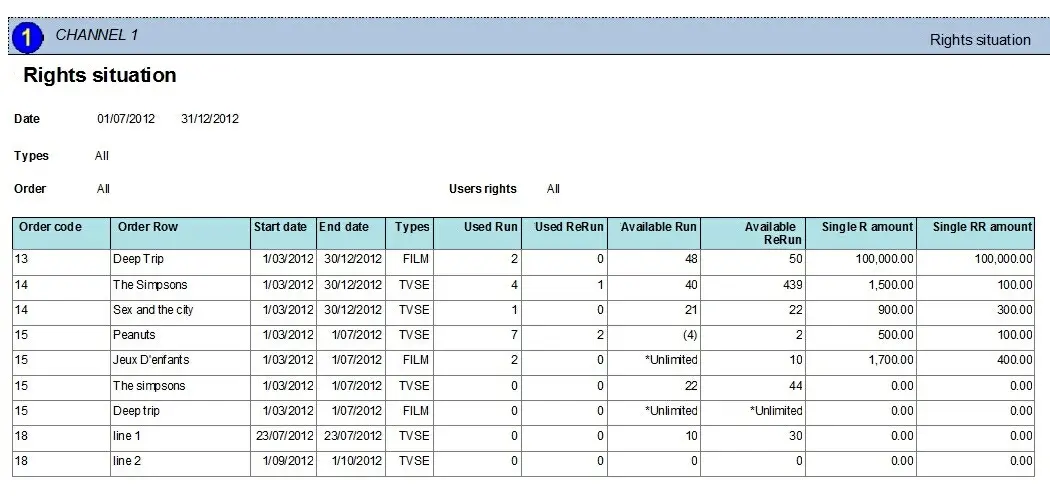 Rights_situation