59.5.8.14 Parental Guidance
Report Description
This report allows the production of a document containing information related to specific parental guidance(s) classifications so that it will be possible to monitor the correct transmission of programs during their allowed time slots. Under this section, the operator can customize the following data to produce an accurate and detailed report.
Report Filters
All the parameters that permit detailed report generation have been spread across seven different tabs to allow for a more straightforward configuration. By default, all filters are disabled (i.e., either blank or unselected); to enable them, it is enough to configure at least one parameter inside. Available filters include:
•Time range to be checked
Indicate the period for which the report is intended to be produced that is, the time interval from which data will be retrieved.
•Parental Guidance
It allows the filtering of retrieved data according to their parental guidance classification; thus, it will be possible to include only those required classifications in the report.
•Types/Genres
It permits the filtering of events by either their type or genre. If no specific type/genre is checked (by default), all types/genres will be included in the report. Otherwise, only selected types/genres will be retrieved.
•Production Country
Use it to filter only those events produced in the selected countries; if no production country is checked, all countries will be allowed.
•Broadcast type
By default, all events are retrieved independently of their broadcast status. However, it is possible to filter the events that will be retrieved according to their broadcast status:
- Premiere: The very first world/national/local on-air appearance,
- Prime: The first scheduled appearance,
- Repeated: An was vent alrbroadcastasted in past schedules.
•Transmission status
It is possible to filter events according to the status of their transmissions, that is, transmitted (certified, ok, in error, in clone mode, out of air, with pause), non-transmitted (idle), cueing, cued, playing, playing with error and warning.
•Other settings
It allows you to set the following options:
-Event duration calculation: Select the duration to be used amongst the asset's scheduled duration (i.e., the average duration) and smpte duration (i.e., the absolute frame duration specified in the smpte metadata dictionary).
- No. Of runs: Indicate if they will also display the 'no. of runs' in the last 'n' months. Leave it to '0' to deactivate it.
- Times: Specify here the following parameters regarding the broadcasting times to be used in the report:
- Time zone: Select if the report will be based on the primary time (where Etere is installed) or the local time (where programs are transmitted).
- On-air time: Select to display events, including their scheduled time (when programs are expected to go on-air) or sharp (when programs are sent on-air).
Display Active Filters
In the middle of the form, a yellow area will display a summary of all the filters enabled for the current report:
summary_of_all_the_filters_enabled
Save Active Filters
Enter a Report Title to display it at the upper-left of the report and also to use it as an identifier when using the 'Save filter' function to either the save current report data layout (i.e., currently active filters), saving filters help to re-use reports without re-entering data quickly.
Report Preview
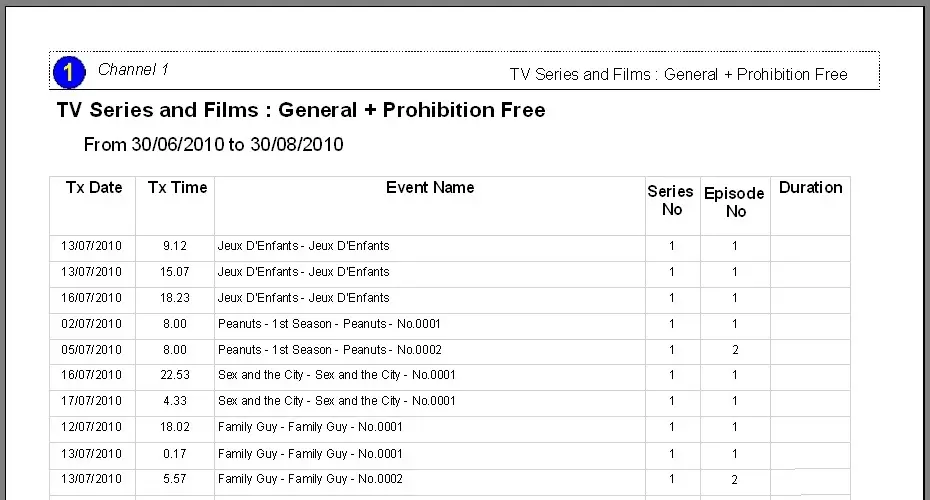
The [Settings] permits configuring the page layout of the outgoing document; once filters and settings have been set, it will be possible to select between displaying a preview using the related [Preview] button or printing the document directly using the [Report] button. Please note that some reports permit the export of the generated document in the most common formats (pdf, CSV, doc, xls, XML, etc) just by using the [Export] button.
automation_parental_guide
NB: At the bottom of the last page of the report, the total sum of all durations will be displayed.
 automation_parental_guide
 summary_of_all_the_filters_enabled