72.19.10 Archived Media Check
The "Archived Media Check" module allows to verify the consistence of assets media present on a certain device. Before start using this application, it is necessary to set the Video Server to use, you can do it under the parameters module (Configuring: Ingested Media Check).
After then, just launch the Archive Media Check module, located in the Etere Ingest main menu:
Archived Videofile Check
There are three ways to perform an Archived Media Check taking into consideration some asset properties:
•Ingested assets which have not yet been checked,
•Ingested assets which have produced some error in the last check,
•All the ingested assets.
Checking archived Assets
The checking process is started with the 'Start Check' button. The checking begins based on the archiving date, first the most recent are checked then gradually the others (older) ones. The check for each asset is made up of the following steps:
1.The archived video file is restored into the Video Server,
2.The just restored video file is put in CUE to see if it is correct,
3.If it is correct, the video file is deleted from the Video Server; if not, the operator is warned about this issue.
4.At the end of the check up results are detailed in the bottom of the window, displaying their more relevant properties such as status, archiving date, code, description, duration, file, etc. The most important among these properties is the status field, which indicates with an icon if the archiving process is currently running, if it is stopped because an error or if it was correctly finished.
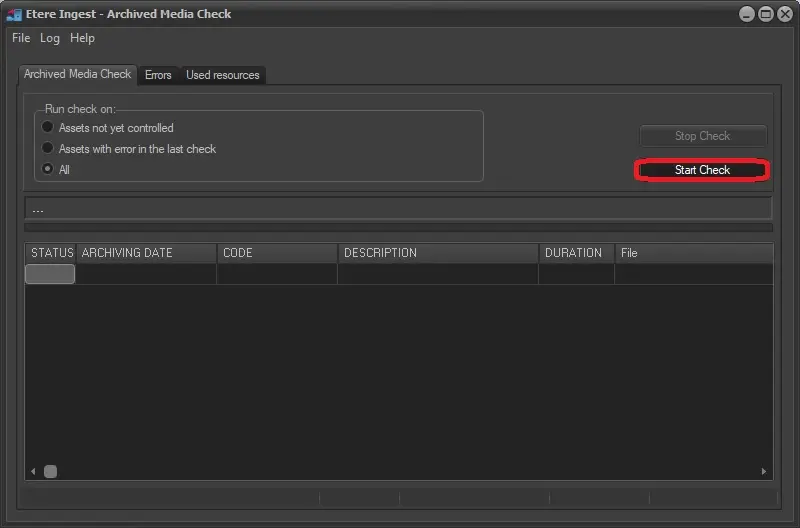 Archived_Videofile_Check