201.3.4.8 Episodes management
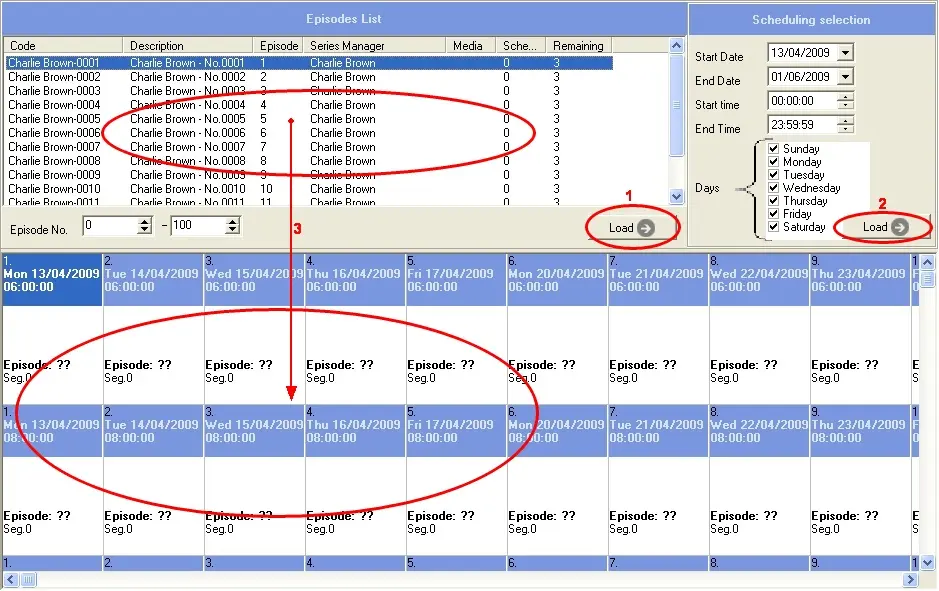
The episode management function is used to associate episodes to the booked spaces for a certain season. It is divided in three key sections which permit a consequent management of episodes within the season:
Bms_orders_1
1.Episodes List
In the episodes list, right click to call up the following functions:
•Load season: It allow to search and insert all the episodes related to the episodes of a certain season,
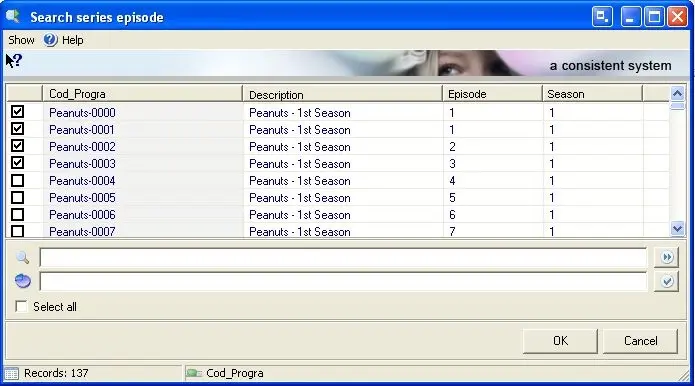
•Add episode: It will display all TV season assets which are valid for the selected period; select and insert all those episodes intended to be linked to the assigned spaces:
Airsales_seriesorders01
•Delete link to the asset: It removes all the selected episodes from the list.
•Asset Management: It opens the asset form of the selected episode.
•Sort by: Sort episodes according to a specific criteria (e.g. code, description, episode number, season manager, media, season, etc).
NB: When all episodes are removed from season, the season would be deleted from Season Manager.
2. Scheduling Selection
Specify the Scheduling selection criteria to the right of the screen, set the scheduled period of the season on which episodes will be assigned:
•Start - end date: Set the date interval on which the season has been scheduled.
•Start - End time: Narrow the retrieval by indicating the exact scheduled time interval.
•Days: Specify the exact days on which the season has been scheduled.
•Load: Use it to show all the previously assigned spaces in the Scheduled episodes section, these spaces can be filtered by date, time and weekday.
3.Scheduled Episodes
In this section available operations are:
•Drag&Drop: Drag episodes from the Episodes list and drop into the related booking space, you can either:
- Schedule them (if the space is empty), or
- Replace them (if the space is occupied by another episode). In case of replacing an exploded episode, the replacement episode will be also automatically exploded. Moreover, Episode's assets can also be replaced in Strategic Editor (using the Change asset contextual function).
NB: After "drag-and-drop" an episode into the booking space, the list of episodes remains at the last inserted episode for the next insertion to take place.
NB: Episodes scheduled across two continuous days will be marked with a red circle to warn the operator about the recurrence.
•Delete episode association (Del): It disassociates the asset assigned to the episode.
•Delete episode and booked space (Ctrl-Del): It disassociates the asset assigned to the episode and remove it from all the booked schedule spaces.
•Shit forward in the same line (Ins): It moves the selected episode to the booked server of the next day within the same daily space.
•Explode (F8): It allows to divide the episode into all its interruption point (created in the asset form).
•Update durations and secondary events (F5): It updates the scheduled episode with the related asset's information including its secondary events. This function updates the properties of the asset, with the exception of the SOM and EOM of the asset remain unchanged, thus there is no impact to the schedule.
•Asset management (F9): It opens the asset form of the selected episode.
•Calculate part number (F12): It simply calculates the segment number within the block on which the episode has been scheduled.
 Bms_orders_1
 Airsales_seriesorders01