69.1.1.2 ASRUN IMAGINE
Export Scope
The F90 - ASRUN IMAGINE export creates a . TXT file containing the actual transmitted schedule for each day in the user-defined date range and exports the files to the specified Export path.
Export Parameters
This export allows the following parameters to be set:
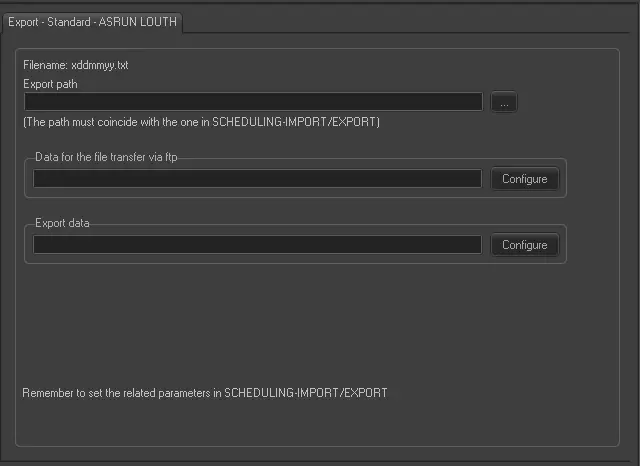
Export - Standard - ASRUN LOUTH
Filename - The filename would be based on a specific format (xDDMMYY.txt), where:
- x: A prefix character defined by the user in the Etere Scheduling > Import/Export module
- DDMMYY: The date (day, month and year) of the exported schedule
Export Path (leave it blank, not export it) - This parameter is required only if you intend to save the exported file to a computer in your network.
This path must coincide with the path set in Etere Scheduling > Import/Export.
Data for the file transfer via FTP - Click on the Configure button and define the FTP parameters described in the Configure Data File Transfer via FTP chapter.
Export data - Opens the Configure Export window to specify the days to be exported and the export frequency. See the chapter Configure Export for more information.
Scheduling related export
Remember to set the export parameters in Etere Scheduling > Import/Export > EXPORT\STANDARD\LOUTH\ASRUN.
 Export_-_Standard_-_ASRUN_LOUTH