70.3.4.1 Manual Archiving
Archive manager is the tool used to perform manual operations like the archiving or restoring of a specific asset or group of assets. After making a selection from Types, the user can specify the number of copies he wants for each asset, and the copies will then be put on different tapes:
Archive manager 1
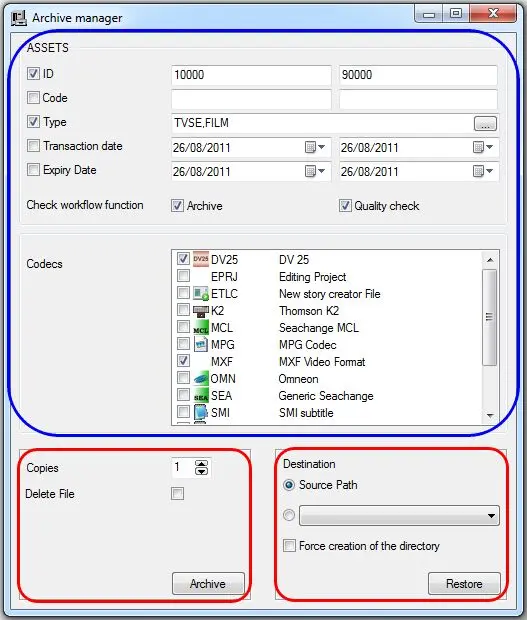
Archive Manager allows to specify various parameters in order to perform a user-defined archive operation, these parameters includes:
•Assets: It is possible to narrow the selection of assets to be archived by setting the following filters:
ID: Specify the interval for which, all assets with an ID within it will be archived.
Code:Specify the interval for which, all assets with a Code within it will be archived.
Type: Narrow the archive operation to only a certain type(s) of media or select to archive all types (i.e. no type selected).
Transaction date: Specify the date interval within which the asset's last transaction date must fall in order to be archived.
Expiry date: Indicate the interval of expiry dates to which assets must belong in order to be archived.
•Check workflow function: If enabled, Etere HSM will archive only those assets linked to an 'archive' and/or 'quality check' T-workflow. Please note that this option is used only for Etere versions lower than 19.
•Codecs: Specify the exact codec(s) of the media linked to the involved assets and which are intended to be archived.
•Copies: In order to request the archiving, it is necessary to press [Archive], specifying how many copies you want for each archived file and whether to delete the original file on disk.
•Destination: In order to request the restore just press the [Restore] button, specifying whether the files must be restored to their original position or in a metadevice selected by the user.
Each time the [Archive] or [Restore] button is pressed, a small window will be displayed listing all assets matching the parameter set above (i.e. id, code, type, codec), once the operation is confirmed -for all displayed assets- the related archive/restore operations will be requested to Etere HSM and displayed in the operator requests section.
Archiving from an Asset Form
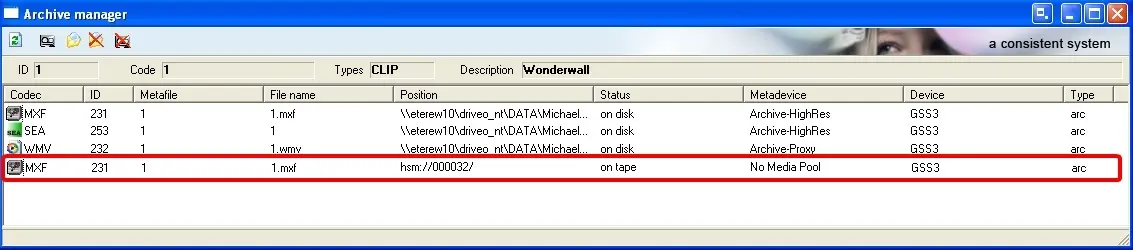
Archive Manager is also available in the Asset Form in order to perform manual operations from any ETERE PC inside the Etere Network. The user can manually do operations regarding the archived files of a particular asset. He can force the backup and the restoring or deleting of the archived file on disk:
Archive manager 2
The Archive Manager tool bar will provide the functions: 'Refresh', 'Backup', 'Restore', 'Delete archived file on disk', and 'Delete archived file on tape' respectively.
 Archive_manager_2
 Archive_manager_1