59.2.31.1 To-do Notifications Settings
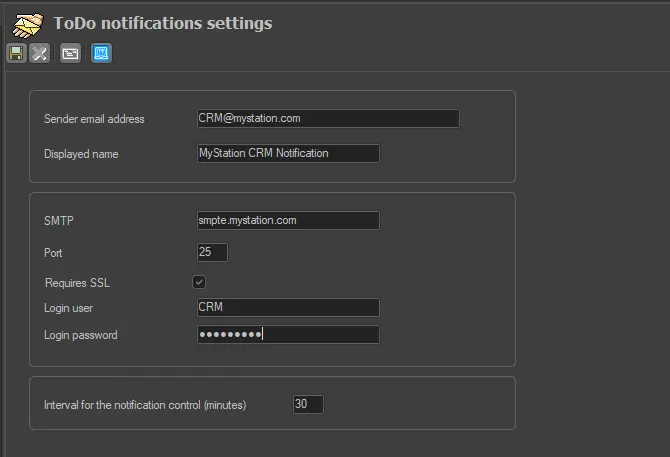
The "ToDo Notification Settings" section allows setting the parameters required for sending ToDo notifications via email. ToDo notifications allow users to create reminders automatically delivered at a specific time.
Please note that the "ToDo Notifications" feature is available only for Etere systems running on Microsoft SQL Server 2005 (or higher) database servers. For this feature to work properly, the following parameters need to be set:
ToDo_Notifications_Settings
Sender email address: Enter the email address to be displayed in the notification sender's email field.
Displayed name: Enter the name to be displayed in the notification sender's name field.
SMTP: Indicate the server (e.g. smtp.mycompany.com) to be used for sending emails.
Port: Specify the port to be used by the email server for communication (e.g. 25).
Requires SSL: If the email server uses SSL (Secure Sockets Layer) encryption, this parameter must be enabled.
Login user: If the "SSL" option is enabled, enter the username to be authenticated in the email server.
Login password: If the "SSL" option is enabled, enter the password to be authenticated in the email server.
Interval for the notification control (minutes): Indicate the frequency with which the system will search for notifications to be sent.
NB: The [test] toolbar button verifies the parameters entered by the user by sending an email to the "sender email address".
Once all the parameters have been set, press the [Save] button to create a "database email profile" based on the parameters provided. At this point, it is possible to start using "ToDo Notifications".
Using ToDo Notifications
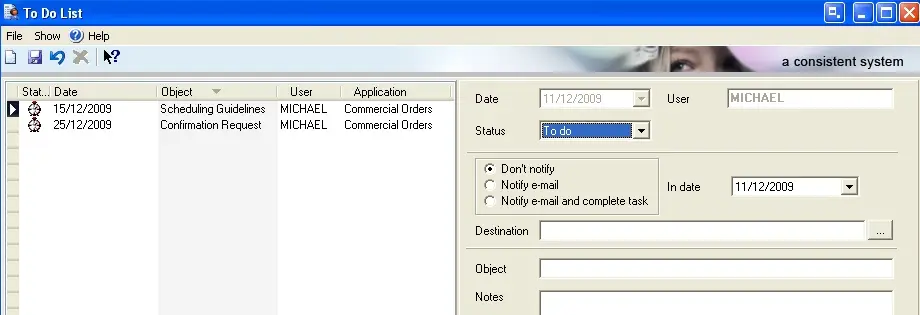
ToDo's can be created from various Etere modules (e.g. Etere BMS > Purchase Orders), and receiving e-mails can be either entered manually or retrieved from the Personal Data database:
Using_ToDo_Notifications
 ToDo_Notifications_Settings
 Using_ToDo_Notifications