59.5.4.84 Revenues by Top Programs PT/NPT
Report Description
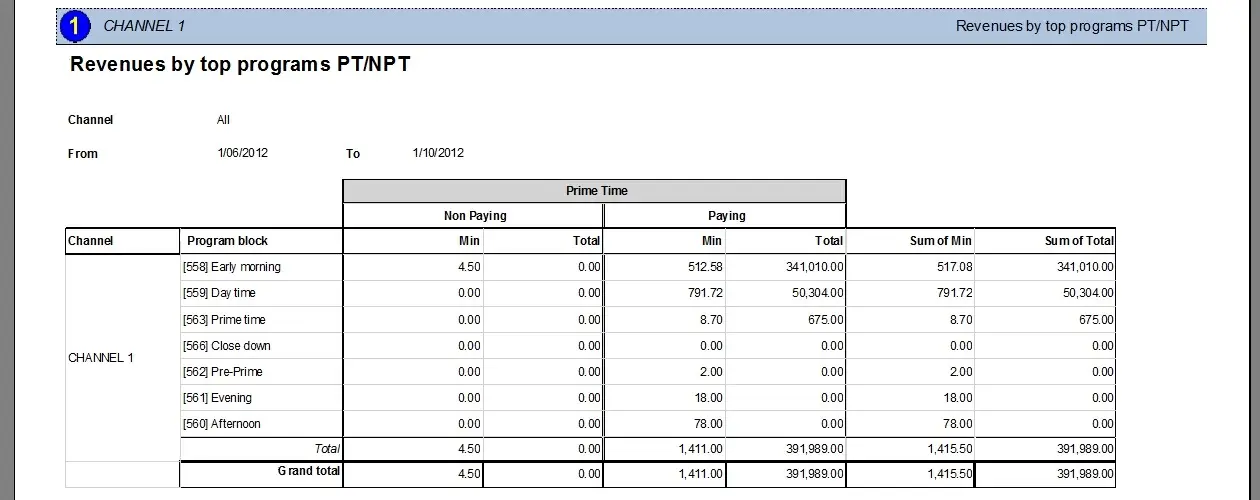
The Revenues by top programs PT/NPT report allows the generation of a document containing the revenues earned on a certain period, classifying data by channels and program blocks. Information provided by this report will be calculated separately for either prime or non-prime time slots:
Non-paying - Details the scheduling time occupied by events free of charge (i.e. transmitted for free)
Paying - Details the scheduling time (and revenues) occupied by charged events (e.g. commercials)
Min - Total length (in minutes) of the events scheduled on the segment
Total - Revenues earned from the events scheduled in the segment
The sum of min - Sum of the paying and non-paying lengths (in minutes) of the segment
The sum of the total - Sum of the paying and non-paying totals of the segment
Total - Sum of all lengths (in minutes) for "non-paying", "paying" and "sum of min"
Grand Total - Sum of all totals for "non-paying", "paying" and "sum of min"
This report is helpful to, for example, generate an analysis of the most profitable programs of the station, allowing us to identify the time slots on which commercials return more revenues.
Note
Please note that this report retrieves data from the production and historical databases (if it exists). This feature will allow more information to be included in the report but may cause more time to be generated.
Report Filters
All the parameters that permit a detailed report generation have been spread across seven different tabs to allow a more manageable configuration. By default, all filters are disabled (i.e., either blank or unselected); to enable them, it is enough to configure at least one parameter inside. Available filters include:
•Period: Specify the period from which data will be retrieved and on which commercials will be scheduled.
•Prime Time or Non-Prime Time: Specify if the report will be generated for revenues returned by either the prime or non-prime time slots. In both cases, it will be necessary to indicate the time interval to be considered (e.g. 19:00-23:00).
•Channel: Indicate the network station from which revenues will be calculated (i.e. on which commercials are scheduled). Leave this parameter blank to include revenues from all channels.
Report Preview
The [Settings] permits the configuration of the page layout of the outgoing document; once filters and settings have been set, it will be possible to select between displaying a preview using the related [Preview] button or printing the document directly using the [Report] button:
Please note that some reports permit the export of the generated document in the most common formats (pdf, CSV, doc, xls, XML, etc) just by using the [Export] button.
Revenues_by_Top_Programs_PT-NPT_preview
 Revenues_by_Top_Programs_PT-NPT_preview