59.2.23.4 Parameters
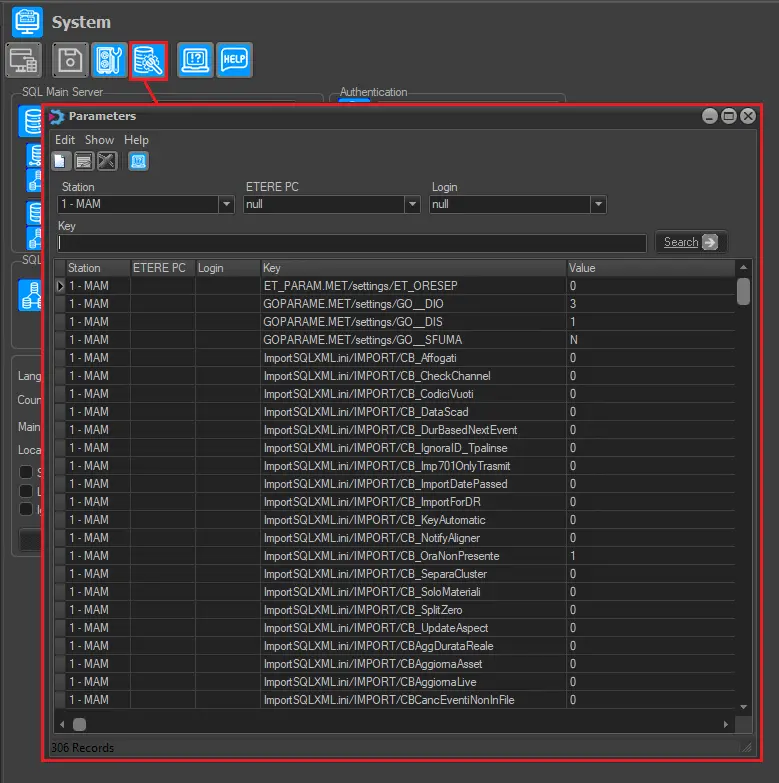
The [Parameters] button is located in the toolbar, positioned at the top portion of the 'System' section; the administrator would be allowed to view the configuration parameters that define Etere's functions.
All parameters of several configurations related to Etere are saved in a SQL table; these parameters are divided according to the station, computer and login:
Parameters_button
Global - Active directory
The "global.ini/Active directory" section allows modifying the parameters on which the integration of Active Directory is managed within Etere:
Imported: Indicates if an Active Directory structure has been imported into the system for authenticating users. - Default: 0
Global - IE force refresh
The "global.ini/IE Force Refresh" section provides an option for the system administrator to force the automatic refresh of the schedule (i.e. TPAL table) on a fixed time basis; this option can be searched using the 'ie force refresh' keyword and set the desired results as follows:
Active: It enables the forced automatic refresh. - Default: 1
Sec: It defines the forced refresh time interval. - Default: 60
Global - Database maintenance
The "global.ini/Database Maintenance/" section provides the following information:
etSqlScripts.dll: Displays the version of the etSqlScripts.dll file used during the last system maintenance and the date the maintenance was performed. - Default: x.x.x.x (e.g. 32.01.01.03)
DB Doma: Display the name of the Do.Ma. Database. - Default: --- (e.g. MyDB_Doma)
DB History: Display the name of the Historical database. Default: --- (e.g. MyDB_Historical)
DB Log: Display the name of the Log database. Default: --- (e.g. MyDB_Logs)
DB Main: Display the name of the Main database. Default: --- (e.g. MyDB)
is Doma: Indicates if the Doma database is used (1) or not used (0). - Default: 0
Executing: Display information message when Etere module is launched if System Maintenance is executing. - Default: 0
is History: Indicates if the History database is used (1) or not used (0). - Default: 0
is Log: Indicates if the Log database is used (1) or not used (0). - Default: 0
is Main: Indicates if the Main database is used (1) or not used (0). - Default: 0
Global – EE Handles
The "Global.ini/EE Handles" provide the following settings:
Count: Set the maximum handle count limit in Operation Log to record the details log data captured during operations. - Default: 3500
Global - Fatturazione
The "Traffic.ini/Fatturazione/" section provides the following invoicing parameters:
c:\windows\temp: Local/network path where temporarily generated pdf invoices are saved. - Default: ---
pdfarc: Local/network path where permanently generated pdf invoices are saved. - Default: ---
Global - Instant Editor
The "global.ini/Instant Editor/" section allows to enable/disable the Etere Instant Editor module:
Active: Indicates if the Instant Editor module should be enabled or disabled from the main
Etere Scheduling menu. - Default: 0 (disabled)
Global - Presentation Editor
The "global.ini/Presentation Editor/" section allows to enable/disable the Etere Presentation Editor module:
Active: Indicates if the Presentation Editor module should be enabled or disabled from the main Etere Scheduling menu. - Default: 1(enabled)
Global - Report Service
The "global.ini/ReportService/" section allows viewing and modifying the connection parameters of the Etere Reporting Service:
asmx: Service Assembler: Select the .asmx file as the web service source (i.e. the report database to be used). - Default: reportservice2005.asmx
domain: Indicate the domain of the MS Windows network. - Default: mydomain
user: Specify the windows username to access the web service; leave it blank to use the currently logged-on user. - Default: reportuser
password: Enter the password to access the web service. - Default: *****
url: Enter the URL address where the webserver is installed. - Default: http://myservername:8080/MyReportServer
db/loginmode: Indicate if the connection will be established using Windows Authentication (1) or SQL Server Authentication (2). - Default: 1
db/user: Specify the user name If using the SQL Server authentication. - Default: sa
DB/password: Enter the user password if using SQL Server authentication. - Default: *****
Global - Settings
The "global.ini/Settings/" section provides the following information:
Etere_Skin_XX: Dictates if Etere modules should be displayed using a colour-rich skinned graphical user interface (enabled) or the Windows system colours (disabled).
Please note that this option is specific for each Etere major version. Therefore, the "XX" variable refers to the installed version (e.g. Etere_Skin_32). - Default: 1(enabled)
DomainPrefixActive: Enable Domain users to execute tasks listed in Agenda.
NB: Set this value on the server/client connecting to the Etere system, and restart the server/client for changes. - Default: 1 (enabled)
Global - Settings - Conforming
The "global.ini/Settings/Conforming" section allows (as the Conforming section) to set the application to be used to conform files (e.g. Rhozet or Vantage) as well as the parameters eventually used for that purpose.
Processor: Application that performs the conforming. Available processors include Rhozet (default) and Vantage. - Default : Rhozet
VantageParams: Parameters used by Vantage to conform files. - Default: ---
Global - Settings - Passwords
The "global.ini/Settings/Passwords" section allows (as the Passwords section) to set the criteria used for the management of passwords (e.g. for creating passwords, accessing web services, etc.):
AExtendedValidity: Number of days after the password expiration where the user is allowed to change the password. - Default: 20
AValidity: Password is valid within the number of days defined. - Default: 365
AWarning: Number of days to notify users before the password expiry date. - Default : 5
CContainsAlpha: Indicates if passwords must contain at least one letter (a b c d...). - Default : 1 (enabled)
CContainsNumber: Indicates if passwords must contain at least one number (0 1 2 3...). - Default : 1 (enabled)
CContainsSymbol: Indicates if passwords must contain at least one special character (- _ + ...). - Default : 0 (disabled)
CDiffChars: Minimum number of different characters to be used in passwords. - Default : 3
CNumChars: Minimum length of the passwords. - Default : 6
CStoredPasswords: Number of old passwords to be kept by the system. - Default : 10
UseRules: All the above criteria will be applied to the management of passwords (creation). Otherwise, they will be freely managed (created). - Default: 1 (enabled)
Global - Settings - Workflow
The "global.ini/Settings/WF" section defines the action to be taken (e.g. rcOperationAllowed, rcForceWorkflowReset, rcAskForConfirmation, or rcOperationDenied) if a default T-workflow is already attached to the asset requested by a certain operation (e.g. upload):
Asset/videofileImport/wfRunningCheck: Set the action to be taken for "video file import" operations. - Default : rcOperationAllowed
Global - Websettings
The "Global.ini/Websettings" section defines the global configuration parameters of EtereWeb functions.
HeaderFixedGrid: Freeze the header column in Agenda View when scrolling up and down. - Default : 0
Parameters - LiveAssist
The "param.ini/Live Assist/" section allows to configure the following parameters:
counter type: This parameter, related to the Etere MTX player engine (i.e. fengine.CountDown), allows using the device counter before calculating the scheduled start time. - Default : 0
delayed cue: This parameter, related to the Etere MTX player engine (i.e. fengine.DelayedCue), allows delay of the cue of a clip in 'x' seconds. Increase this parameter if experiencing timeout problems (e.g. an error related to "too many handles"). - Default : 0
Parameters - Settings
The "param.ini/settings/" section allows to configure the following parameters:
crawl_logoeffect_default: To set a default crawl script to be automatically loaded each time the 'properties > crawl device' form is open for an asset, search and set the following parameter, where by default is '0' (off) to either '1' (fixed), '2' (variable), '3' (crawl) or '4' (i.e.: script) - Default : 0
Map logo 'x' to Logo 'y': If enabled (i.e. set to 1), each time a schedule containing events with a logo 'x' is published, a new logo 'y' will be automatically created for the same event. The new logo will copy the logo 'x' and feature the same information (e.g. duration, position, etc.).
NB: Once set, open instances of Etere Scheduling (Presentation Editor and Executive Editor) must be restarted for changes to take effect. - Default : 0
RemoveFixedFromTPal: In Executive Editor:
•When a variable event scheduled before a fixed event went overlap, the counter overflowed in Main Automation.
•When a fixed event was scheduled, Automation added frames to the previous event, and the fixed event start time was delayed.
If the value of this parameter is set to "1", the duration of the event scheduled before the fixed event would be recalculated during publishing, and the variable event and the standing event would not be republished. - Default : 1
ShowAutomationLogosWithETXG: if enabled, enables the Crawl/Logo tab in Executive Editor > double click on Parameters of the event of interest > parameters, and in Media Library > secondary events tab
- Default : 0
Parameters - WebSettings
The "param.ini/Websettings/" section holds all the configuration parameters used for EtereWeb to function. These parameters are:
codecLink: The ID of the codec which assets will be linked from the "EtereWeb > Rundown" section.
NB: This value corresponds to the id codec field of the codecs table. - Default : 0
codePage: Specify the character set to be used for encoding characters into a binary form that the computer can interpret. Define the codepage code related to the language used in the system; some common values are "1252" for English, "1251" for Russian, "874" for Thai, etc.
Moreover, in case the selected code page is Unicode (e.g. 1251-Russian, 874-Thai, etc.), it is necessary to set the "useLnFunction" parameter to "1" to display asset titles and descriptions as Unicode characters. - Default : 1252
dayLog: If the debug is enabled, set the number of days that logs will be kept in the system before being deleted. - Default : 3
debug: Enable (1) or disable (0) the debug mode for logging errors. - Default : 0
dropMenuVoice: If enabled (1), the user's custom menu will be reset to default items during the next system maintenance. - Default : 0
email: Set the e-mail address (e.g. non-reply@my-station.tv) where confirmation e-mails will be sent (e.g. after a password change operation). - Default : info@etere.eu
id_FTP_bkp: Set the code of the FTP path to be used for uploading media directly on the backup video server (set in IdMetaDeviceImparja_BKP).
NB: This value corresponds to the id_basepath field of the fs_basepath table. - Default : --
id_FTP_main: Set the code of the FTP path to be used for uploading media directly on the main video server (set in IdMetaDeviceImparja_MAIN).
NB: This value corresponds to the id_basepath field of the fs_basepath table. - Default : --
idMetaDeviceImparja_BKP: Set the code of the cloud device to be used for direct uploads as the backup video server.
NB: This value corresponds to the id_cloud-device field of the fs_cloud-device table. - Default : --
idMetaDeviceImparja_MAIN: Set the code of the cloud device to be used for direct uploads as the main video server.
NB: This value corresponds to the id_cloud-device field of the fs_cloud-device table. - Default : --
idWebAssetPathLink: The ID of the media folder to which assets will be linked from the "EtereWeb > Rundown" section.
NB: This value corresponds to the id_webassetpaths field of the webassetpaths table. - Default : 0
imparja: If enabled (i.e. 1), the options mentioned above will be active. - Default : 0
lnDefault: Indicates the system default language (e.g. 2=english). - Default : 2
MaxMenuHPvoice: Specifies the maximum number of items to be displayed in the home page menu of EtereWeb (from version 22 onwards). - Default: 8
path_EDL: Set this path if the asset's EDL will be retrieved from an ASX file stored in a certain way. - Default: ASX
path_SamiFile: Indicate the path subtitles will be retrieved for previewing via the web. - Default : http://localhost/sami
reloadWebSchedule: Set a frequency (in seconds) to automatically refresh schedule views on the web. Setting this parameter to zero will disable the auto-reload. - Default : 12000
renameFileUpload: Set the way uploaded files would be stored in the database; if the value is set to '1' (default), uploaded files would be renamed according to Etere's rules. Else, uploaded files would be stored with their original names intact. - Default : 1
TapelessCodecLink: The codec ID where assets will be linked from the "Tapeless Reception > Assets to link" web section.
NB: This value corresponds to the id_codec field of the codecs table. - Default : 0
TapelessidWebassetpathLink: The ID of the media folder to which assets will be linked from the "Tapeless Reception > Assets to link" web section.
NB: This value corresponds to the id_webassetpaths field of the webassetpaths table. - Default : 0
timeZonePalinse: If disabled (i.e. 1), the timezone set in the Etere Configurations > Settings > System > Local time section will be displayed in the schedules. - Default : 0
uploadForm: Set this parameter to '0' to use the 'Active X browsing' method for uploading, or set it to '1' to upload files using 'Java drag&drop box'. - Default : 1
useExtensionUpload: Set this parameter to '1' to upload files, including the extension in the filename (e.g. proj_49787.mxf). Else, set to '0' to omit the file extension (e.g. proj_49787). - Default : 0
useLnFunction: f the "Use language function" is enabled (i.e. 1), EtereWeb will suit all asset titles and descriptions to be displayed as Unicode. - Default : 0
webIcon: If set to '0', searched assets will be displayed along with their media codec icon; Else, set to '1' to display the related meta device icon. - Default : 0
 Parameters_button