72.7.4.5 Global subtitles parameters
The Global subtitles parameters are a set of properties used by Etere for managing subtitles through the following functions:
▪Produce new subtitles (using the subtitles tool)
▪Import subtitles (from new files, formerly linked files)
▪Preview subtitles (from Media Library, EtereWeb, etc)
▪Export subtitles (for delivery, transcoding, etc)
The global parameter subtitle can be edited for individual asset's (e.g. for the english subtitles of the asset #1425) under the Subtitles Tool. The global subtitles parameters are set in the "Configuration > Configuration editor > Subtitles > Parameters" section, through the following parameters:
Parameters
Property - Border color
Description : Color with which text border will be displayed
Default value : black
Property - Border width
Description : Width with which text borders will be displayed. [0...10]
Default value : 5
Property - Box Color
Description : [...]
Default value : black
Property - Closed Caption Style
Description : [...]
Default value : RollUp
Property - Font
Name - Font type with which subtitling text will be displayed. Microsoft Sans Serif
Size - Size with which subtitling text will be displayed. 8,25
Unit - Unit to which size is related. [World, point, pixel, inch, document, millimeter] point
Bold - Enable this option to display subtitles with bold text. false
GdiCharSet - Set the character used for displaying the selected font.
(0=ansi, 1=default, 163=vietnamese, 204=russian, 222=thai, etc) 1
GdiVerticalFont - Enable this option to display subtitles vertically (i.e. top-to-bottom). false
Italic - Enable this option to display subtitles with italic text. false
Strikeout - Enable this option to display subtitles with strikeout text. false
Underline - Enable this option to display subtitles with underlined text. false
Property - Font Bold 2nd line
Description : Enable this option to display subtitles with bold text.
Default value :N/A
Property - Font Bold 3rd line
Description : Enable this option to display subtitles with bold text.
Default value : N/A
Property - Font color 2nd line
Description : Color with which text body will be displayed
Default value : Transparent
Property - Font color 3rd line
Description : Color with which text body will be displayed
Default value : Transparent
Property - Font Italic 2nd line
Description : Enable this option to display subtitles with italic text.
Default value : N/A
Property - Font Italic 3rd line
Description : Enable this option to display subtitles with italic text.
Default value : N/A
Property - Font Underline 2nd line
Description : Enable this option to display subtitles with underlined text.
Default value : N/A
Property - Font Underline 3rd line
Description : Enable this option to display subtitles with underlined text.
Default value : N/A
Property - Hard shadow
Description : Shadow with a hard border (true) or normal shadow (false)
Default value : false
Property - Max font size
Description : Maximum size with which text body will be displayed
Default value : 100
Property - Row characters
Description : Maximum number of characters for each subtitle entry.
Default value : 120
Property - Rows number
Description : Maximum number of rows of each subtitle entry. [1...5]
Default value : 2
Property - Screen lines number
Description : Number of lines in which the screen is divided. [10...30]
Default value : 23
Property - Shadow width
Description : Shadow around the text used to enhance its readability. [0...10]
Default value : 2
Property - Speed Reading
Description : [...]
Default value : 200
Property - Text alignment
Description : Horizontal position for aligning subtitles. Center (0), Left (1) or Right (2).
Default value : center
Property - Text out of bounds
Description : Background color to be used to indicate that the maximum number of characters/rows has been exceeded.
Default value : (pale red) 255,128,128
Property - Vertical position
Description : Row number (starting from bottom) where to display subtitles. [0...10]
Default value : 3
Property - Vertical position Key 1
Description : [...]
Default value : 3
Property - Vertical position Key 2
Description : [...]
Default value : 10
Property - Vertical position Key 3
Description : [...]
Default value : 21
Once the global parameters are set, changes can be managed through the following buttons:
Function - Save
Description : Stores changes in the database, making them available as the default settings for Etere modules.
NB: Global subtitles parameters are stored in the database within an XML file.
Function - Undo
Description : Reverses the last performed changed.
Function - Restore
Description : Sets all parameters present in this section to their default values.
Note:
For information on how parameters are exported according to the ProMedia Carbon specifications refer to Export Mapping for ProMedia.
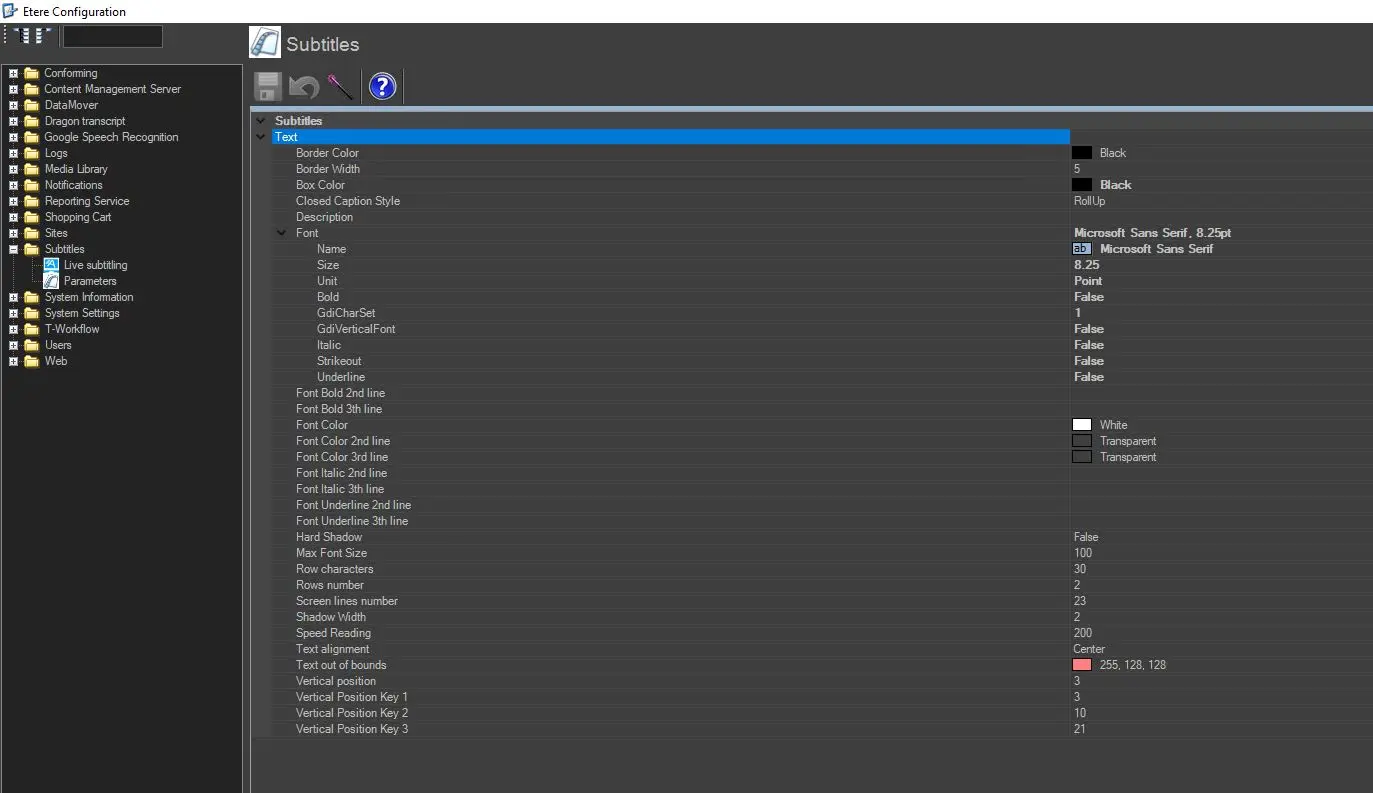 Parameters