59.5.8.23 SIAE Log
Report Description
The SIAE Log report allows the creation of a file containing a custom report of all the SIAE information (ROM and ROF) of events scheduled within a certain period, making it possible to send the created log to the SIAE as a regular or supplementary report.
Report Filters
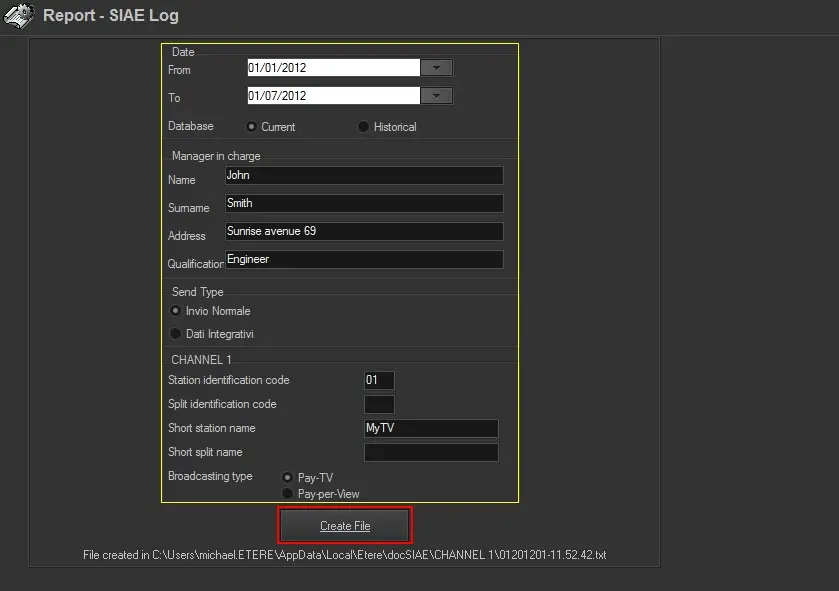
All parameters that permit detailed report generation have been spread across seven different tabs to allow for a more straightforward configuration. By default, all filters are disabled (i.e., either blank or unselected); it is enough to configure at least one parameter inside to enable them.
Available filters include:
automation_report_siae
DATE - Indicate the time criteria to be used for filtering events; it is possible to define any of the following methods:
•From - To: Specify the period on which assets to be retrieved are scheduled.
•Database: Indicate if the data to be included in the report will be retrieved from the current production or historical databases.
Manager in charge - Set information related to the person who is creating the report:
•Name, surname, Address, and Qualification: Enter the personal data of the person in charge of the SIAE management.
Send type - Specify if the report is being created for either a regular or supplementary sending:
•Normal sending: It indicates that the file is a single report containing all information required by the SIAE.
•Supplementary sending: The generated file will supplement a previously sent file.
Channel (Station) - Select the station(s) from which scheduled data will be retrieved:
•Station identification code: A unique code provided by the SIAE to identify the station liable for taxation.
•Split identification code: Unique code provided by the SIAE to identify the network.
•Short station name: Brief station's name.
•Short split name: Brief network's name.
•Type of broadcasting: Select if the broadcast service provided by the station is either Pay-TV or Pay-Per-View:
PAY-TV - All events transmitted which are available for users who paid a subscription for the TV service reception without any other extra cost
PAY-PER-VIEW - All transmitted events are available ONLY for those users who acquired the fruition of the event just for once with separate orders.
Report Creation
To generate the file containing the SIAE Log, just press the [Create file] button; the file will be created in the Etere Data Folder with the following name format:
[station][year][month]-[hour.minutes.seconds].txt (e.g. 01201201-11.52.42.txt)
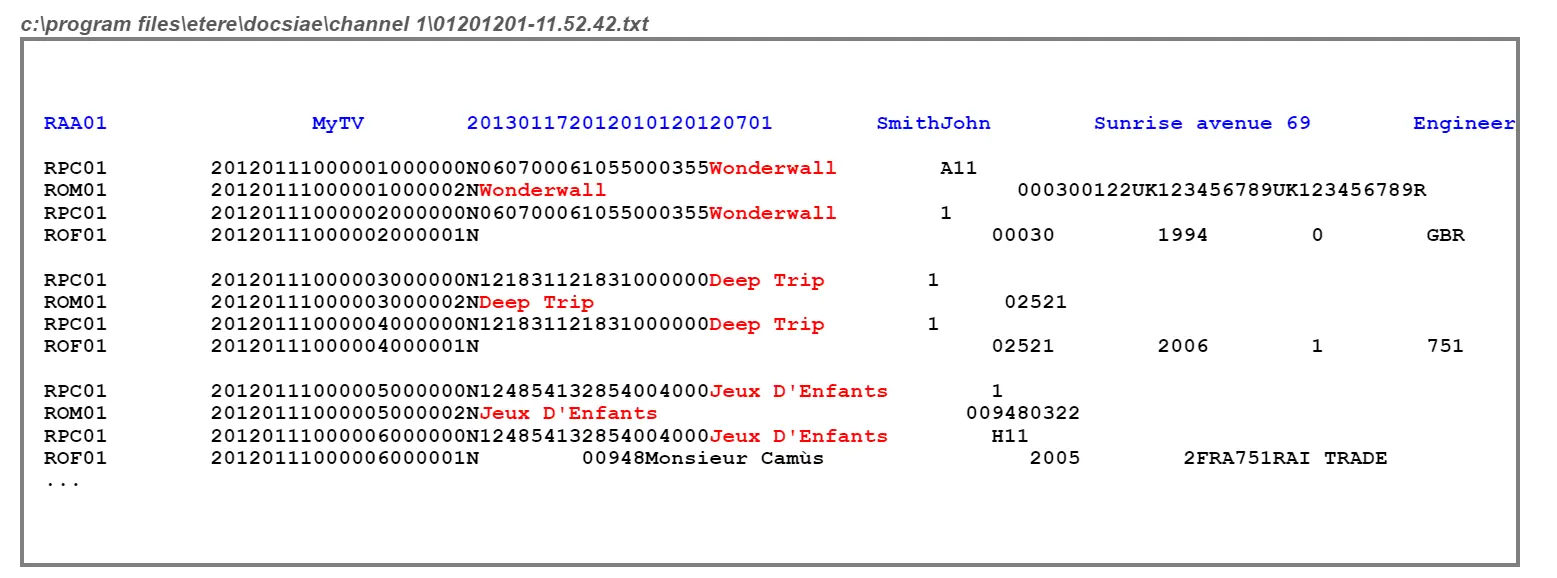
The following table illustrates an example of the content of a SIAE log file
example_of_the_content_of_a_SIAE_log_file
NB: Since this report is mainly used for export purposes, the [Preview] and [Print] functions will not be available.
 automation_report_siae
 example_of_the_content_of_a_SIAE_log_file