85.2.4.3 Advanced
It is possible to choose any kind of field belonging to the assets repository table (filmati), the scheduled assets table (tpalinse) and also the SMPTE metadata table. With the advanced insertion you are able to better filter assets that can be assigned graphic titles. The following parameters can be set:
•Select database fields
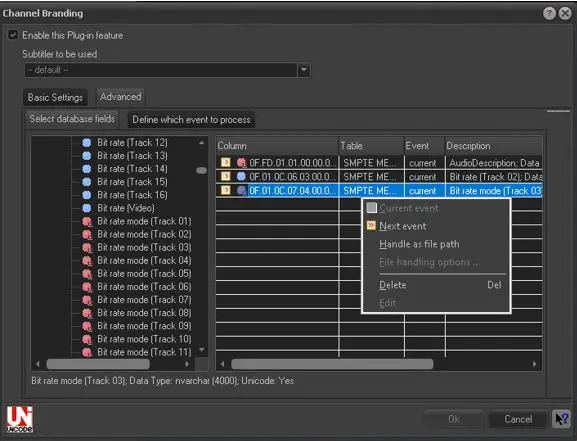
Select the fields to be sent to the titler by dragging and dropping them from left to right. Please refer to the Database Fields Wizard chapter for detailed information on adding fields:
Stman_advanced subtitling
Moreover, as shown in the figure above, making right-click on a certain added field will bring access to the following functions:
•Current event: Set it to retrieve the selected database field from the "current scheduled event".
•Next event: Set it to retrieve the selected database field from the "next scheduled event".
•Handle as file path: If enabled, the selected database field implies a file-transfer to a directory based on specific "file handling options" (destination path and rename criteria). For detailed information on this feature please refer to the Sending images to watchfolders chapter.
•Delete: It simply removes the selected database field from the list.
•Edit: Use it to customize the way the selected database field will be displayed.
•Define which event to process
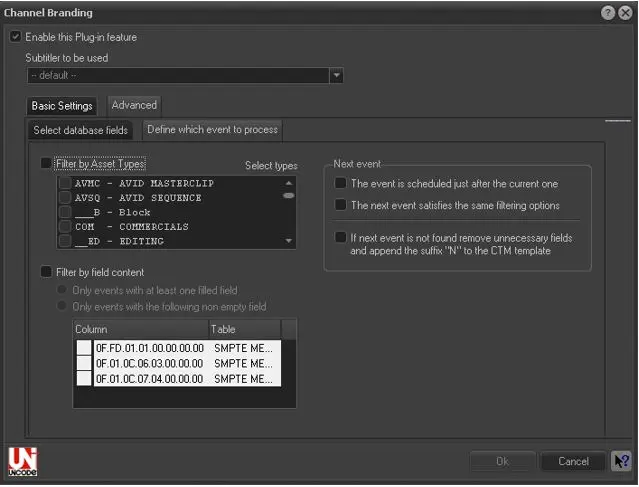
Enable up to two filters (i.e.: by asset type and field content) as well as three parameters related to Next Event:
Stman new feature
•Filter by Asset types: Specify the type that scheduled assets must have in order to be taken into account by STMan,
•Filter by field content: Dictate the asset fields which fullness must be compulsory,
•The next event is scheduled just after the current one: The next event is the one scheduled immediately after the current one,
•The next event satisfies the same filtering options: The next event is the first following event that satisfy the filters,
•If next event is not found, remove unnecessary fields and append the suffix 'N' to the CTM template: If there isn't a following event that satisfy set criteria, unnecessary fields will be removed and a 'N' suffix will be appended to the CTM template.
 5154_Stman_advanced_subtitling
 5155_Stman_new_feature