84.4.5.84 CUSTOM > VTV > SCHEDULE XML
Import Scope
The "VTV Schedule XML" import allows reading an XML file to retrieve information related to the on-air playlist of a certain television day and importing this information into the Etere database system.
Required configuration
The following elements must exist in Etere's flexi-metadata structure (in "Configuration > Settings > MAM > Flexi-metadata"):
Element name - TENCM
Element type : string
Element name - MADVSX
Element type : string
Element name - TENDVSX
Element type : string
Element name - NGUOISX
Element type : string
Element name - DTNGUOISX
Element type : string
Element name - GHICHU
Element type : string
Element name - PRODUCTION_NOTE
Element type : string
Element name - EDITOR_NAME
Element type : string
Element name - TRANGTHAI
Element type : integer
Element name - NGUOITH
Element type : string
Element name - NGAYTH
Element type : datetime
Element name - HTPS
Element type : integer
Element name - LUU
Element type : integer
Element name - KIEU
Element type : integer
Element name - DOHOA
Element type : string
Element name - KENHPS
Element type : string
Element name - DUYET
Element type : boolean
Element name - LUUTULIEU
Element type : boolean
Element name - NGUONTULIEU
Element type : boolean
Element name - QC
Element type : boolean
Element name - SOLANQC
Element type : integer
¹ : Boolean data must be specified as either "1" or "true" (not case sensitive)
² : Date time data must contain a data in the format "dd/mm/yyyy".
Import parameters
Once all parameters have been correctly set, just press the <Import> button to launch the import operation.
Import
Import_custom_vtv_schedule_xml
•File to import: Specify the directory from where XML files will be retrieved for the import. Files are named as follows:
[channel]_[yyyymmdd]_[version].xml
e.g.
1_20130626_1.xml
•Last imported playlist: Here is displayed the filename of the last exported playlist.
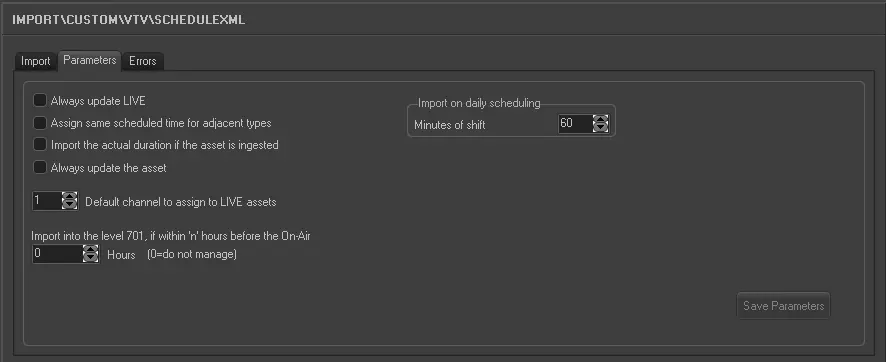
Parameters
Import_custom_vtv_schedule_xml_1
•Always update Live: Allows you to always update the Live events, even if they already exist in the archive.
•Assign same scheduled time for adjacent types: For events that have the same typology and fall adjacent to each other in the schedule (e.g. commercials in a cluster) this parameter allows you to assign the same scheduled time to these events. In the 'Data' to import under the previous tab the field HOUR must not be activated for this parameter to work.
•Import the actual duration if the asset is recorded: Allows you to import the real duration of the asset form in a situation where it has been recorded, even if the scheduled duration is present and different in the imported file.
•Default channel to assign to LIVE: Specify the channel to associate to LIVE events.
•Import into the level 701*, if within x hours before the on-air: If enabled, data imported 'x' hours before the on-air time will be directly imported into the level 701 (i.e.: the real schedule), thus avoiding the manual confirmation of changes that could result on an undesired loss of time.
* If there is conflict between the two levels (701 and 2001-2010), the latter (2001-2010) would take precedence.
•Import on daily scheduling: If you are importing the schedule for the current day, this parameter defines what time on the schedule the import starts from. It is calculated as Current time + Time shift. Events with a start time before the current time will not be imported
Sample file to import
The file to be imported using this method will have to the following structure in order to be correctly imported:
<data datetime="6/25/2014 7:46:40 PM">
<TRAFFICXML description="Station=VTV2 (channel=VTV2) ">
<row>
<EXTERSTRID>TRA_1_64560</EXTERSTRID>
<DURATION>8600</DURATION>
<COD_PROGRA>V2_112_00h00</COD_PROGRA>
<Season_ID> </Season_ID>
<Season_NAME> </Season_NAME>
<EPISODE> </EPISODE>
<SEASON> </SEASON>
<DESCRIZIO>BC GT bu?i PS (t? 00h00 d?n 24h00)</DESCRIZIO>
<TITLE>BC GT bu?i PS (t? 00h00 d?n 24h00)</TITLE>
<ASPECT>H</ASPECT>
<TIMECODE_I>0</TIMECODE_I>
<TIMECODE_O>8599</TIMECODE_O>
<DATA>11/06/2014</DATA>
<ORA>0</ORA>
<NEWTYPE>CDQB</NEWTYPE>
<TENCM>Qu?ng bá</TENCM>
<MADVSX> </MADVSX>
<TENDVSX> </TENDVSX>
<NGUOISX> </NGUOISX>
<DTNGUOISX> </DTNGUOISX>
<GHICHU> </GHICHU>
<PRODUCTION_NOTE> </PRODUCTION_NOTE>
<Editor_Name> </Editor_Name>
<TRANGTHAI>1</TRANGTHAI>
<NGUOITH> </NGUOITH>
<NGAYTH> </NGAYTH>
<HTPS>0</HTPS>
<LUU> </LUU>
<KIEU>1</KIEU>
<DOHOA> </DOHOA>
<KENHPS>VTV2</KENHPS>
<DUYET>1</DUYET>
<LUUTULIEU>True</LUUTULIEU>
<NGUONTULIEU>True</NGUONTULIEU>
<QC>True</QC>
<SOLANQC>0</SOLANQC>
</row>
<row>
<EXTERSTRID>TRA_0_988d2cf4-6fcd-4a25-a6b2-59e652ce89de</EXTERSTRID>
<DURATION>85700</DURATION>
<COD_PROGRA>ttgtb3456</COD_PROGRA>
<SEASON_ID> </SEASON_ID>
<SEASON_NAME> </SEASON_NAME>
<EPISODE> </EPISODE>
<SEASON> </SEASON>
<DESCRIZIO>Tìm v? câu hát cu</DESCRIZIO>
<TITLE>Tìm v? câu hát cu</TITLE>
<ASPECT>H</ASPECT>
<TIMECODE_I>0</TIMECODE_I>
<TIMECODE_O>85699</TIMECODE_O>
<DATA>11/06/2014</DATA>
<ORA>0</ORA>
<NEWTYPE> </NEWTYPE>
<TENCM>Cho muôn d?i sau</TENCM>
<MADVSX>61</MADVSX>
<TENDVSX> </TENDVSX>
<NGUOISX>Nguy?n Minh Hoa</NGUOISX>
<DTNGUOISX> </DTNGUOISX>
<GHICHU> </GHICHU>
<PRODUCTION_NOTE> </PRODUCTION_NOTE>
<Editor_Name> </Editor_Name>
<TRANGTHAI>1</TRANGTHAI>
<NGUOITH> </NGUOITH>
<NGAYTH> </NGAYTH>
<HTPS> </HTPS>
<LUU> </LUU>
<KIEU>0</KIEU>
<DOHOA> </DOHOA>
<KENHPS>VTV2</KENHPS>
<DUYET> </DUYET>
<LUUTULIEU>true</LUUTULIEU>
<NGUONTULIEU>0</NGUONTULIEU>
<QC>True</QC>
<SOLANQC>0</SOLANQC>
</row>
<!-- ... -->
</TRAFFICXML>
</data>
 5300_Import_custom_vtv_schedule_xml
 5299_Import_custom_vtv_schedule_xml_1