69.1.2.1 AGB ITALY
Export Scope
The F90 - AGB ITALY export allows creating a text file (.tel) for various scheduling days according to the following criteria:
The day runs from 02:00 to 01:59 of the day after.
- Each line represents an event, which data is separated by a comma.
- The file contains a sort of 'Events Log' of the station.
- Events with a duration less than 1 second are not exported.
- Split events are exported in one line with a total duration.
- Events belonging to a commercial break can be grouped as a single event.
Export Parameters
This export function needs the following parameters to be configured:
Export - Custom - AGB ITALY
Export Path - Indicate the path where the exported file would be placed.
This path must coincide with the one set in Etere Scheduling > Import/Export.
Data for the file transfer via FTP - Click on the Configure button and define the FTP parameters as described in Configure Data File Transfer via FTP chapter.
Note: If “Parallel Export” parameter is enabled in Etere Scheduling export, the second file generated in parallel would also be transferred via FTP to destination server.
Export data - Opens the Configure Export window to specify the days and the frequency to be exported.
Scheduling related export
Remember to set the same parameters in the Etere Scheduling > Import/Export module > EXPORT\CUSTOM\AGB ITALY, and APPLY the changes once done.
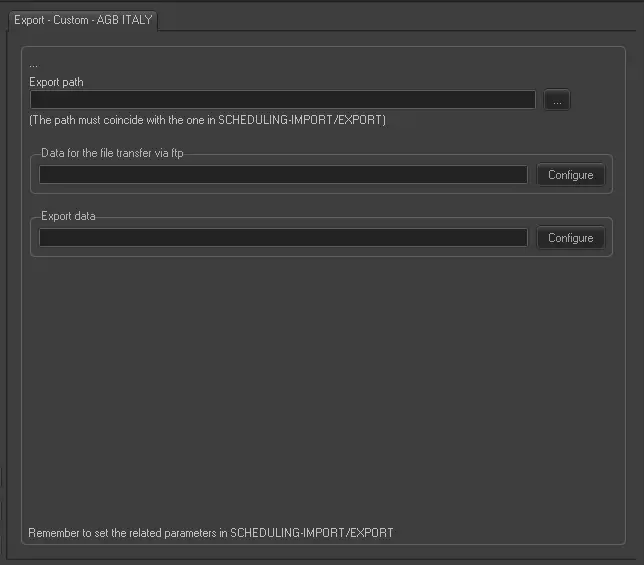 Export_-_Custom _-__AGB_ITALY