65.6.3 Encoding panel
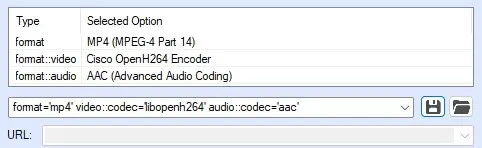
In this panel must be specified the properties of the transcoded file, in other words, it must be defined how the source file (or files) will be transcoded.
encoding_panel
format - Select in which format the file will be transcoded.
format::video - Select which encoder, among the ones supported, will be used to write the file.
format::audio - Choose the audio codec.
Double-clicking on the option under the Type column it's possible to define additional attributes for each one of the 3 properties.
Note: Attributes displayed vary according to the format selected.
The properties just configured are written in the encoding string, that is displayed automatically in the text box right below the table. It's also possible to insert a custom string, pasting it directly in the box.
Using the Save and Load buttons beside the text box, it's possible to save the configuration of the source and destination formats in xml file format, or load an already saved configuration.
Note: Any media added as a playlist item or break element will not be saved.
 encoding_panel