72.7.2.5 Speech recognition
The speech-to-text capability uses the Windows Speech Recognition tool to allow users to dictate subtitles and have them automatically in text format ready to be saved or edited.
Windows Speech Recognition is a tool based on the Microsoft's Speech API (Application Programming Interface), the latest Microsoft technology for speech recognition and speech synthesis.
First time use
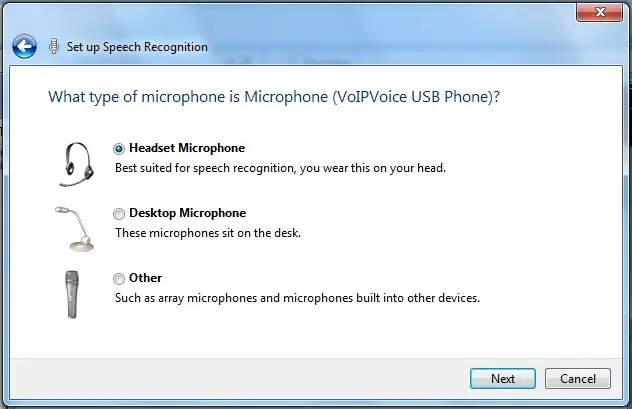
In case of using the Window's Speech to text, a welcome screen will be displayed, allowing you to complete the Microphone Wizard and the Windows Speech Recognition tutorial before using the Windows Speech Recognition (WSR), this will ensure that your microphone is properly set-up and help the speech engine become adapted to your voice:
Set up Speech Recognition
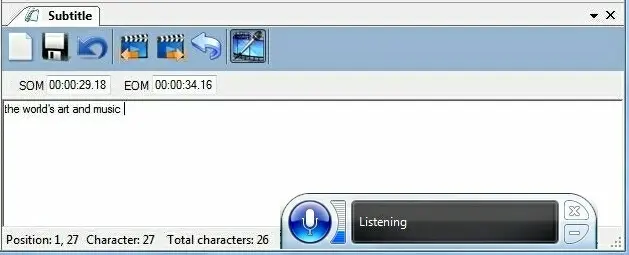
Once the wizard configuration is completed it will be possible to start dictating words to the text-to-speech engine, this, just by pressing the [Listen] button and the text will be automatically inserted in the Etere's subtitle box:
Listen
Supported languages
Windows Speech Recognition is currently available in English (U.S.), English (U.K.), German (Germany), French (France), Spanish (Spain), Japanese, Chinese (Traditional), and Chinese (Simplified).
System requirements
In order to use the Window's Speech Recognition module make sure the following requirements are fulfilled:
•Computer running a genuine copy of Windows 7, 2008 Server or Vista (x86 or x64).
• A high-quality microphone (bluetooth microphones are not recommended since they do not support high enough quality audio for speech recognition to work optimally).
•A minimum of 1GB of memory is recommended.
•Speakers or headset for sound and voice output.
 Set_up_Speech_Recognition
 Listen