59.5.17 Nunzio - Human Resources
Report Description
This report captures the activities in Nunzio panels for human resources tracking.
The report would include the following information:
•Story creation date
•Story ID
•Story Title
•Name of Story Author (Journalist)
•Name of Editor
•Name of Video Editor
•Name of Camera operator
•All roles present in Nunzio
•Name of Producer who approves the story
•Name of Rundowns where the story is present
•On-air time in Rundown
•Number of runs (from creation date to current date)
•Asset ID of Video present in the story
•Title / Tags of video present in the story
Report Filters
No parameter is required. Use the following filters to extract the asset information:
•From Select a start date to filter the assets.
•To Indicate the end date for filtering.
•Full-text Search: Enter the keyword in the text box to filter the assets.
Report Preview
A sample Human Resources report is displayed below. You can use the <Print> icon to print the report, use the <Page setup> icon to modify the page layout or export the report using the <Export> icon to export the report to Word format or other supported formats, e.g. PDF, Excel, PowerPoint, Data Feed, XML, etc.
nunzio_report_human_resource
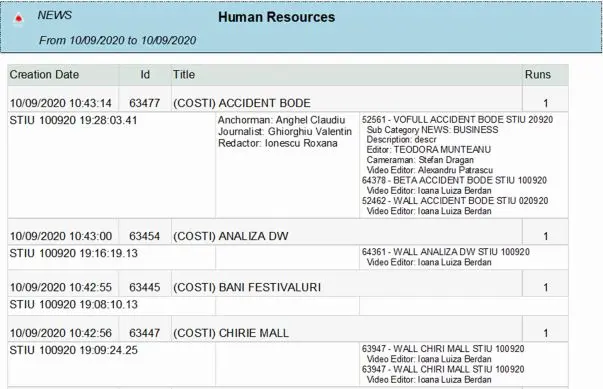 nunzio_report_human_resource