72.18.2.20 Configure the Media Folders
The folders intended to be utilized by Adobe clients (i.e. set in the Settings tab) must be correctly configured in "Etere Configuration > Settings > Web > Media Folders", this, depending on the operating system on which the client runs:
Windows OS: - Specify in the "EtereWeb download/upload path" the storage path in either UNC, FTP or Local format:
\\myserver\media\proxy\ ftp://myserver/media/proxy/ d:\myserver\media\proxy\
Mac OS: - Specify the storage path in unix format (exactly as mounted in the MAC client):
/Volumes/AdobexMAC111/Proxy/
For instance, you can set the media folders to be used for the following extension settings:
"Source Adobe Path for import" or "Select the FTP space":
Source Adobe Path for import
"Generated sequences path" or "Project file import path":
Generated sequences path
Note:
Media folders can be used for all computers, for a specific IP Address (e.g. 192.32.15.107), IP Class (e.g. 192.32.15.xxx) or IP Subnet (e.g. 7.255.255.0).
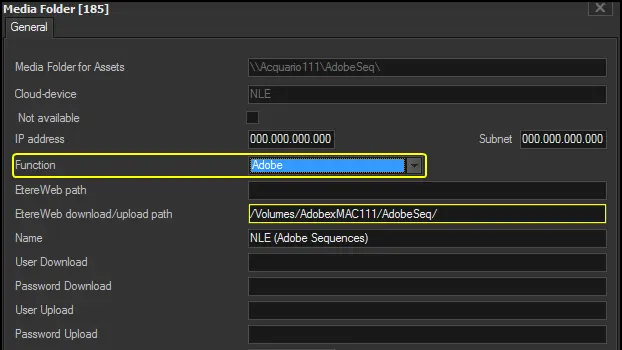 Source_Adobe_Path_for_import
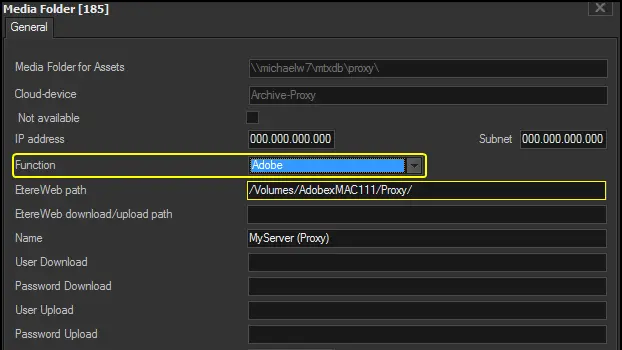 Generated_sequences_path