84.4.4.33 STANDARD > SIAE 2018 CSV
Export Scope
The Export Standard SIAE 2018 CSV export SIAE’s scheduled data within specified period (from "00:00:00" to "23:59:59") into a CSV format file. The CSV file contains 21 data columns separated by semicolon (;).
During export, the following criteria would be applied:
•The composer’s registry would be exported if they do not contain any data
•The relative description of the asset would be inserted during export to determine the ROF and ROM program type.
•The details of the ROM asset type would be extract from the asset’s “Tipologia” field ("Type" field) in the asset ROM tab.
•If the asset contains both ROM and ROF tab data, ROM tab would be exported.
•If the event ROM contains no detail, the schedule duration would be exported as effective duration
•The Original “TitleEpisodio” and “TitoloItalianoEpisodio” are taken from the ROF Registry, if they are not present, it would be taken from 'Original Title Episode' and 'Italian Title Episode' in flexi-metadata.
•If the editable field “Transmission Genre” is present in asset’s ROF tab with value (numeric code), the field would be exported. If the field contain no value, the type of the material sheet would be exported.
•The value in the "Production country" and "Production year" fields would be retrieved from the general data of “Season Manager” tab in Media Library.
•The assets must be classified within category 1 to category 5 in order to be exported. The asset category details is read from “Registro_interruzioni.tipologia” field in the logical table.
•The “Transmission title” data field in column 3 must be exported from Media Library
oFlexi-metadata > SIAE > Italian title of the film / seasons
oIf above field is empty, export from SIAE > ROF > Italian title of the film / seasons
oIf above field is empty, export from “descrizio” (Description) field in asset repository table.
•The “Original Transmission title” data field in column 4
oIf data is not found, export from “descrizio” (Description) field in asset repository table.
Export Parameters
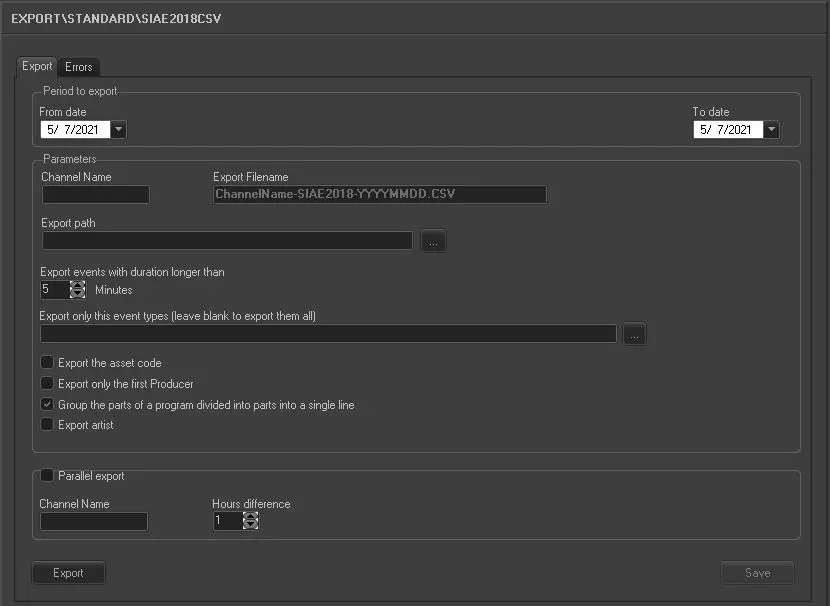
Export_standard_siae_2018_csv_new
Period to export:
•From date:
select a date from the calendar to indicate the start date for export.
•To date: select a date from the calendar to indicate the end date for export.
Parameter:
•Channel name: The channel used to perform the export.
•Export path: Indicate the directory path where the exported CSV file would be stored. You can use the browse button to locate the path in network.
•Export filename: Define the file name for the exported file. The file name format is: ChannelName-SIAE 2018-YYYYMMDD.csv
•Export events with the duration longer than: Only export those events with duration longer than the specific “n” minutes. You can set the counter to “0” (zero) in order to export events with duration less than 1 minute.
•Export only this event types (leave blank to export all): Export only the selected types of events specified in the text box. If the parameter is leave blank, all event types would be exported.
❑Export the asset code: Enable this option to export the asset code as well. The asset code would be exported to the last column in the file.
❑Export only the first producer: Enable this option to export only the first producer in card. If disabled, all producers presented in the card would be exported.
❑Group the parts of a program divided into parts into a single line: When exporting musical program (both "ROM" and "ROF" included) that divided into different blocks in the schedule, enable this option to group various consecutive program blocks (and its duration) into single block to set the musical bases accordingly. The total duration of the divided program blocks must not exceed the duration of the single block. If this option is disabled, those already processed program blocks would be skipped during export.
❑Export artist: When this option is enabled, the data in the “Artist” field would be exported and appended to the last column of the CSV format file.
❑ Parallel export: If this option is enabled, an additional file would be created from the export for the same broadcaster with scheduled time shifted by the hour(s) set in the parameter.
•Channel name: Specify the channel name used for the parallel export.
•Hours difference: Set the shifted hour(s) to start the export of schedules for the same broadcaster, e.g. 1 hour later, 2 hours later, etc.
Launch the Export
Once all the parameters has been configured, click the <Export> button to start the export.
 5098_Export_standard_siae_2018_csv_new