85.2.21.2 How to use it
In order to promote events via EPG, the next procedure needs to be followed:
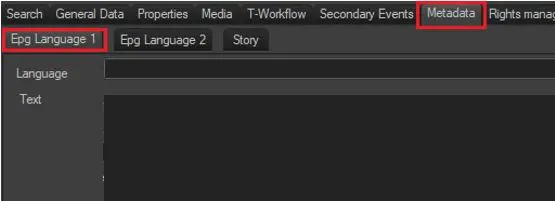
1.The title of the event in the EPG must be set in the Asset Form | Metadata | Epg Language 1 section:
Asset Form 1
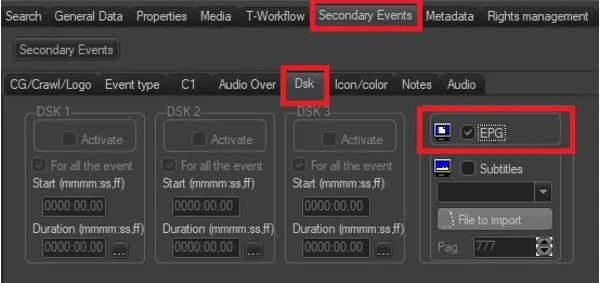
2.Under the Asset Form, in the Properties | DSK section, it is required to enable the EPG property that will permit STMan to promote the event in question:
Asset Form 2
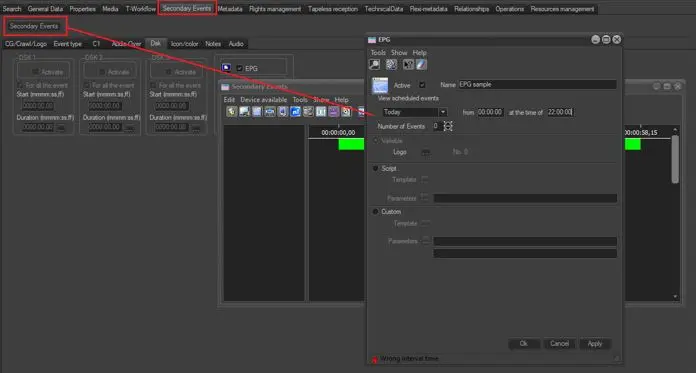
3.Associate an EPG secondary event to the relative scheduled event though the secondary events form, from either Executive Editor or Asset Form:
Asset Form 3
NB: Detailed information about how to compile this form can be found in the EPG chapter of the Etere Scheduling user-guide.
4.At this point, when the scheduled event to which the EPG has been associated will be broadcasted, Etere STMan will send a TV Guide to the proper device.
 Asset_Form_1
 Asset_Form_2
 Asset_Form_3