59.2.40.27 Secondary Events
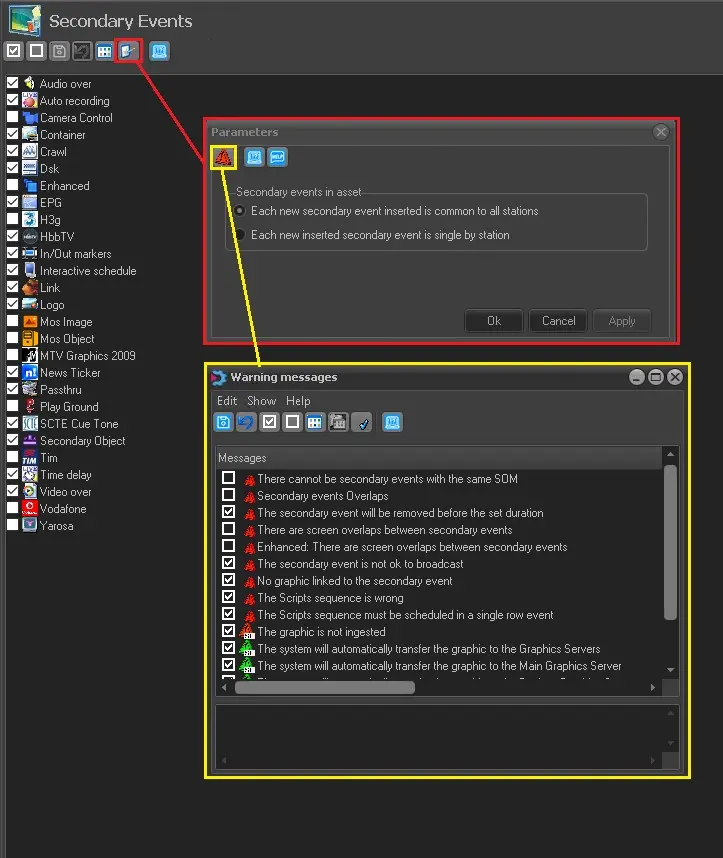
Under this section is displayed a list of available Etere secondary events; you can enable or disable the events from other Etere modules (i.e. Etere Scheduling, Etere Air Sales, etc.) by checking or uncheck the events, respectively:
Secondary_Events
Moreover, by clicking on the 'Parameters' button, the user is able to select one of the two rules regarding the insertion of secondary events:
• Each new secondary event inserted is common to all stations (enabled by default): Secondary events associated with a certain asset will be valid for all stations.
• Each new inserted secondary event inserted is for a single station: Secondary events associated with an asset are valid (and viewable) only for the station they had been inserted.
After selecting the rules, when inserting a graphic secondary event (in STMan), a warning message would be prompted if the secondary events match the conditions.
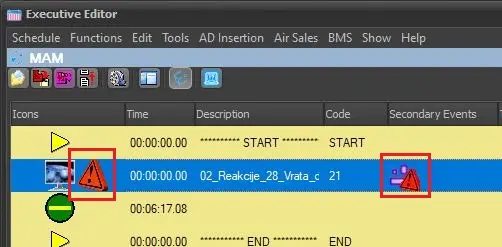
When a warning occurs, a red triangle icon would be presented in the "Secondary Event" column in Executive Editor View with the description of the warning message to alert the user.
Warnings for secondary events can be enabled or disabled. Click on the Warnings button on Parameters window to open a new one where it's possible to select which warning messages should be displayed.
message_alert_in_Executive_Editor
This form provides the following functions, available on both the toolbar and the Edit menu:
• Save: Apply the modifications.
• Cancel: Undo the modifications.
• Select/Deselect all: Quickly select or deselect every warning in the list.
• View: Switch the warning messages view between list or icons.
• Change icon: Change the icon for the selected warning, choosing among the ones in the Etere system (refer to chapter 59.2.12.0 Icons for more information).
• Restore default values: Revert any change to the default setting.
A description of the selected warning is displayed in the box below the list.
For the "Parameters are missing" warning, a text box has been added to specify the types which the warning should be applied for.
Note: All the changes made in this section are valid only for the current station.
Further information regarding secondary events can be found in the chapter 84.2.4.0 Secondary Events of the Etere Scheduling user guide.
 message_alert_in_Executive_Editor
 Secondary_Events