201.2.1.8 Rules
Set under the "Rules" tab the criteria that will determine how the single/season program must be scheduled:
Rule_multichannels
Parameter - Run type
Description : Specify the way in which Runs will be managed for the purchased single/season program:
Linked to each single asset
If enabled, an individual number of Runs will be managed for each asset (e.g. episode) forming part of the purchased single/season program.
For instance, in case a season of 10 episodes counts with 3 Run rights, it will be possible to schedule a maximum of 30 episodes (i.e. 3 run rights x 10 episodes).
Bms_contract_single_01
Independent of the single asset
If enabled, a global number of Runs will be managed for the entire single/season program.
For instance, in case a season of 10 episodes counts with 3 Run rights, it will be possible to schedule a maximum of 3 episodes. (The Runs in the contract line are NOT multiplied by the episodes)
Bms_contract_single_02
Unlimited Runs
If enabled, the Runs related to the purchased single/season program will be always available for scheduling without restrictions since its purchased rights are unlimited.
Please note that this option will be enabled only in case the "unlimited rights" option is enabled under the main data tab.
Parameter - ReRun type
Description : Specify the way in which Runs will be managed for the purchased single/season program:
Linked to each single Run
If enabled, an individual number of Runs will be managed for each asset (e.g. episode) forming part of the purchased single/season program.
For instance, in case a season of 10 episodes counts with 3 Run rights and 4 ReRun rights, it will be possible to schedule a maximum of 120 ReRuns (i.e. 3 Runs rights x 4 ReRuns rights x 10 episodes).
Bms_contract_single_01_rr
Independent of the single Run
If enabled, a global number of Runs will be managed for the entire single/season program.
For instance, in case a season of 10 episodes counts with 3 Run rights and 4 ReRun rights, it will be possible to schedule a maximum of 4 ReRuns. (The ReRuns in the contract line are NOT multiplied by the episodes)
Bms_contract_single_02_rr
Unlimited ReRuns
If enabled, the ReRuns related to the purchased single/season program will be always available for scheduling, that is, without restrictions since its purchased rights are unlimited.
Please note that in case of setting unlimited ReRuns, the "ReRun" value set in the main data tab will be also modified (i.e. set to zero).
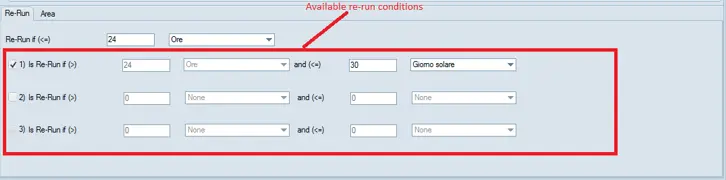
In addition, an "available re-run conditions" field is provided for multiple ReRun calculation to be configured for rerun process. The maximum number of rerun type are multiplied.
Multiple_rerun
Parameter - Consider as ReRun if scheduled within next
Description : Indicate the interval of time used for considering all performances subsequent to a scheduled Run as ReRuns. Available time units include:
Option - Hours
Description : A 60-minutes period after the Run scheduled time.
Example : "48 hours" means that all performances scheduled within the next 48 hours after a Run will be considered a ReRun.
Option - Solar day
Description : A 24-hours period that begins at the 00:00:00 (of the Run scheduled date) and ends at the 23:59:59 of the same day.
Example : "2 solar days" means that all performances scheduled within the next 2 solar days after a Run (comprising the Run scheduled date) will be considered a ReRun.
Option - Custom day
Description : A 24-hours period that begins at a custom rollover time (of the Run scheduled date) and ends on the next day.
Example : "2 custom days" means that all performances scheduled within the next 2 custom days after a Run (comprising the Run scheduled date) will be considered a ReRun.
Option - Out of time slot
Description : A custom daily period outside which all transmissions will be considered RR.
Example : "06:00 - 22:00" means that all performances scheduled out of this time slot will be considered a ReRun.
Parameter - Template area
Description : Select the template area (i.e. territories and media) for which the purchased program rights are licensed. For detailed information please refer to the Diffusion of rights chapter.
Parameter - Destination
Description : Destination(s) allows specifying the stations to which purchased rights are intended to be applied.
All the stations (with a valid BMS license) would be listed, select only the stations associated to the previously selected template area.
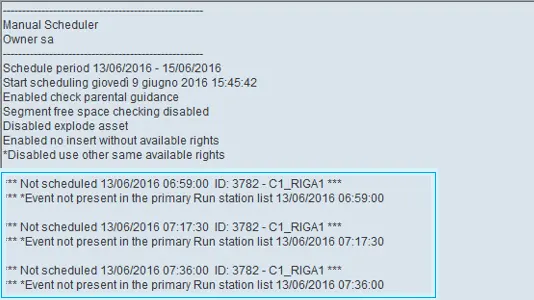
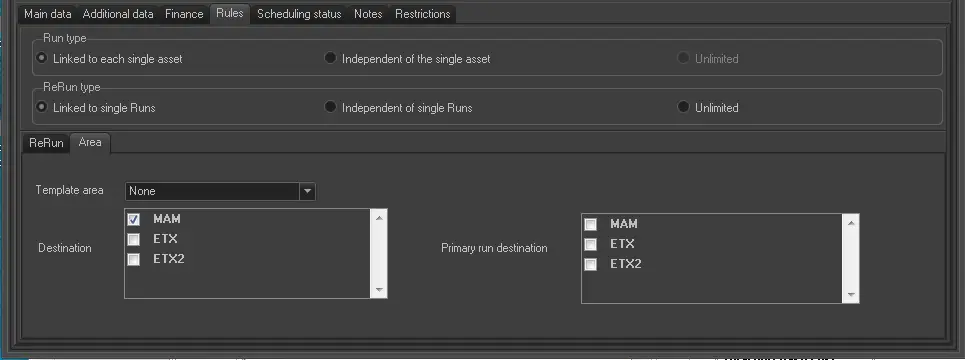
The rule has been enhanced to allow run/rerun on multiple channels. Under the rule, first run must be scheduled on primary channel in the Primary destination parameter, and multiple channels are make available for selection in the Destination parameter. The Scheduler (Program and Season) will check the run present in primary channel in Primary destination and trigger multiple channels in destination parameter if the rule is true. If the Scheduler failed to detect run in primary channel, other channels will not be scheduled.
The failed event will be logged in the Scheduler report.
Scheduler_report
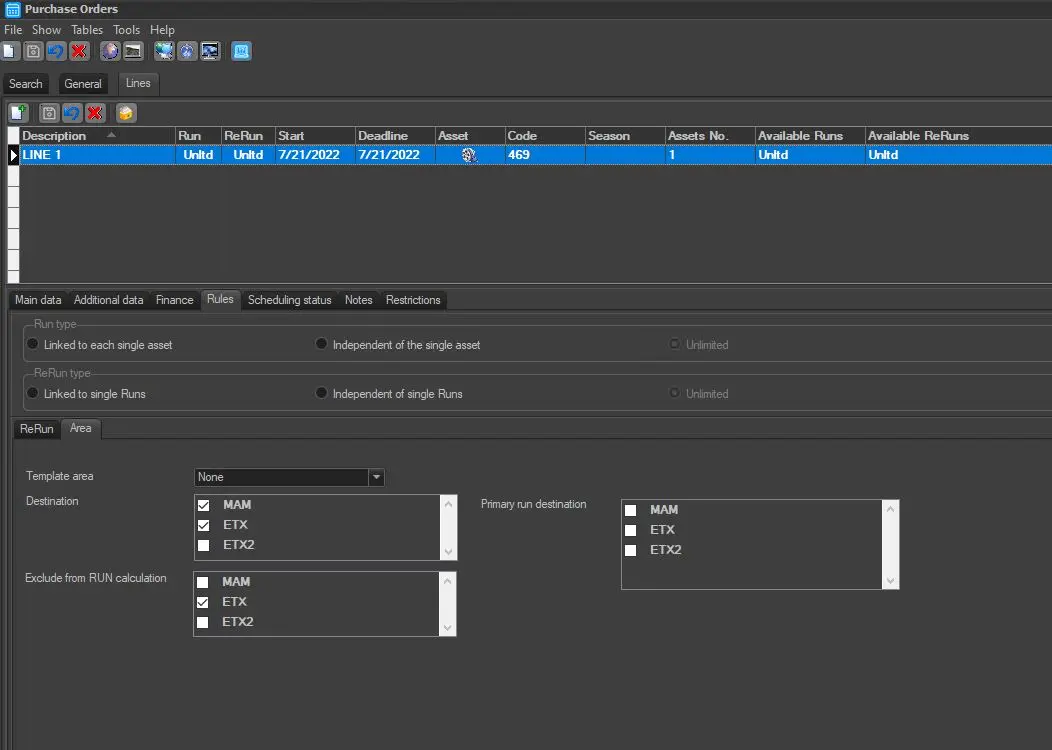
Parameter - Exclude from RUN calculation
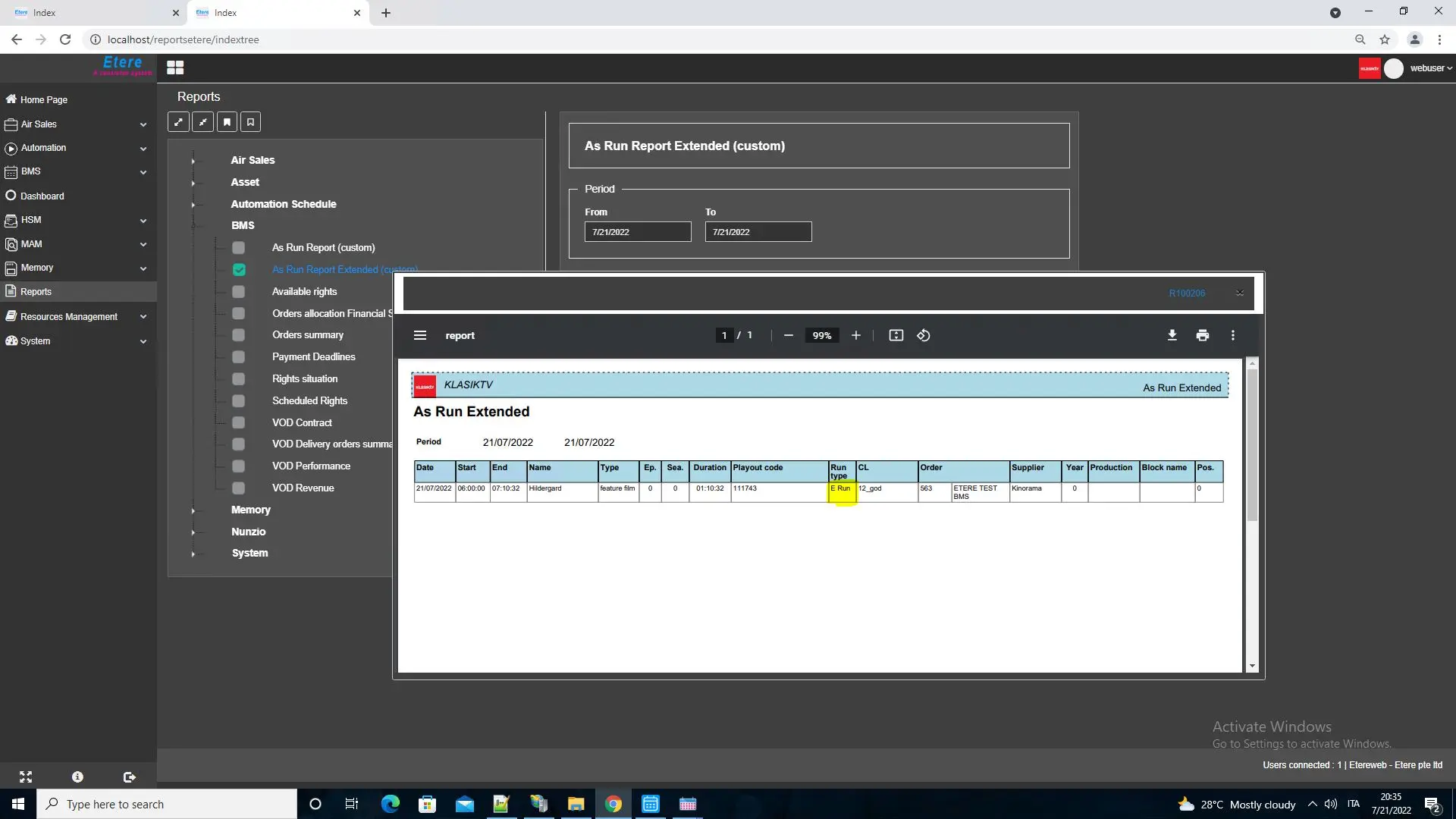
Description : This section allows the exclusion of any run for the selected station. The system would not perform the calculation of any RUN for the selected statin; however they will be displayed as E(excluded) i the given ASRUN report.
exclude_runs
asrun_web_report
NB: It's possible to edit the current order line exclusively from the stations specified here, unless a user count with the BMS\OrdersForAllStations" rights (in that case the user will be allowed to edit order lines from any station).
NOTE
You are able to include a single episode of a season in the contract when selecting an existing season or when creating a new contract.
 Bms_contract_single_02_rr
 Multiple_rerun
 Bms_contract_single_02
 Scheduler_report
 Bms_contract_single_01_rr
 Rule_multichannels
 Bms_contract_single_01
 exclude_runs
 asrun_web_report