84.2.4.22 Show Secondary Events Conflicts
In Executive Editor, for better management of Secondary Events you can check for all scheduled secondary events and detect the conflicts. From the Tools menu bar select Show Secondary Events Conflicts from the drop down menu to display conflicts found in the scheduling.
4989_Show_Secondary_Events_Conflicts_1
In Etere Configuration > Settings > Schedule parameters > Secondary events as default, it's possible to enable the option Show Secondary Events conflicts on each EE publishing process which will perform automatically the check at each publish.
The detected secondary events conflicts would be displayed on screen.
4988_Show_Secondary_Events_Conflicts_2
From the Secondary Events Conflicts display, you can print the list of conflicts in various formats.
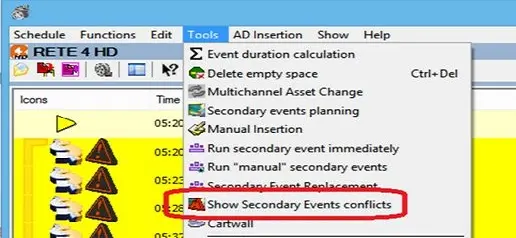 4989_Show_Secondary_Events_Conflicts_1
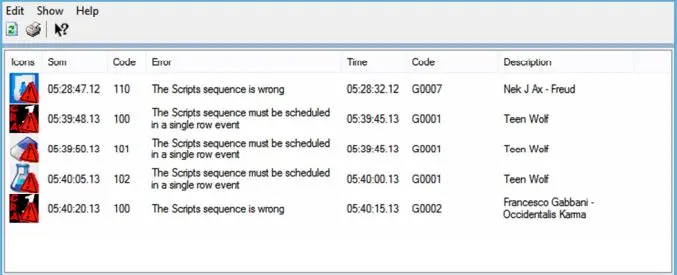 4988_Show_Secondary_Events_Conflicts_2