Etere Resources Management
14.1 Calendar
The Calendar View provide a Web interface to manage the appointments at one glance.
You can view the appointments scheduled in a day, within a specific week in a month, or a particular month in the year.
DAILY VIEW
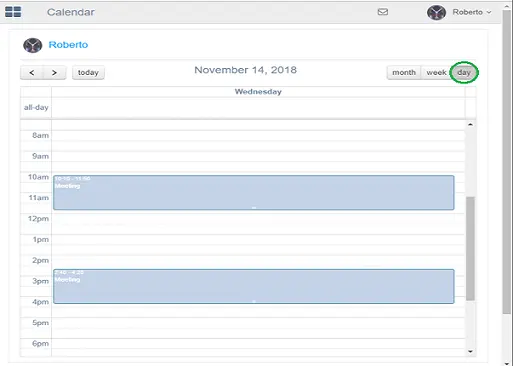
Daily View
It displays the appointments scheduled for a specific day.
- Use the scroll bar to view appointments scheduled from start-of-day till end-of-day;
- Use the forward key “ > ” to view appointments scheduled on the following day;
- Use the backward key “ < ” to view appointments scheduled on the previous day;
- Click on the “Today” key to return the Calendar to the current day.
WEEKLY VIEW
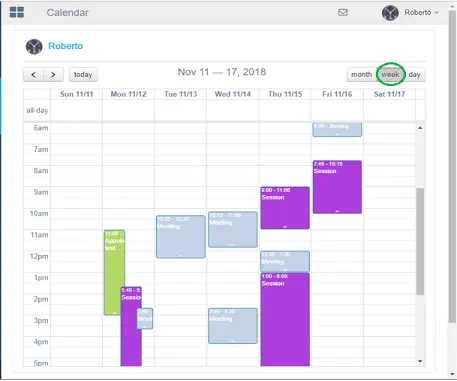
Weekly View
The “Week” calendar displays the appointments scheduled in the current week.
- Use the scroll bar to view appointments scheduled from start-of-day till end-of-day on any day within the week;
- Use the forward key “ > ” to view appointments scheduled on following week;
- Use the backward key “ < ” to view appointments scheduled on the previous week;
- Click on the “Today” key to return the Calendar to the current week.
MONTHLY VIEW
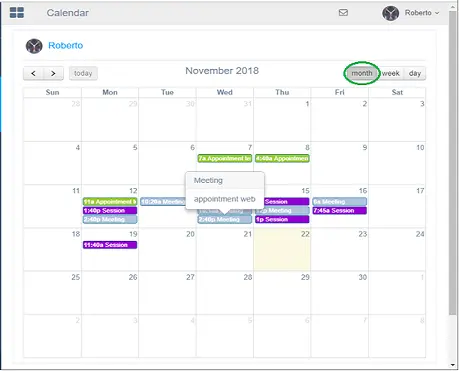
Monthly View
The “Month” calendar display the appointments scheduled within the specific month of the year, where the current day is highlighted.
- Use the scroll bar to view appointments scheduled from the first day of the month till the last day of the month.
- Use the forward key “ > ” to view appointments scheduled for next month.
- Use the backward key “ < ” to view appointments scheduled on the previous month.
- Click the “Today” key to return the Calendar to the current month.
Users granted appropriate rights can move the appointment by drag-and-drop the appointment to a new date and time in the Calendar.
Essentially, when an appointment is moved to a new timeslot:
- The changes would also update the user’s job assignment in Resource Management;
- When a job assignment becomes an appointment in the agenda, a default name would be assigned to the appointment.
 Daily_view
 Weekly_View
 Monthly_View