Stories
79.4.8.2 Agenda View
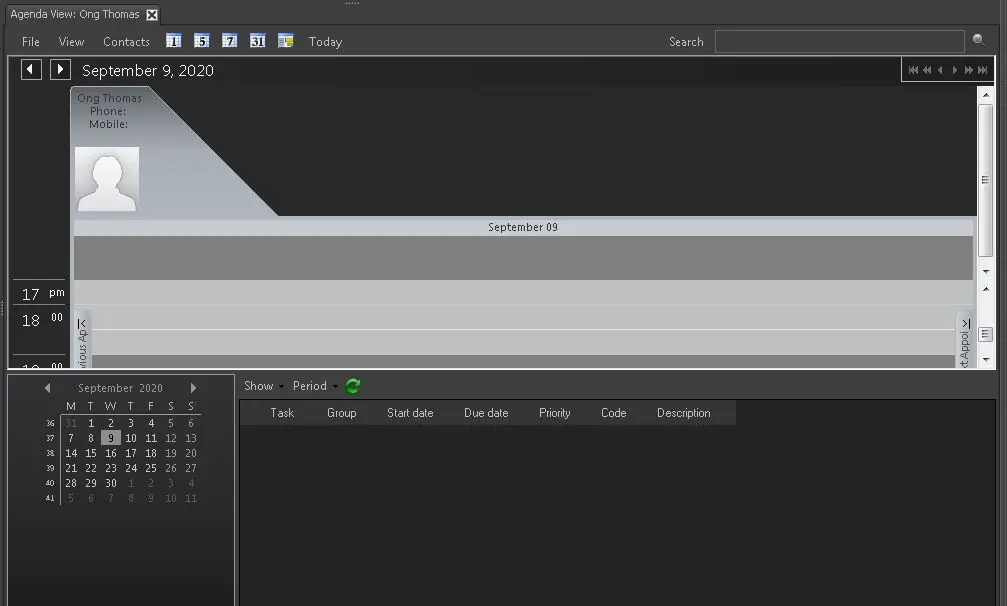
The Agenda View displays a list of tasks available in Nunzio, where you can execute any task from the view.
4745_Agenda_View
Functions in Menu bar includes:
- File
- Open:
Select one of the following criteria to display in Agenda View:
- Assignee: Display a list all assignee in the system, where allows you to search for their assignee code or description
- Team: Similar to Assignee, where it displays all assignee code and description.
- Contact: It list the contact of all assignee or team.
- Location: It show the location of the assignee or team, if available.
- Equipment: It show available equipment, if available.
- Reload image: Refresh and reload the agenda view.
- Exit: Exit from Agenda View
- Open:
- View
- Calendar: Display or hide the calendar in the bottom left panel.
- Contact: Display or hide the contact information in Agenda View
- Display the single day view.
- Display 5 consecutive days (including Sat and Sun) in Agenda View starting from the date selected in calendar.
- Display all 7 days within the week (from Mon to Sun) when click on any date in the calendar.
- Display all dates in the whole month when moving from month to month in calendar.
- Select the previously selected date.
- Go to today date.
Change the Agenda View by selecting one of the option:
- Search: Enter the key word in text box and click the search button to filter the asset.
In the bottom panel, use the Show and Period options to get a precise view:- Show: you can choose to view Not available tasks, Available tasks, Completed tasks, or All tasks.
- Period: Select one of the available period to view the task, e.g. last week, this week, next week, last month, this month, next month, or select All to view all the above period.
 Agenda_View