59.5.4.2 Billing - Agency Settlement Rebates Notice
Report Description
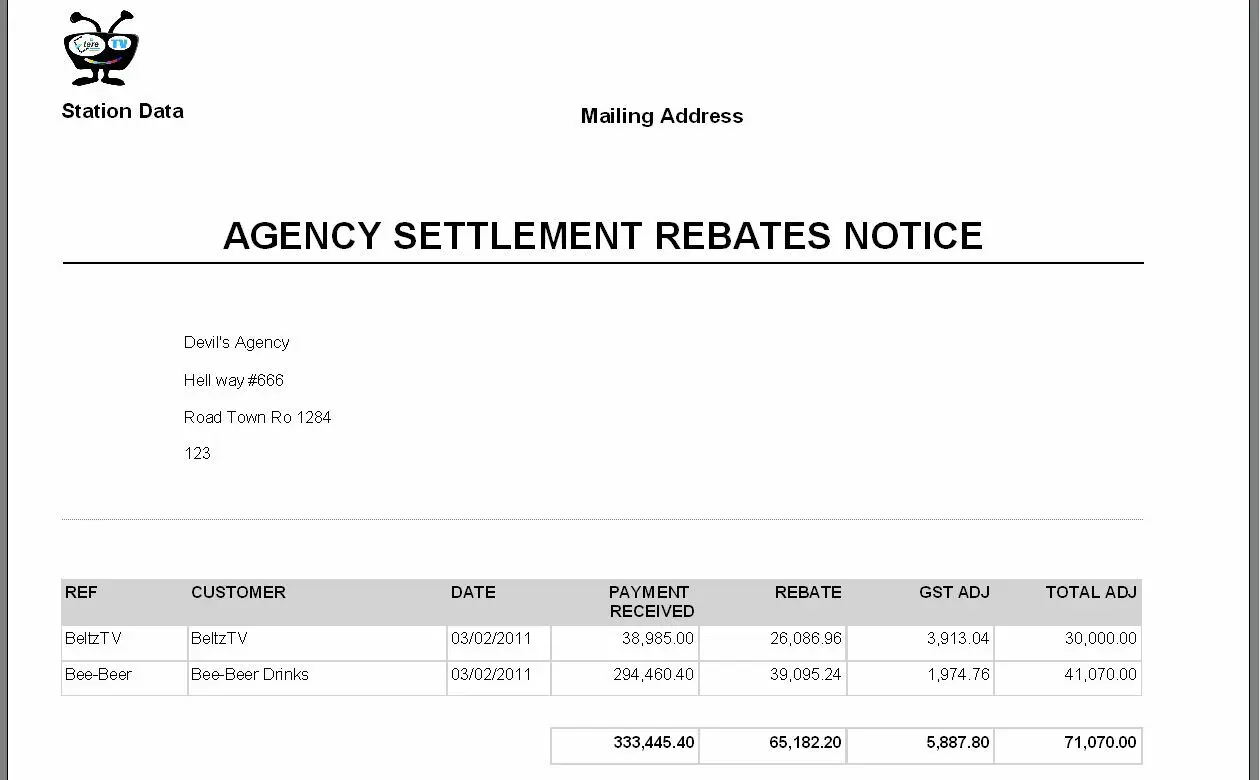
The Agency settlement rebates notice report allows the generation of a document containing all the invoices that have changed (i.e. due to a rebate) after issuance. It will be possible to specify the agency and the period to which invoices are related, and for all invoices, the reference, customer, date, received payment, settlement rebate, VAT adjustment, and the total adjustment (settlement rebate plus VAT adjustment) will be detailed.
Report Filters
All the parameters that permit a detailed report generation have been spread across seven different tabs to follow a more manageable configuration. By default, all filters are disabled (i.e., either blank or unselected); to enable them, it is enough to configure at least one parameter inside. Available filters include:
•Date range: Specify the period from which data will be retrieved, indicate if it will be the current month, the previous month or a custom period,
•Agency: It allows the specification of the agency that will be considered for generating the report.
Report Functions
Etere allows managing reports (preview, export, print) through a series of functions provided in the bottom part of the reports form:
managing_reports_-preview,_export,_print
Export - Saves the report using a standard format (pdf, CSV, doc, xls, xml, etc).
PDF - Create a PDF document containing the report.
Email - Deliver the report via email as an attachment based on predefined parameters.
Preview - Once filters and settings have been set, selecting between displaying a preview will be possible.
Report - Launches the report document printing.
Settings - Configure the page layout of the outgoing document.
 managing_reports_-preview,_export,_print.