96.1 Service installation and setup
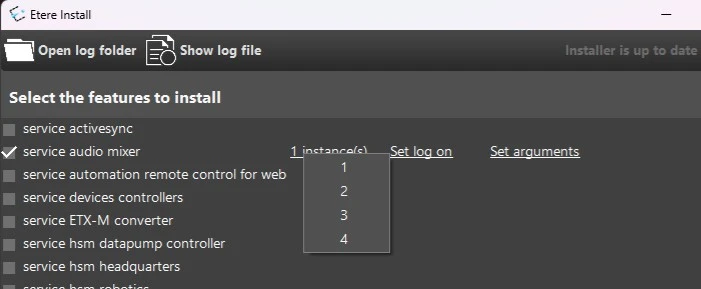
NOTE: In the most recent Etere and Etereweb versions, Etere Audio Mixer service can only be installed with the new installer EtereUpdate.exe. See chapter 15.17.4.0 Audio mixer.
The Etere Audio Mixer Service must be installed on the same pc where the sound card to be used is located.
It is possible to install more than one service per machine, however their use is subject to the licenses owned.
audio_mixer_service_feature
Set the logon credentials of an administrator user clicking on Set log on.
LICENSING
The license EA9247 “Etere Audio Mixer” allows to have one working service for each license owned.
In Etere Resource Editor, the licenses must be assigned to one or more workstations on which the service(s) will run, one license for each service.
Any services installed, exceeding the number of assigned licenses on the machine, will not work.
E.g.: If a server is expected to host 3 services, I have to assign 3 licenses in the corresponding resource's properties. If 3 is the number of purchased modules in the license and I then install 4 services, the 4th service won't work.
audio_service_licensing
SETUP
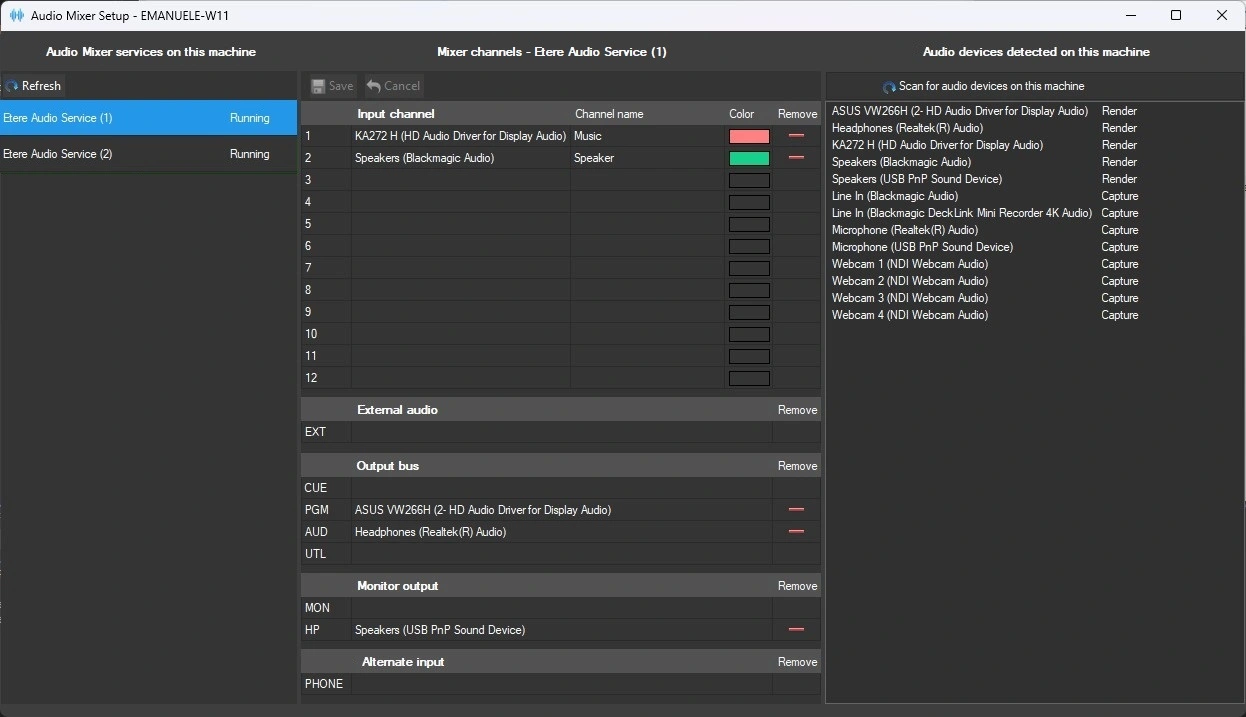
Along with the service, the Etere Audio Mixer Setup application is installed.
Here it's possible to assign the channels of the audio devices present on the machine to the channels of the audio mixer.
The left column lists the Audio Mixer services installed on the machine, select one to configure it. Etere audio mixer setup recognizes the services installed in the same machine by their number.
The right column lists the audio channels of the devices located on the machine. Drag and drop them to assign them to mixer channels.
For the mixer input channels you can also assign a label and color that will be displayed on the console.
Services need to be restarted in order to apply the changes. To restart the services, it's necessary to run Etere Audio Mixer Setup as administrator.
audio_mixer_service_setup
 audio_mixer_service_feature
 9526_audio_mixer_service_setup