208.4.1.1 DataMover Concurrency
What is DataMover concurrency?
The DataMover concurrency feature can perform different instances of one data transfer process simultaneously, allowing single stations to leverage high computing resources to perform multiple concurrent transfers.
When to use DataMover concurrency?
Etere suggests using concurrency, for example, in case various T-workflows use the current action simultaneously or if the source and destination have a wide bandwidth.
How to enable DataMover concurrency?
To use concurrency on a specific action, it is required to enable the feature under the Etere Configuration > Configuration Editor > Media Manager Actions section by configuring the "concurrent processes" parameter:
Concurrent processes
The highlighted parameters indicate the maximum number of concurrent instances for a specific action; in this way, each time Etere Data Mover receives a request for action, it is allowed to execute the number of concurrent instances as specified in the parameter (either directly or as separate agents).
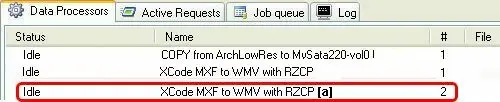
Moreover, in Etere Data Mover, the concurrency actions are displayed in the Data Processors list, showing one data processor per instance (e.g. for a concurrency of 3, there will be created #1, #2 and #3 data processors):
Data Processors
NB: It is important to note that Etere Data Mover would wait one second between each "simultaneous" execution to avoid overlapping process instances, thus eliminating concurrency problems and improving the overall system reliability.
 Concurrent_processes
 Data_Processors